Screenshots From the README of owen282000/life-dashboard-ha.
About
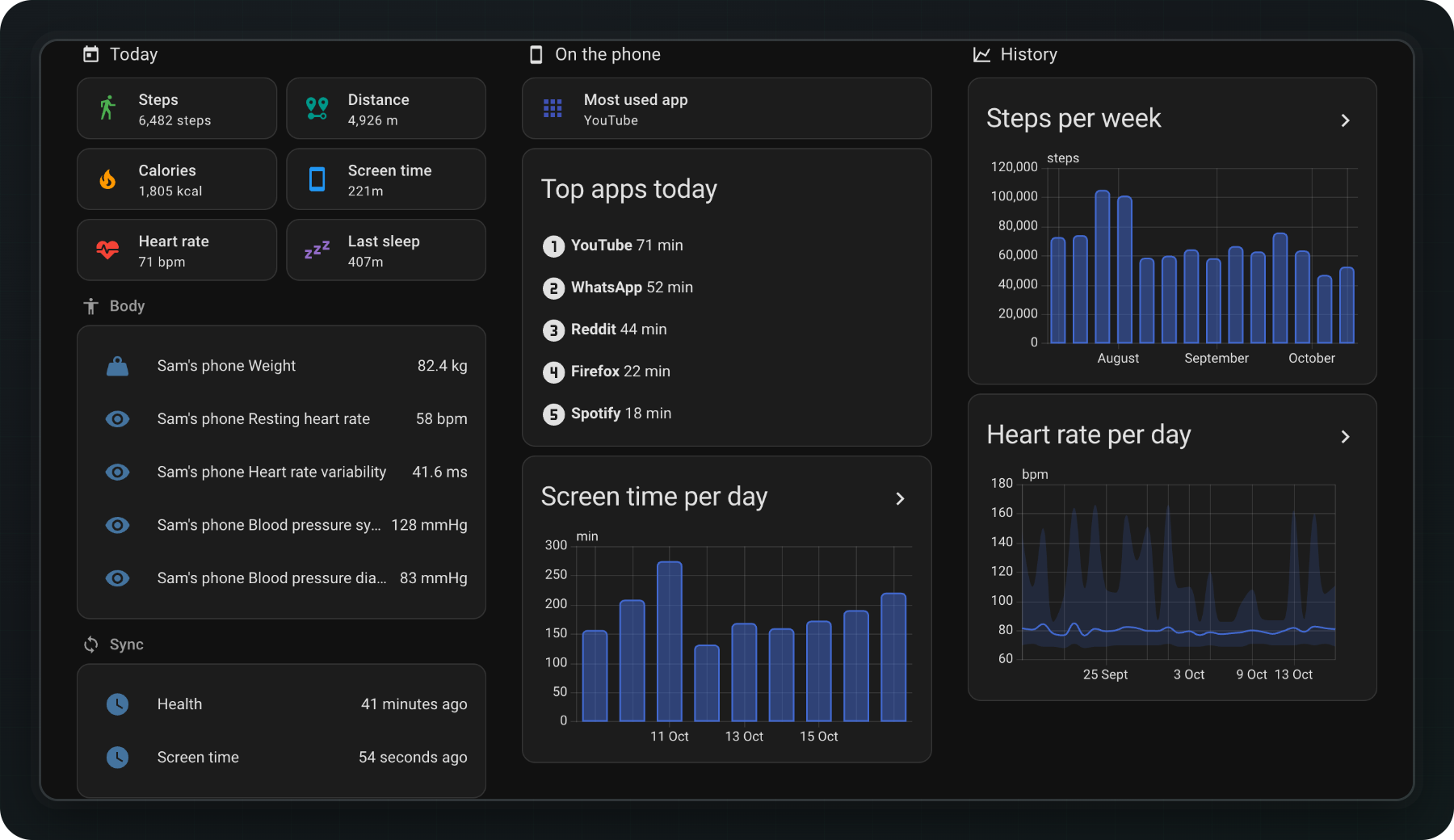
Steps, sleep, heart rate and workouts from Samsung Health, Fitbit, Garmin or Apple Health as Home Assistant sensors with a year of history. Needs the Life Dashboard Companion phone app. Screen time...
Description from owen282000/life-dashboard-ha
Supports
Works locally Talks to your devices on your own network. No vendor cloud in between.
From the Marketplace Installed through the Marketplace, formerly HACS.
Actively maintained Its author released or pushed a change in the last six months.
Provides
- Sensors
Setting it up
Install it from the Marketplace and restart Home Assistant, then add it under Settings, Devices and services.
Add a phone
- NameBecomes the device name. Worth setting with more than one phone in the house.
- Home Assistant addressJust the address, without /api/webhook. You can change it later without pairing again.
- Use Home Assistant Cloud insteadCreates a cloudhook with your Home Assistant Cloud subscription, so the phone syncs from anywhere without port forwarding. The address above is then not used.
Life Dashboard
- Home Assistant addressJust the address, without /api/webhook.
- Use Home Assistant Cloud insteadCreates a cloudhook, so the phone syncs from anywhere without port forwarding. The address above is then not used.
- Generate a new secretThe phone stops syncing until it has the new secret: scan the new code, or paste the secret in the app.
After setup
- Shortest workout (minutes)Workouts shorter than this are left out of Last workout, Exercise today and Exercise yesterday, such as a short walk the phone noticed by itself. 0 counts every workout. The exercise statistic is not affected.
- EntityA sensor, number or input number with a mass unit (kg, g, lb, st, oz). Converted to what Health Connect wants.
- Measured at (optional)A timestamp sensor that holds when the measurement was taken, such as a scale's last measurement time. Without one, the moment the value changed in Home Assistant is used.
- EntityA sensor, number or input number with a length unit (m, cm, ft, in). Converted to what Health Connect wants.
- Measured at (optional)A timestamp sensor that holds when the measurement was taken, such as a scale's last measurement time. Without one, the moment the value changed in Home Assistant is used.
- EntityA sensor, number or input number with a percentage. Converted to what Health Connect wants.
- Measured at (optional)A timestamp sensor that holds when the measurement was taken, such as a scale's last measurement time. Without one, the moment the value changed in Home Assistant is used.
- EntityA sensor, number or input number with a mass unit. Converted to what Health Connect wants.
- Measured at (optional)A timestamp sensor that holds when the measurement was taken, such as a scale's last measurement time. Without one, the moment the value changed in Home Assistant is used.
- EntityA sensor, number or input number with a mass unit. Converted to what Health Connect wants.
- Measured at (optional)A timestamp sensor that holds when the measurement was taken, such as a scale's last measurement time. Without one, the moment the value changed in Home Assistant is used.
- EntityA sensor, number or input number with a mass unit. Converted to what Health Connect wants.
- Measured at (optional)A timestamp sensor that holds when the measurement was taken, such as a scale's last measurement time. Without one, the moment the value changed in Home Assistant is used.
- SystolicA pressure sensor (mmHg or kPa).
- DiastolicA pressure sensor (mmHg or kPa).
Texts from the code of owen282000/life-dashboard-ha.
Entities
- ButtonsSend history to phone
- SensorsHeart rate, Resting heart rate, Heart rate variability, Speed, Last sleep duration, Weight, Blood pressure systolic, Blood pressure diastolic, Blood glucose, Oxygen saturation, Body temperature, Skin temperature delta, and 23 more
Actions
- Send history to phoneQueues the past measurements of the entities mapped to a phone, from the recorder, so the app writes them to Health Connect at its next sync. At most 90 days back, which is how long the queue keeps a reading. Measurements older than 30 days only arrive when Accept older measurements is on in the app. A value that stayed the same is one row in the recorder, so two equal weighings in a row come back as one; for blood pressure the half that did not change takes its last known value. A reading the phone already wrote or refused is not queued again.Fields: Phone, Days, Types
Troubleshooting
- DiagnosticsDownloads a diagnostics file to attach to a bug report.
From the README
Steps, sleep, heart rate, weight and workouts from your phone as Home Assistant sensors, with a year of history.
Screen time per app on Android. Paired with a QR code: no broker, no YAML.

Shows in Vulpo
Button card, Chart card, Apple Watch.Information
- Installs
- 50 sharing analytics
- GitHub stars
- 5
- Connection
- Works locally
- Upkeep
- Updated in the last 6 months
- Version
- 0.11.1,
- Category
- Health and wellbeing
- Kind
- Marketplace integration
- Needs
- Needs the Marketplace (HACS on 2026.10 and older)
- Domain
life_dashboard- Issues
- Report an issue