
Screenshots From the README of notDIRK/luxtronik2-hass.
About
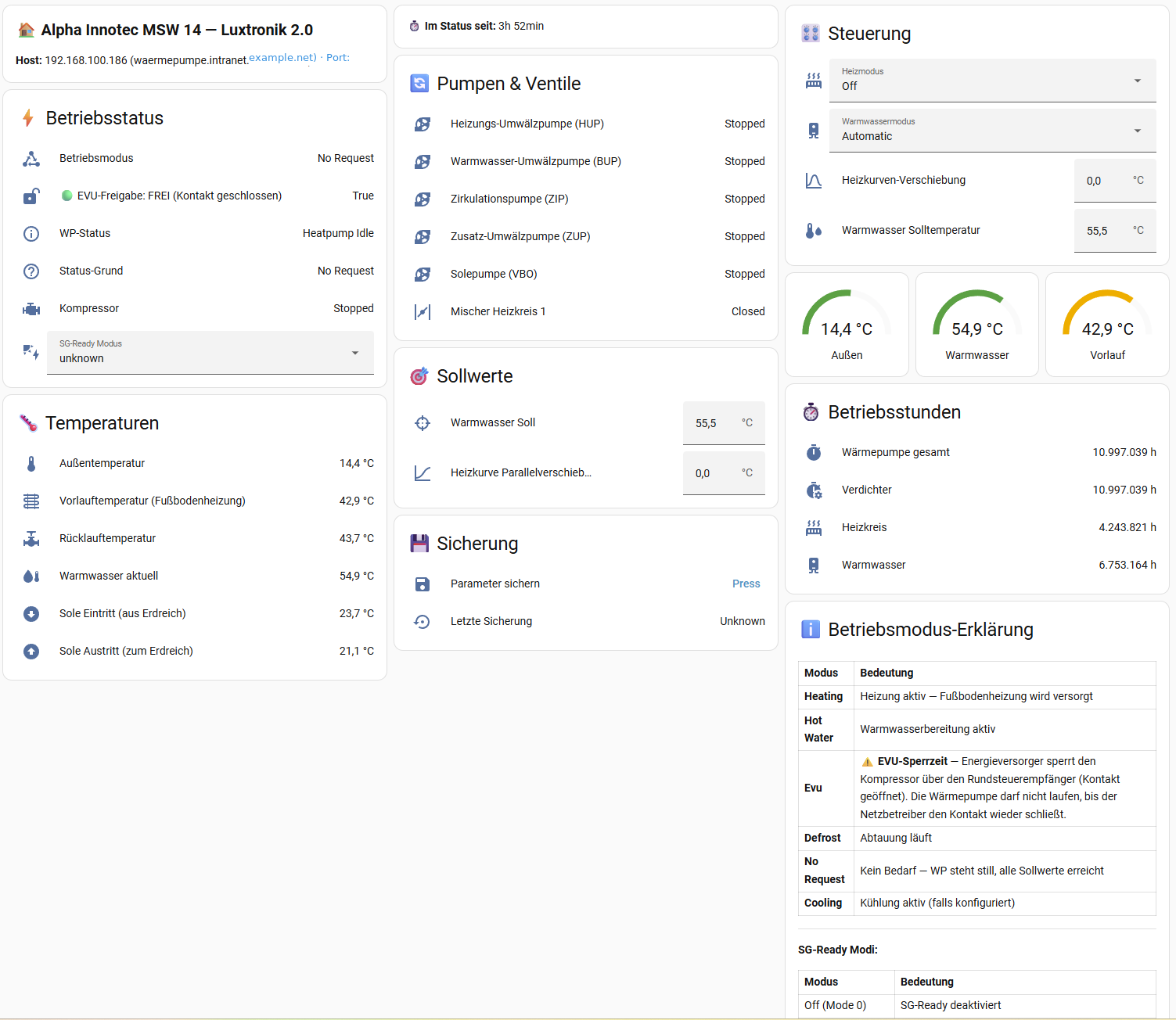
Luxtronik 2.0 (Home Assistant) is a custom integration for Luxtronik 2.0 heat pump controllers. It talks to the controller locally and is set up in the UI by entering the controller's IP address. It adds sensors for temperatures, heat quantity, power and status, plus selects for heating mode, hot water mode and SG Ready, and numbers for the hot water setpoint and heating curve offset. A Bath Boost button heats the hot water tank to a chosen target temperature and then restores the normal setpoint, with a status sensor to follow progress. Switches enable Solar Boost, which raises the hot water setpoint when grid feed-in passes a set threshold, and a Night Heating Pause, which turns floor heating off between two chosen times. Options also cover the poll interval, and a button backs up the controller parameters.
Automatic summary of the README and code of notDIRK/luxtronik2-hass. Something wrong, or are you the maintainer and want your own text here? Get in touch
Supports
Works locally Talks to your devices on your own network. No vendor cloud in between.
From the Marketplace Installed through the Marketplace, formerly HACS.
Actively maintained Its author released or pushed a change in the last six months.
Provides
- Switches
- Sensors
Setting it up
Install it from the Marketplace and restart Home Assistant, then add it under Settings, Devices and services.
Connect to Luxtronik 2.0
- IP AddressLocal IP address of the Luxtronik 2.0 controller (e.g. 192.168.x.x)
After setup
- What do you want to configure?
- IP AddressLocal IP address of the Luxtronik 2.0 controller (e.g. 192.168.1.100)
- Poll Interval (seconds)How often to read data from the heat pump (10–300 seconds, default: 30)
- Enable Solar Boost
- Grid Power SensorEntity ID of your grid power sensor, e.g. sensor.grid_total. Convention: positive = consumption (buying from grid), negative = feed-in (selling to grid). Leave empty to disable Solar Boost.
- Feed-in Threshold (Watts)Solar Boost activates when grid feed-in exceeds this value. Example: 1500 means the heat pump only starts heating when you export more than 1500 W.
- Normal Hot Water Temperature (°C)The normal hot water setpoint used when Solar Boost is not active. This is the temperature your hot water tank is normally heated to.
- Boosted Hot Water Temperature (°C)The raised hot water setpoint during Solar Boost. This should not exceed your controller's maximum allowed hot water temperature.
- Minimum Boost Duration (minutes)Once Solar Boost activates, it stays active for at least this many minutes — even if clouds reduce feed-in temporarily. This prevents the heat pump from cycling on/off rapidly.
- Enable Night Heating Pause
- Pause Start Time (HH:MM)Time when floor heating is turned off. Example: 18:00 means heating stops at 6 PM.
- Pause End Time (HH:MM)Time when floor heating is restored to automatic mode. Example: 09:00 means heating resumes at 9 AM.
- Target Temperature (°C)The temperature to heat the hot water tank to when Bath Boost is activated. Default: 65.0 °C.
- Normal Temperature (°C)The temperature to restore after Bath Boost completes. This is your normal hot water setpoint. Default: 55.5 °C.
Texts from the code of notDIRK/luxtronik2-hass.
Entities
- ButtonsBackup Parameters, Bath Boost
- NumbersHot Water Setpoint, Heating Curve Offset
- SelectsHeating Mode, Hot Water Mode, SG Ready
- SensorsLast Backup, Bath Boost Status
- SwitchesSolar Boost, Night Heating Pause
From the README
Home Assistant is the primary, actively maintained way to use this project. This repository ships a HACS custom integration that talks directly to Luxtronik 2.0 heat pump controllers and exposes them as Home Assistant entities. A separate legacy Modbus TCP proxy exists as an unmaintained byproduct for users who specifically need raw Modbus access.
If you own a Luxtronik 2.0 heat pump from Alpha Innotec, Novelan, Buderus, Nibe, Roth, Elco, or Wolf, install the HACS integration below — it is the supported path.

Shows in Vulpo
Quick Toggle card, Button card, Select card, Chart card, Apple Watch, Control Center.Information
- Installs
- 56 sharing analytics
- GitHub stars
- 8
- Connection
- Works locally
- Upkeep
- Updated in the last 6 months
- Version
- v1.2.7,
- Category
- Climate, Heat pumps and air conditioning
- Kind
- Marketplace integration
- Needs
- Needs the Marketplace (HACS on 2026.10 and older)
- Domain
luxtronik2_hass- Issues
- Report an issue










