Yamaha (YNCA)
On Home Assistant 2026.11 or newer? Open it in the Marketplace
- Installs
- 1.1k sharing analytics
- GitHub stars
- 114
- Connection
- Works locally
- Upkeep
- Updated in the last 6 months
- Version
- v9.7.0,
- Category
- Media and entertainment, Speakers and audio
- Kind
- Marketplace integration
- Brand
- Yamaha
- Needs
- Needs the Marketplace (HACS on 2026.10 and older)
- Domain
yamaha_ynca- Issues
- Report an issue
Independent directory, made by the developer of Vulpo. Not affiliated with Home Assistant or the Open Home Foundation.
Screenshots From the README of mvdwetering/yamaha_ynca.
About
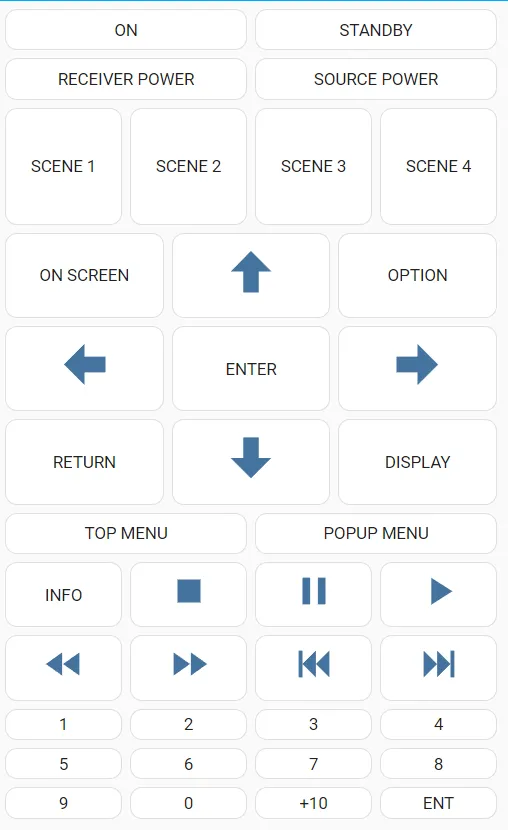
Yamaha (YNCA) is a custom integration that controls Yamaha AV receivers using the YNCA protocol over serial or network. Each receiver zone appears as its own device, with a media player plus buttons for scenes, numbers, selects, switches, a remote and a source sensor where the zone supports them. Settings cover items such as volume limits, headphone and speaker tone, sleep timer, surround decoder, speaker pattern and HDMI output. The source sensor reports input changes even while the receiver is off, which the media player cannot do in automations. Actions are available to store a preset for the current input and to send raw commands for debugging. It works locally, is added through the UI with a serial port or a receiver address, and options let inputs and scene counts be set per zone.
Automatic summary of the README and code of mvdwetering/yamaha_ynca. Something wrong, or are you the maintainer and want your own text here? Get in touch
Supports
Works locally Talks to your devices on your own network. No vendor cloud in between.
From the Marketplace Installed through the Marketplace, formerly HACS.
Actively maintained Its author released or pushed a change in the last six months.
Provides
- Media
- Remotes
- Switches
- Sensors
Setting it up
Install it from the Marketplace and restart Home Assistant, then add it under Settings, Devices and services.
Serial connection
- Serial port e.g. /dev/ttyUSB0
Network connection
- Receiver IP address or hostname e.g. 192.168.1.123
- YNCA port; default is 50000
PySerial URL handler (advanced)
- URL handler
After setup
- Sound modes
- Surround decoders
- Inputs
- Number of scenes
- Inputs
- Number of scenes
- Inputs
- Number of scenes
- Inputs
- Number of scenes
Texts from the code of mvdwetering/yamaha_ynca.
Entities
- NumbersHeadphones bass, Headphones treble, Initial Volume, Max Volume, Speaker bass, Speaker treble, Volume (dB)
- RemotesRemote
- SelectsHDMI Out, Initial Volume Mode, Sleep timer, Speaker pattern, Surround Decoder
- SensorsSource
- SwitchesAdaptive DRC, Direct, Compressed Music Enhancer, Extra Bass, HDMI Out, HDMI Out 1, HDMI Out 2, All zones power, Party mode, Pure Direct, Zone A speakers, Zone B speakers, and 11 more
Actions
- Send raw YNCA commandSend raw YNCA commands, intended for debugging. Responses can be seen in the 'history' part of the diagnostics file or in the Home Assistant logs after enabling debug logging on the Yamaha (YNCA) integration.Fields: Yamaha (YNCA) instance, Raw YNCA data
- Store presetStore a preset for the current input.Fields: Preset number
Troubleshooting
- DiagnosticsDownloads a diagnostics file to attach to a bug report.
From the README
Announcement: I have replaced my receiver with a new one which is not a Yamaha.
What does that mean for this integration? In practice probably not a lot. There is usually not a lot of maintenance needed, so I intend to keep the integration working, do small fixes and answer questions, but won't do big reworks anymore. To make it easier for others to contribute and submit PRs I documented some details about the development.

Shows in Vulpo
Quick Toggle card, Media Player card, Button card, Select card, Apple Watch, Control Center.Information
- Installs
- 1.1k sharing analytics
- GitHub stars
- 114
- Connection
- Works locally
- Upkeep
- Updated in the last 6 months
- Version
- v9.7.0,
- Category
- Media and entertainment, Speakers and audio
- Kind
- Marketplace integration
- Brand
- Yamaha
- Needs
- Needs the Marketplace (HACS on 2026.10 and older)
- Domain
yamaha_ynca- Issues
- Report an issue