
FordConnect Query (for EU/UK/North America)
On Home Assistant 2026.11 or newer? Open it in the Marketplace
- Installs
- 254 sharing analytics
- GitHub stars
- 85
- Connection
- Uses the vendor's cloud
- Upkeep
- Updated in the last 6 months
- Version
- 2026.10.7,
- Category
- Vehicles and transport, Cars and EVs
- Kind
- Marketplace integration
- Brand
- Ford
- Needs
- Needs the Marketplace (HACS on 2026.10 and older)
- Domain
fordconnect_query- Issues
- Report an issue
Independent directory, made by the developer of Vulpo. Not affiliated with Home Assistant or the Open Home Foundation.
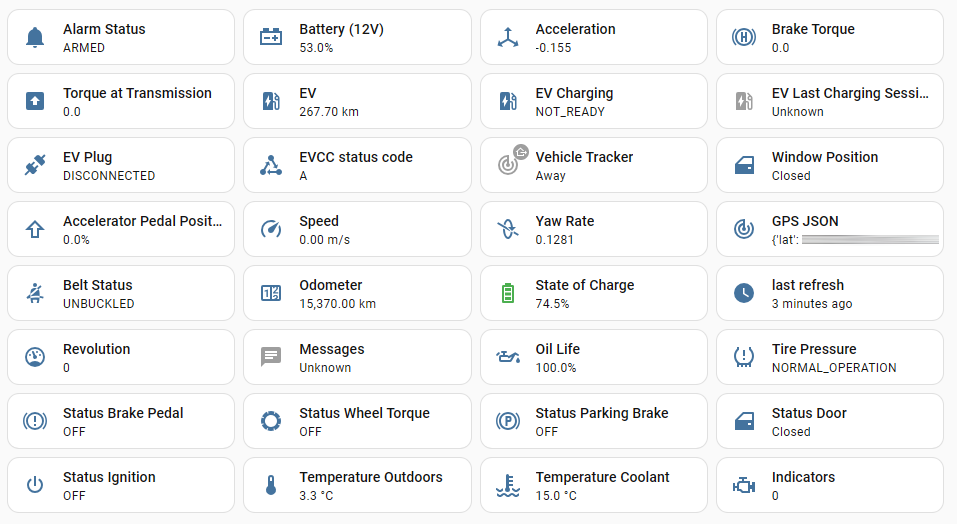
Screenshots From the README of marq24/ha-fordconnect-query.
About
FordConnect Query (for EU/UK/North America) connects Ford and Lincoln vehicles to Home Assistant through the Ford Connect API. It adds a vehicle tracker, sensors for odometer, fuel, 12V battery, oil life, tire pressure and door and window status, plus EV data. Controls cover door locking, honk and flash, EV charging start, pause and resume, charge level targets, and remote climate settings such as seat and windshield heating. Departure schedules can be set and deleted through actions, and the polling interval and pressure unit are adjustable in the options. It is tuned for electric vehicles and for use with EVCC, and it handles several vehicles on one account. It relies on Ford's cloud and a Ford developer application, and sign-in happens on the vendor's own page through the UI.
Automatic summary of the README and code of marq24/ha-fordconnect-query. Something wrong, or are you the maintainer and want your own text here? Get in touch
Supports
Uses the vendor's cloud Needs an internet connection and an account with the vendor.
Sign in with the vendor Connects through the vendor's own sign-in page.
From the Marketplace Installed through the Marketplace, formerly HACS.
Actively maintained Its author released or pushed a change in the last six months.
Provides
- Sensors
- Presence
Setting it up
Install it from the Marketplace and restart Home Assistant, then add it under Settings, Devices and services.
Add new FordPass™/The Lincoln Way™ account or vehicle
- What do you want to do?If you set up a second vehicle with the same account, only one of the two may be active in HA at any one time - otherwise the access tokens will overwrite each other
Setup Token
- URL: copy this into your browser
- Token Request-URL: after the login process is completed in the browser, paste the full Request-URL
Also asked when signing in again.
Add a new Ford Vehicle
- Please select a name for your Configuration entry
Select your FordPass™/The Lincoln Way™-Account
- FordPass™/The Lincoln Way™ accountIf you set up a second vehicle with the same account, only one of the two may be active in HA at any one time - otherwise the access tokens will overwrite each other
Brand
- Select your Brand
New account ford
- FordPass™ Password
- FordPass™ Username (Email)If using a mobile instead of email please enter your number (minus initial 0) also include + and the country code (e.g. +99123456789)
- FordPass™ RegionThe region you are going to select must match the region for which you have registered your FordPass™ account. Further details at GitHub
New account lincoln
- The Lincoln Way™ Password
- The Lincoln Way™ Username (Email)If using a mobile instead of email please enter your number (minus initial 0) also include + and the country code (e.g. +99123456789)
- The Lincoln Way™ RegionThe region you are going to select must match the region for which you have registered your The Lincoln Way™ account. Further details at GitHub
After setup
- Unit of Pressure
- Interval to poll Ford-API requests (Seconds)The minimum update interval is 30 seconds
- Interval to poll Ford-API requests (Seconds)The minimum update interval is 30 seconds
- The remote climate (❄|☀) control options should always be availableIf you activate this option, the setting specified by Ford will be ignored.
- Log API responses to local HA filesystem
Texts from the code of marq24/ha-fordconnect-query.
Entities
- ButtonsLocal Sync, Remote Sync, Lock, Unlock, EV Charging start, EV Charging resume, EV Charging pause, Honk & Flash [1 sec.], Honk & Flash [3 sec.], Honk & Flash [5 sec.], RC (❄|☀): Extend Time, Messages: Delete All, and 5 more
- PresenceVehicle Tracker
- LocksDoors
- NumbersRC (❄|☀): Climate Temperature [RemoteControl], Target charge level, General: Target charge level, AC Current Limit, DC Power Limit
- SelectsZone Lighting, RC (❄|☀): Temperatur [RemoteControl], RC (❄|☀): Seat rear left [RemoteControl], RC (❄|☀): Seat rear right [RemoteControl], RC (❄|☀): Seat front left [RemoteControl], RC (❄|☀): Seat front right [RemoteControl], Target charge level, Target charge level [alt location 1], Target charge level [alt location 2], General: Target charge level, DC Power Limit
- SensorsOdometer, Fuel, Battery (12V), Oil Life, Tire Pressure, GPS JSON, Alarm Status, Status Ignition, Status Door, Window Position, last refresh, EV, and 53 more
- SwitchesRC (❄|☀): Start [RemoteControl], EV Charging (Pause), Guard Mode, Automatic Software Updates, RC (❄|☀): Rear Defrost [RemoteControl], RC (❄|☀): Heated Windshield [RemoteControl], RC (❄|☀): Steering Wheel Heating [RemoteControl], Departure Times
Actions
- Refresh Vehicle StatusPoll car for latest status (Takes up to 5mins to update once this function has been run!)Fields: VIN
- Clear TokensClear the stored token cache (requires an re-authentication afterwards)
- ReloadReload the FordPass Integration
- Poll APIManually poll API for data update (Warning: doing this too often could result in a ban)
- Delete FordPass MessageDelete a Message from the Messages list. Enter the Message ID to delete a specific message.Fields: Message ID
- Update Departure ScheduleSet a departure schedule time and preconditioning temperature for selected days.Fields: Hour, Minute, Preconditioning Temperature, Days
- Delete Departure Schedules by DaysDelete the first departure schedule for the selected weekdays.Fields: Days
- Delete Departure Schedules by IDsDelete departure schedules by it's scheduleIDs. (see the 'schedule' attribute from the 'Next scheduled Departure' sensors)Fields: Schedule IDs
Troubleshooting
- DiagnosticsDownloads a diagnostics file to attach to a bug report.

Shows in Vulpo
Chart card, Apple Watch.Information
- Installs
- 254 sharing analytics
- GitHub stars
- 85
- Connection
- Uses the vendor's cloud
- Upkeep
- Updated in the last 6 months
- Version
- 2026.10.7,
- Category
- Vehicles and transport, Cars and EVs
- Kind
- Marketplace integration
- Brand
- Ford
- Needs
- Needs the Marketplace (HACS on 2026.10 and older)
- Domain
fordconnect_query- Issues
- Report an issue
More from Ford

You might also like



 Kia Uvo / Hyundai Bluelink6.3k installs · A Home Assistant HACS integration that supports Kia Connect(Uvo…Open
 Tesla Custom Integration4.4k installs · Tesla custom integration for Home Assistant. This requires a re…Open