Screenshots From the README of magikh0e/ha-medication-reminder.
About
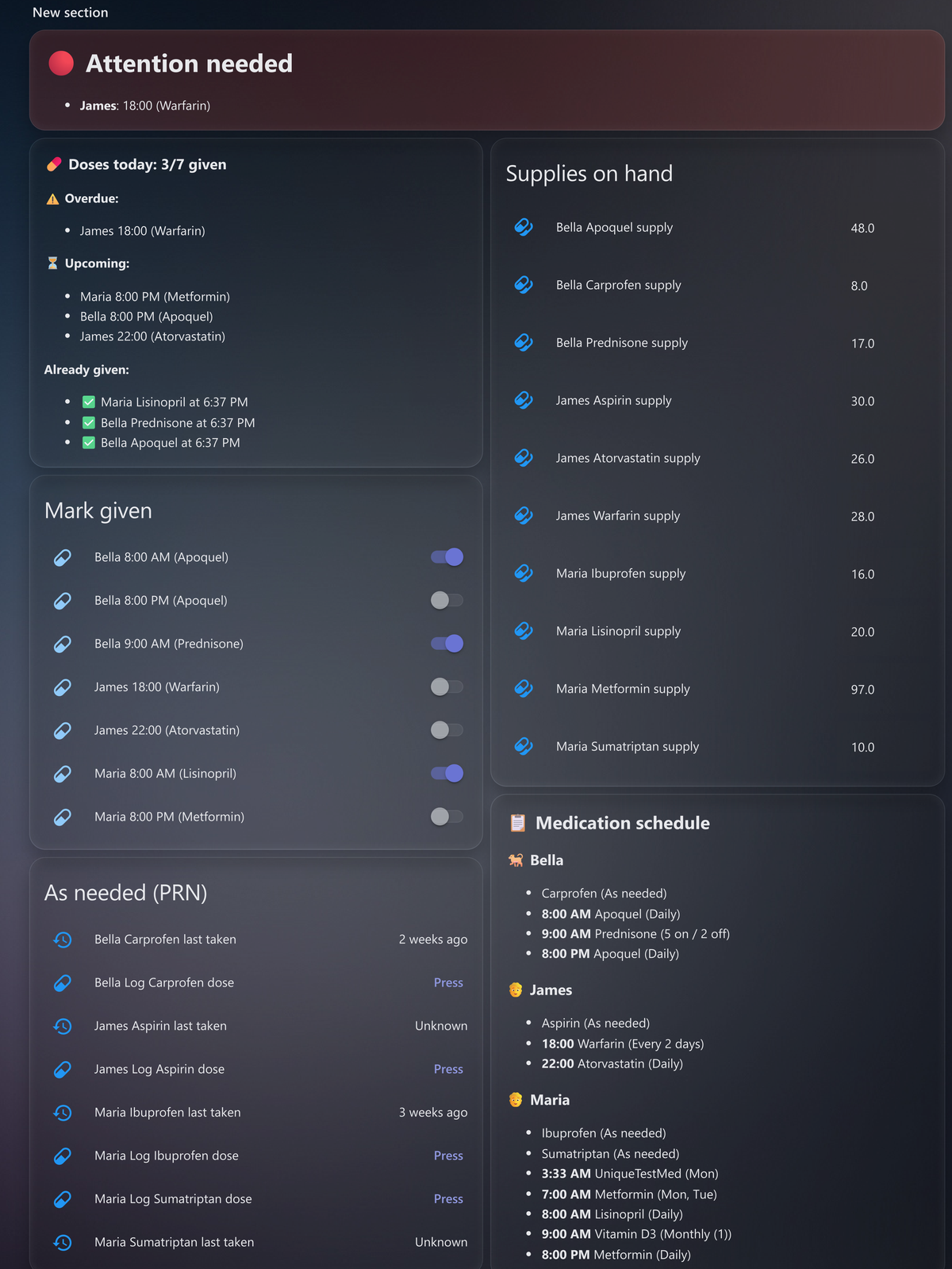
Medication Reminder is a custom integration that tracks medication doses for pets and people. Patients and their dose schedules are added in the UI, and a switch is created for each dose, marked on when given today and reset daily. Schedules can be daily, on chosen weekdays, every N days, an on/off cycle, specific days of the month, or as-needed, with optional start and end dates. As-needed medications get a log button, and the integration can warn when a dose comes too soon or too many are logged in a day. It can also track supply per medication with a low-stock threshold, refill amounts, prescription refills left and cost per unit. Companion automations handle reminders, and the integration works locally with sensors, calendars and buttons alongside the switches.
Automatic summary of the README and code of magikh0e/ha-medication-reminder. Something wrong, or are you the maintainer and want your own text here? Get in touch
Supports
Works locally Talks to your devices on your own network. No vendor cloud in between.
From the Marketplace Installed through the Marketplace, formerly HACS.
Actively maintained Its author released or pushed a change in the last six months.
Provides
- Switches
- Sensors
- Calendars
Setting it up
Install it from the Marketplace and restart Home Assistant, then add it under Settings, Devices and services.
Add a patient
- Patient name
- Patient type
- Notify target (person or group)
After setup
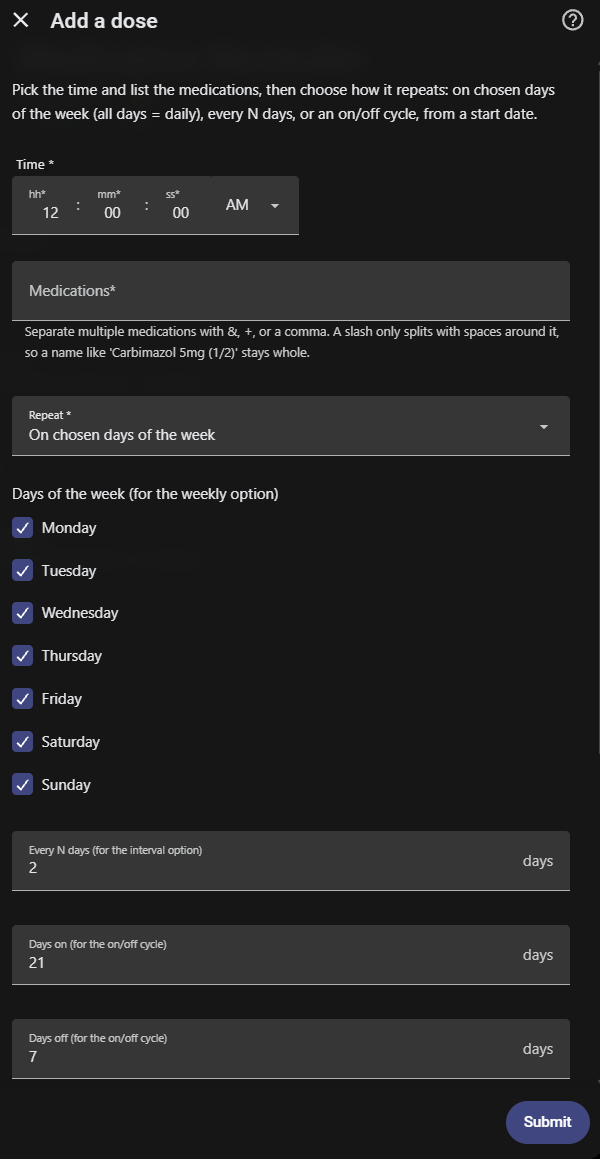
- Time
- MedicationsSeparate multiple medications with &, +, or a comma. A slash only splits with spaces around it, so a name like 'Carbimazol 5mg (1/2)' stays whole.
- Repeat
- Days of the week (for the weekly option)
- Every N days (for the interval option)
- Days on (for the on/off cycle)
- Days off (for the on/off cycle)
- Start date (optional; no reminders before this date)
- Minimum hours between doses (as-needed only; 0 = no limit)For an as-needed medication, warn (never block) when it is logged again sooner than this many hours, e.g. a pain med no less than 4 hours apart.
- Max doses per day (as-needed only; 0 = no limit)For an as-needed medication, warn once this many doses have been logged today.
- Units consumed (this dose)Overrides the medication's default units per dose, for this dose only. Leave 0 to use the default; use decimals like 0.5 for half a pill.
- Ask for amount when markingTurn on for a medication whose dose varies (e.g. adjusted from a reading). It adds an amount field you set before marking the dose given, and the supply decrements by that amount instead of the configured one. Off = always use the configured amount.
- Additional times (optional)Create the same dose at more than one time in one go, e.g. a twice-daily med. Enter extra 24-hour times separated by commas (14:00, 20:00); each becomes its own dose with the same medication, schedule, and options. Leave blank for a single time.
- End date (optional; no reminders after it)Optional. Stop reminding for this medication after this date, for a course with a set length (e.g. 7 days or 3 months). Leave blank to continue indefinitely.
- Dose to edit
- Time
- MedicationsSeparate multiple medications with &, +, or a comma. A slash only splits with spaces around it, so a name like 'Carbimazol 5mg (1/2)' stays whole.
- Repeat
- Days of the week (for the weekly option)
- Every N days (for the interval option)
- Days on (for the on/off cycle)
- Days off (for the on/off cycle)
- Start date (optional; no reminders before this date)
- Minimum hours between doses (as-needed only; 0 = no limit)For an as-needed medication, warn (never block) when it is logged again sooner than this many hours, e.g. a pain med no less than 4 hours apart.
- Max doses per day (as-needed only; 0 = no limit)For an as-needed medication, warn once this many doses have been logged today.
- Units consumed (this dose)Overrides the medication's default units per dose, for this dose only. Leave 0 to use the default; use decimals like 0.5 for half a pill.
- Ask for amount when markingTurn on for a medication whose dose varies (e.g. adjusted from a reading). It adds an amount field you set before marking the dose given, and the supply decrements by that amount instead of the configured one. Off = always use the configured amount.
- End date (optional; no reminders after it)Optional. Stop reminding for this medication after this date, for a course with a set length (e.g. 7 days or 3 months). Leave blank to continue indefinitely.
- Doses to remove
- Medication name
- Units on hand now
- Units consumed per dose
- Low-stock threshold
- Refill amount (a full supply)
- Add on refill (package refill)On refill, add the refill amount to what is left (e.g. 17 + 30 = 47) instead of setting the count to the refill amount.
- Cost per unit (0 = do not track)Cost of one unit (a pill, ml, etc.) in your currency, used for the value-on-hand and cost-per-dose attributes. Leave at 0 to skip cost tracking.
- Refills remaining on prescription (0 = do not track)How many refills the prescription still allows. Each time you press the refill button, this counts down by one, and the supply flags as low when it reaches zero so you know to reorder. Leave at 0 to skip refill tracking.
- Unit / form (optional)The unit this medication is counted in (tablets, drops, ml, syringes, pens, ...). Pick one or type your own. It is shown next to the count and the dose amount, e.g. '30 tablets'. Leave blank for a plain number.
- Medication
- Units on hand now
- Units consumed per dose
- Low-stock threshold
- Refill amount (a full supply)
- Add on refill (package refill)On refill, add the refill amount to what is left (e.g. 17 + 30 = 47) instead of setting the count to the refill amount.
- Cost per unit (0 = do not track)Cost of one unit (a pill, ml, etc.) in your currency, used for the value-on-hand and cost-per-dose attributes. Leave at 0 to skip cost tracking.
- Refills remaining on prescription (0 = do not track)How many refills the prescription still allows. Each time you press the refill button, this counts down by one, and the supply flags as low when it reaches zero so you know to reorder. Leave at 0 to skip refill tracking.
- Unit / form (optional)The unit this medication is counted in (tablets, drops, ml, syringes, pens, ...). Pick one or type your own. It is shown next to the count and the dose amount, e.g. '30 tablets'. Leave blank for a plain number.
- Supplies to stop tracking
Texts from the code of magikh0e/ha-medication-reminder.
Troubleshooting
- DiagnosticsDownloads a diagnostics file to attach to a bug report.
- Repair noticesNotices it can show in Settings, Repairs:Tracked supply has no matching dose
From the README
A Home Assistant custom integration for tracking medication doses, for pets and people. Add patients and their dose schedule in the UI; the integration auto-creates a switch per dose (on = given today) and resets them daily. Pair it with the included companion automations for actionable, nagging, missed-dose reminders synced across every Companion app.
This is the full-featured, actively developed version, and the recommended way to run Medication Reminder. An older, now-deprecated
- Pets and people, all in the UI. Add patients and their dose schedule from Settings, no YAML; entities auto-create per patient and survive restarts.
- Flexible scheduling. Each dose daily, on specific days of the week, every N days, an on/off cycle (e.g. 21 on / 7 off), specific days of the month, or as-needed (PRN, no reminders), in 12h or 24h.…
- As-needed (PRN) meds. A "Log dose" button (and log_dose service) records each dose taken, with a last-taken timestamp, a doses-today count, and a supply decrement, so meds taken several times a day…
- Partial dose marking. For a dose that groups several meds, mark it given while flagging one or more meds as skipped, so the skipped med's supply is not counted and the skip shows in history. No need…
- Skip a dose for the day. Intentionally skipping today's dose? A "Skip today" button on the reminder (and the skip_today service) clears it for the day: reminders and missed-dose nagging stop, but it…

Shows in Vulpo
Quick Toggle card, Button card, Calendar card, Chart card, Apple Watch, Control Center.Information
- Installs
- 127 sharing analytics
- GitHub stars
- 41
- Connection
- Works locally
- Upkeep
- Updated in the last 6 months
- Version
- v0.46.2,
- Category
- Health and wellbeing
- Kind
- Marketplace integration
- Needs
- Needs the Marketplace (HACS on 2026.10 and older)
- Domain
medication_reminder- Issues
- Report an issue