Adjustable Bed
kristofferR
On Home Assistant 2026.11 or newer? Open it in the Marketplace
- Installs
- 274 sharing analytics
- GitHub stars
- 66
- Connection
- Works locally
- Upkeep
- Updated in the last 6 months
- Version
- v4.2.4,
- Category
- Health and wellbeing
- Kind
- Marketplace integration
- Needs
- Needs the Marketplace (HACS on 2026.10 and older)
- Domain
adjustable_bed- Issues
- Report an issue
Independent directory, made by the developer of Vulpo. Not affiliated with Home Assistant or the Open Home Foundation.
Screenshots From the README of kristofferR/ha-adjustable-bed.
About
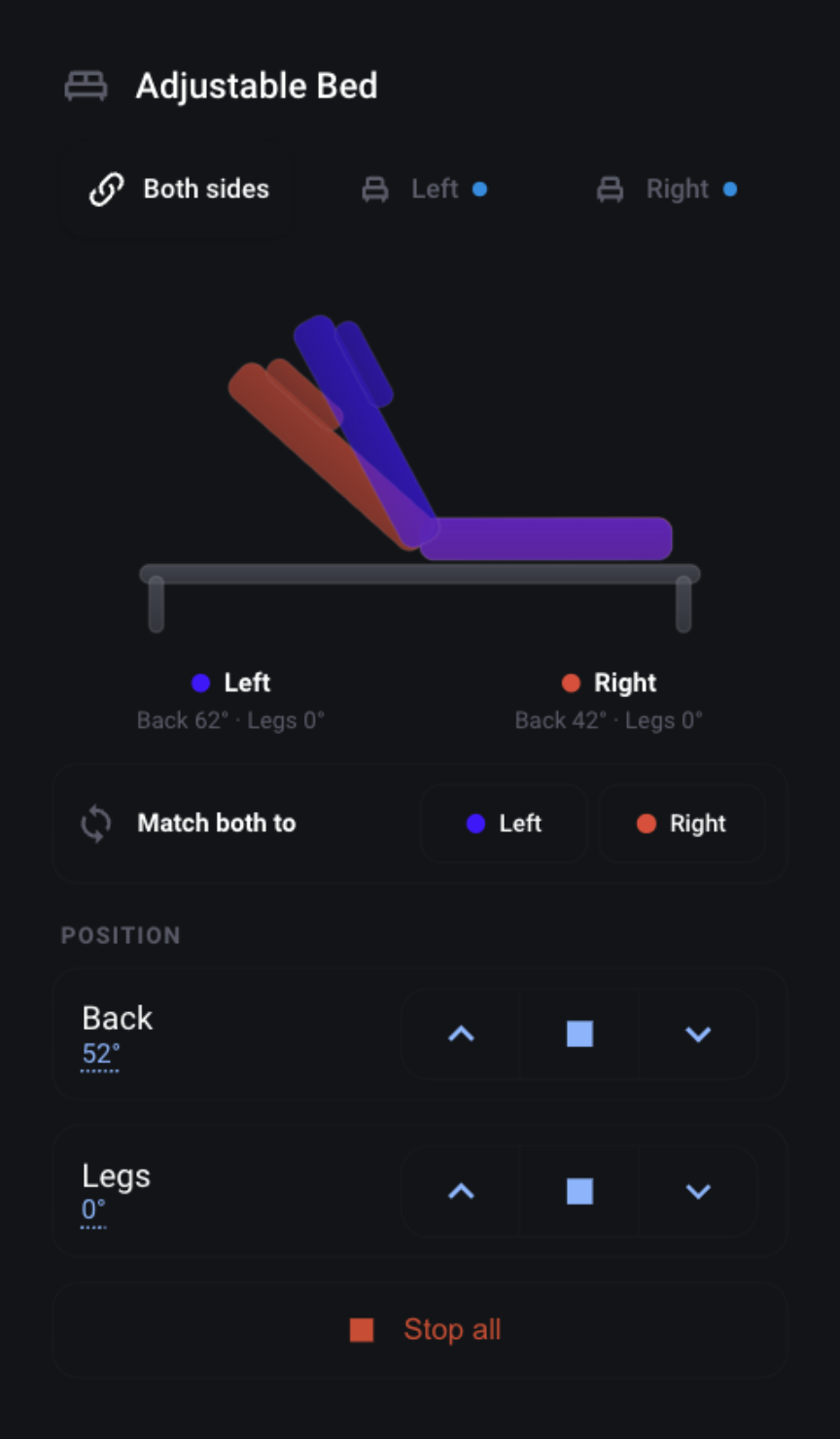
Adjustable Bed is an integration that controls smart adjustable beds over Bluetooth, working locally. It adds motor controls for head, back, legs and feet, position sliders, memory presets, under-bed lights, massage settings, and climate or footwarming controls on beds that support them. Compatible split beds can get separate Left, Right and Both controls, and an existing entry can be converted back and forth. Actions cover going to or saving a preset, setting motor positions, timed moves, stopping all motors, and brand-specific alarms and timers. Beds are usually discovered automatically over Bluetooth and set up in the UI, with a manual option that asks for bed type and protocol variant. A support bundle action and a diagnostics download help with troubleshooting unsupported beds.
Automatic summary of the README and code of kristofferR/ha-adjustable-bed. Something wrong, or are you the maintainer and want your own text here? Get in touch
Supports
Works locally Talks to your devices on your own network. No vendor cloud in between.
Found by itself Home Assistant spots it on the network and offers to add it.
From the Marketplace Installed through the Marketplace, formerly HACS.
Actively maintained Its author released or pushed a change in the last six months.
Provides
- Lights
- Climate
- Covers
- Switches
- Sensors
Setting it up
Install it from the Marketplace and restart Home Assistant, then add it under Settings, Devices and services.
Select Adjustable Bed
- Device
Also asked when entering the address.
Confirm Adjustable Bed
- Bed typeAuto-detected bed type. Change if detection was incorrect. Options are controller protocols, not mattress brands; example beds are shown in parentheses. See the Supported Actuators guide if unsure.
- Name
- Number of motorsNumber of physical actuators. Malouf/Lucid beds use the separate actuator-layout setting below.
- Malouf/Lucid actuator layoutPhysical controls on the remote. This is independent of BLE protocol: Lucid L600 beds have shipped with multiple protocols.
- Malouf/Lucid memory positionsNumber of memory buttons on the physical remote. Auto exposes one for a two-motor L600-style layout and two for other layouts.
- Has massage feature
- Disable angle sensingWhen enabled, position sensors and position controls are disabled but the physical remote will continue working. Uncheck to enable position sliders for beds that support them.
- Bluetooth adapterSelect a specific Bluetooth adapter or proxy, or let Home Assistant choose automatically.
- Protocol variantSome beds have multiple protocol variants. Auto-detect usually works, but you can override if needed. For beds used with the Woosa Sleep app, select Solace and the woosa variant. Shared QMS-MQ and QMS2 Bluetooth names do not identify the app.
- Richmat remoteSelect the Richmat remote code (use auto if unsure).
- RMControl 21.3.7 product (optional)Opt in only for the exact product code used in RMControl. Leave the legacy profile selected to keep existing behavior. Nordic and WiLinke only; hardware unverified.
- RMControl sideUse the side selected in RMControl. This applies only when an RMControl product is selected.
- Motor pulse countNumber of command pulses sent for motor movement (1-100). Higher = longer movement.
- Motor pulse delay (ms)Delay between command pulses in milliseconds (10-500). Lower = smoother movement.
- Disconnect after each commandRelease the BLE connection one second after commands finish so the physical remote can reconnect. Rapid commands share this short window; periodic position polling stays off while idle. Recommended for beds that only allow one connection at a time.
Select Actuator Brand
- Actuator brandSelect the brand shown on your bed's motor or remote. Common brands include Okin, Richmat, Keeson, Linak, and Leggett & Platt.
Select variant
- VariantDifferent beds use different protocols. The hints describe what the Bluetooth device name typically looks like for each variant.
Select Bed Type
- Bed typeIf unsure, try the first option - you can change this later in device settings.
- Show all bed types...
Choose connection behavior
- Disconnect after each commandRelease the BLE connection one second after commands finish so the physical remote can reconnect. Rapid commands share this short window; periodic position polling stays off while idle. Leave disabled for beds that need to retain connection-scoped state.
Manual config
- Bed typeOptions are controller protocols, not mattress brands; example beds are shown in parentheses. See the Supported Actuators guide if unsure.
- Protocol variantLeave as 'auto' unless you know the specific protocol. Keeson: base (Member's Mark/Purple) or ksbt (KSBT03/KSBT04, including some Ergomotion Sync beds). Leggett: gen2 (most common) or okin. Richmat: auto-detected. For beds used with the Woosa Sleep app, select Solace and the woosa variant. Shared QMS-MQ and QMS2 Bluetooth names do not identify the app.
- Name
- Number of motorsNumber of physical actuators. Malouf/Lucid beds use the separate actuator-layout setting below.
- Malouf/Lucid actuator layoutPhysical controls on the remote. This is independent of BLE protocol: Lucid L600 beds have shipped with multiple protocols.
- Malouf/Lucid memory positionsNumber of memory buttons on the physical remote.
- Has massage feature
- Disable angle sensingWhen enabled, position sensors and position controls are disabled but the physical remote will continue working. Uncheck to enable position sliders for beds that support them.
- Bluetooth adapterSelect a specific Bluetooth adapter or proxy, or let Home Assistant choose automatically.
- Motor pulse countNumber of command pulses sent for motor movement (1-100). Higher = longer movement.
- Motor pulse delay (ms)Delay between command pulses in milliseconds (10-500). Lower = smoother movement.
- Disconnect after each commandRelease the BLE connection one second after commands finish so the physical remote can reconnect. Rapid commands share this short window; periodic position polling stays off while idle. Recommended for beds that only allow one connection at a time.
- Idle disconnect timeout (seconds)How many seconds to wait before automatically disconnecting when idle (10-300). Lower values free up the connection faster for the physical remote, higher values reduce reconnection overhead.
After setup
- Bed typeController protocol used for this device. After you select a different type, submit once to load its protocol-specific settings, review them, then submit again to save. Connected GATT evidence may correct an incompatible shared-UUID choice.
- Number of motorsNumber of physical actuators. Malouf/Lucid beds use the separate actuator-layout setting below.
- Malouf/Lucid actuator layoutChoose the controls present on the physical remote. Protocol detection does not identify the actuator layout or retail model.
- Malouf/Lucid memory positionsChoose the number of memory buttons on the physical remote. Auto uses one for the two-motor layout and two otherwise.
- Has massage feature
- Disable angle sensingWhen enabled, position sensors and position controls are disabled but the physical remote will continue working. Uncheck to enable position sliders for beds that support them.
- Refresh positions while idlePeriodically reconnect and read positions while idle so Home Assistant catches up with moves made using the physical remote. This is enabled by default for Linak beds and may briefly use the BLE connection in the background.
- Position update modeSpeed: faster button response. Accuracy: extra position read after each command.
- Stop discovering new Bluetooth devicesWhen enabled, Home Assistant stops automatically suggesting newly seen Bluetooth devices as adjustable beds. This applies to the whole integration, not just this bed. You can still add a new bed at any time with 'Add Integration'.
- Bluetooth adapterSelect a specific Bluetooth adapter or proxy, or let Home Assistant choose automatically.
- Connection profileBalanced is faster to connect. Reliable uses longer timeouts and backoff for flaky beds.
- CB24 bed sideChoose the native CB24 A/B selector. Both uses the broadcast selector.
- Protocol variantChange the protocol variant if the bed isn't responding correctly. For beds used with the Woosa Sleep app, select Solace and the woosa variant. Shared QMS-MQ and QMS2 Bluetooth names do not identify the app.
- Richmat remoteSelect the Richmat remote code (use auto if unsure).
- RMControl 21.3.7 product (optional)Opt in only for the exact product code used in RMControl. Leave the legacy profile selected to keep existing behavior. Nordic and WiLinke only; hardware unverified.
- Removal confirmed✅ The Bluetooth bond was removed and the removal was confirmed.
- Removal failed
- Saved command/parser selector
- Bluetooth transport selector
- Bed side
- Saved command/parser selector
- Bluetooth transport selector
- Split this paired bed
- Saved command/parser selector
- Bluetooth transport selector
- Enable Left / Right / Both controls
- Saved command/parser selector
- Bluetooth transport selector
- Restore standalone controls
- Saved command/parser selector
- Bluetooth transport selector
- Bluetooth adapter
- Connection profile
- Motor pulse count
- Motor pulse delay (ms)
- Disconnect after each command
- Idle disconnect timeout (seconds)
- Foundation size (app metadata)This records the app foundation choice. It does not determine physical BLE sides.
- Processor unit number (wire side)Use the app-recorded integer. 0, 1 and 2 are examples, not proven left/right mappings. Restricted sessions use 0.
- Status snapshot side ordinalApp snapshot ordinal: 0 left, 1 right, 2 entire bed, 3 other.
- Restricted app session (no authentication)
- Processor type (0 if unknown)App processor types 5, 6 and 7 hide preset saving. This does not describe a motor count.
- Bluetooth adapter
- Connection profile
- Motor pulse count
- Motor pulse delay (ms)
- Disconnect after each command
- Idle disconnect timeout (seconds)
- Foundation size (app metadata)This records the app foundation choice. It does not determine physical BLE sides.
- Processor unit number (wire side)Use the app-recorded integer. 0, 1 and 2 are examples, not proven left/right mappings. Restricted sessions use 0.
- Status snapshot side ordinalApp snapshot ordinal: 0 left, 1 right, 2 entire bed, 3 other.
- Restricted app session (no authentication)
- Processor type (0 if unknown)App processor types 5, 6 and 7 hide preset saving. This does not describe a motor count.
Texts from the code of kristofferR/ha-adjustable-bed.
Entities
- Binary sensorsAnti-snore intervention, Music playing, Bed lock, RGB motion, BLE Connection, Bed Presence, Position Feedback Fault, Alarm Enabled, and 61 more
- ButtonsFlat, Zero Gravity, Sync Both Sides, Child Lock, Anti-Snore, TV, Lounge, Swing, and 392 more
- ClimateClimate, Climate Left, Climate Right, Footwarming, Footwarming Left, Footwarming Right
- CoversTV Lift, Head, ELEVATE Actuator 1, ELEVATE Actuator 2, ELEVATE Both Actuators, Back, Legs, and 105 more
- LightsUnder Bed Lights, Left: Under Bed Lights, Right: Under Bed Lights
- NumbersBack Position, Legs Position, Head Position, Feet Position, Lumbar Position, Auxiliary 1 Position, Auxiliary 2 Position, and 55 more
- SelectsMassage: Timer, Light Timer, Climate Timer, Climate Timer Left, Climate Timer Right, Footwarming Timer, Footwarming Timer Left, and 47 more
- SensorsRMControl protocol version, RMControl bed mode, Light timer, Head massage strength, Foot massage strength, Massage mode, Massage frequency, and 266 more
- SwitchesUnder Bed Lights, Controller Sync, Automatic Drive, Left: Under Bed Lights, Right: Under Bed Lights, Left: Controller Sync, Right: Controller Sync, and 3 more
Actions
- Release Svane Remote axisSignal the active writer to release one axis while the other continues.Fields: Device, Axis, Side
- RMControl alarmConfigure a supported product's countdown or repeating alarm using its exact action catalog.Fields: Device, Operation, Countdown minutes, Product action, Alarm slot, Local alarm time, Repeat on, Side
- RMControl snore interventionEnable, configure or query supported automatic snore intervention, separate from the position preset.Fields: Device, Operation, Enabled, Configuration mode, Intervention value, Side
- Go to PresetMove bed to a saved memory position.Fields: Device, Preset Number, Hold duration, Side
- Save to PresetSave current bed position to a memory slot.Fields: Device, Preset Number, Side
- Stop All MotorsImmediately stop all bed motors.Fields: Device, Side
- Generate Support BundleCapture the full adjustable-bed support bundle for troubleshooting unsupported or broken beds. The bundle includes up to 30 ranked nearby Bluetooth devices, including their names and addresses.Fields: Device, Target Address, Capture Duration, Include Recent Logs
- Set Motor PositionMove a motor to a specific position and stop when reached.Fields: Device, Motor, Position, Side
- Set Multiple Motor PositionsMove several motors to validated target positions in one ordered request. Every target is validated before movement starts.Fields: Device, Positions, Side
- Timed MoveMove a motor for a specified duration.Fields: Device, Motor, Direction, Duration (ms), Side
- Hold controlHold one control that the bed's app profile declares for a bounded duration, then send that profile's release sequence. Every target is checked before any bed moves; an unsupported control is rejected with the list of valid controls.Fields: Device, Control, Duration, Side
- Rename Bluetooth controllerWrite a new Bluetooth name to each targeted controller that supports it. Each app profile applies its own name rule to every target before any write. This does not rename the Home Assistant device.Fields: Device, Name, Side
- Synchronize bed clockSet each targeted controller's clock to Home Assistant's local time. Every target is checked before any write.Fields: Device, Side
- Move Two Sections TogetherMove two different sections with one native command (Linak Bed Control, Jensen JMC400), then send STOP.Fields: Device, First Motor, First Direction, Second Motor, Second Direction, Duration, Side
- Rename Linak ControllerSame as Rename Bluetooth controller (rename), limited to 17 UTF-8 bytes. The controller disconnects afterwards so it can advertise the new name. Kept for existing automations.Fields: Device, Name, Side
- Set Linak AlarmProgram a Bed Control alarm with up to four actions, recurrence, and commit.Fields: Device, Seconds, Actions, Recurrence Count, Recurrence Minutes, Side
- Control Solace audioSelect or preview MotionFlex music, query volume, or set volume.Fields: Device, Action, Track, Volume, Side
- Set Solace alarmProgram the MotionFlex or Woosa Sleep alarm time, recurrence, action, massage, and sound. Woosa supports sound off or alarm only.Fields: Device, Enabled, Time, Weekdays, Bed action, Massage, Sound, Side
- Set Leggett sleep timerStart a delayed preset or cancel the stored sleep timer.Fields: Device, Action, Delay, Sleep action, Side
- Set Leggett alarm timerStart an alarm delay or cancel the stored alarm using the selected app profile.Fields: Device, Action, Delay, Side
Troubleshooting
- DiagnosticsDownloads a diagnostics file to attach to a bug report.
- Repair noticesNotices it can show in Settings, Repairs:Combine two beds into one (Dual Bed), Uses limited Remacro controls
From the README
A Home Assistant custom integration for controlling smart adjustable beds via Bluetooth.
- Native Dashboard Card - Auto-loading Lovelace card that adapts to your bed (details)
- Paired Beds - Left, Right, and Both controls for compatible split beds, with reversible conversion of existing entries
- Motor Control - Raise/lower head, back, legs, and feet
- Position Control - Position sliders in degrees or percentages, according to the controller
- Memory Presets - Jump to saved positions with one tap
- Under-bed Lights - RGB color control on supported beds, toggle on/off on others
- Climate Controls - Cooling, heating, and footwarming on supported beds
- Massage Control - Adjust massage intensity and patterns
- Position Feedback - See current angles on supported beds
- Presence Sensors - Occupancy sensors on supported beds
- Firmness Controls - Sleep Number settings on supported beds
- Automations - "Flat when leaving", "TV mode at 8pm", etc.

Shows in Vulpo
Light card, Quick Toggle card, Cover card, Climate card, Apple Watch, Control Center, Climate Live Activity.Information
- Installs
- 274 sharing analytics
- GitHub stars
- 66
- Connection
- Works locally
- Upkeep
- Updated in the last 6 months
- Version
- v4.2.4,
- Category
- Health and wellbeing
- Kind
- Marketplace integration
- Needs
- Needs the Marketplace (HACS on 2026.10 and older)
- Domain
adjustable_bed- Issues
- Report an issue