myUplink
On Home Assistant 2026.11 or newer? Open it in the Marketplace
- Installs
- 614 sharing analytics
- GitHub stars
- 71
- Connection
- Uses the vendor's cloud
- Upkeep
- Updated in the last 6 months
- Version
- 1.8.5,
- Category
- Climate, Heat pumps and air conditioning
- Kind
- Marketplace integration
- Brand
- NIBE
- Needs
- Needs the Marketplace (HACS on 2026.10 and older)
- Domain
myuplink- Issues
- Report an issue
Independent directory, made by the developer of Vulpo. Not affiliated with Home Assistant or the Open Home Foundation.
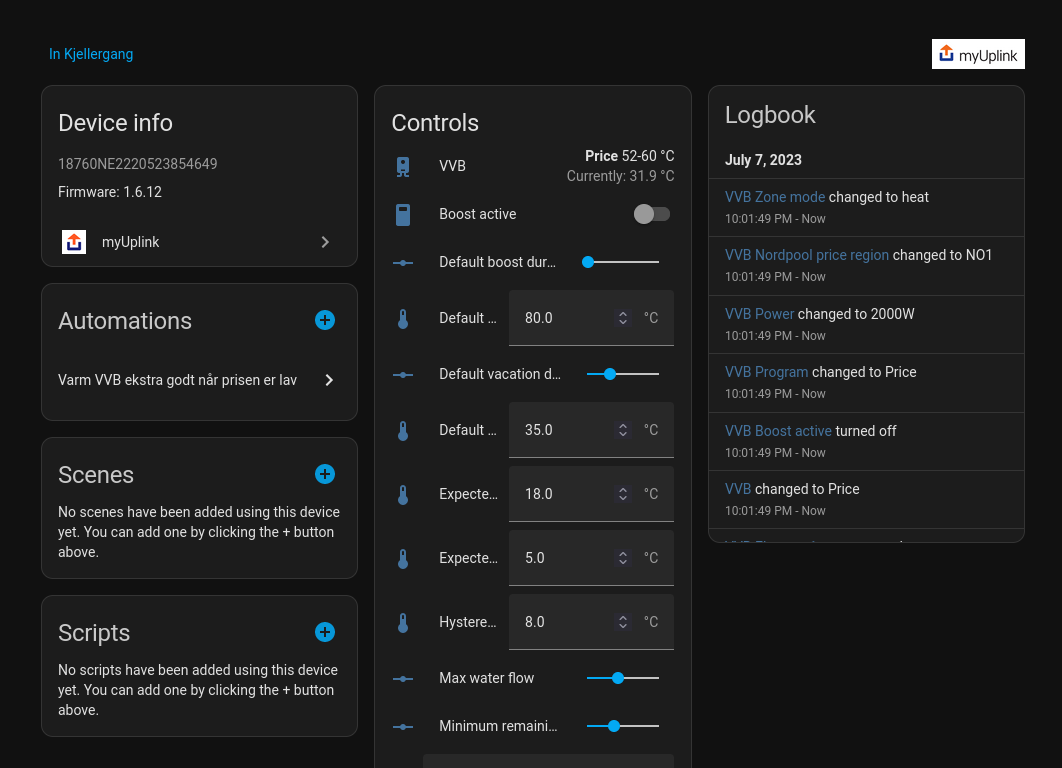
Screenshots From the README of jaroschek/home-assistant-myuplink.
About
myUplink is a custom integration that brings devices and sensors from a myUplink account, including NIBE systems, into Home Assistant. It talks to the vendor's cloud and signs in through the vendor's own sign-in page, with setup done in the UI. It provides binary sensors, climate, numbers, selects, sensors, switches, updates and water heaters, including a connection state, thermostat, notifications and firmware update. A Smart Home Mode select and optional smart home zone support can be turned on, along with firmware and notification fetching, each of which costs extra API calls. Expert settings allow overriding the platform or writable state of a parameter, limiting the requested parameters to a whitelist, or adding extra parameter IDs. Two actions set a device parameter to a value or set a property on a smart home zone.
Automatic summary of the README and code of jaroschek/home-assistant-myuplink. Something wrong, or are you the maintainer and want your own text here? Get in touch
Supports
Uses the vendor's cloud Needs an internet connection and an account with the vendor.
Sign in with the vendor Connects through the vendor's own sign-in page.
From the Marketplace Installed through the Marketplace, formerly HACS.
Actively maintained Its author released or pushed a change in the last six months.
Provides
- Climate
- Water heaters
- Switches
- Sensors
Setting it up
Install it from the Marketplace and restart Home Assistant, then add it under Settings, Devices and services.
Options
- Enable Smart Home Mode?The Smart Home Mode is a system related entity in the myUplink API. If a system has only one single device, the Smart Home Mode will be added to this device. Otherwise the Smart Home Mode will be added to an additional device, that is based on the available system information. The support of the Smart Home Mode requires one additional API call per system.
- Fetch Firmware Info from API?Requires an additional API call per device.
- Fetch Notifications from API?Requires an additional API call per system.
- Scan Interval (seconds)
- Keep disconnected parameters available?Show parameter entities of disconnected devices as available.
- Expert ModeConfigure advanced options.
Expert Settings
- Platform OverridesForce a specific platform for a given parameter ID. This is sometimes necessary if the myUplink API provides incorrect parameter data and the integration detects the wrong platform. Must be valid JSON. To restore the default, invalidate the field and save. An empty field will cause no change.
- Writable without PremiumWhen you do not have a Premium subscription and are not able to write parameter values, create writable entities in Home Assistant anyway This is enabled by default to avoid issues with lapsed subscriptions, non-Premium users adding subscriptions, and the possibility of myUplink providing manage permissions unilaterally.
- Writable OverridesSet specific parameter to writeable or not writeable. This is sometimes necessary if the myUplink API provides the wrong state for the paramter option writable. Must be valid JSON. To restore the default, invalidate the field and save. An empty field will cause no change.
- Parameter WhitelistRestriction of the requested parameters to a specific list of parameter IDs. This can be useful if the myUplink API provides an extremely large number of parameters, some of which are unimportant, and you want to restrict the available list of parameters. List of parameter IDs separated by commas. An empty list does not result in any restriction. Must be valid JSON. To restore the default, invalidate the field and save. An empty field does not result in any change.
- Additional ParameterAdd additional parameter IDs to the query. In extremely rare cases, the myUplink API does not provide all available parameters. With this list, it is possible to add known parameter IDs, which are then queried directly. Comma-separated list of parameter IDs. An empty list does not result in any restrictions. Must be valid JSON. To restore the default, invalidate the field and save. An empty field does not result in any changes.
After setup
- Enable Smart Home Mode?The Smart Home Mode is a system related entity in the myUplink API. If a system has only one single device, the Smart Home Mode will be added to this device. Otherwise the Smart Home Mode will be added to an additional device, that is based on the available system information. The support of the Smart Home Mode requires one additional API call per system.
- Enable Smart Home Zone?Requires an additional API call per device.
- Fetch Firmware Info from API?Requires an additional API call per device.
- Fetch Notifications from API?Requires an additional API call per system.
- Scan Interval (seconds)
- Keep disconnected parameters available?Show parameter entities of disconnected devices as available.
- Expert ModeConfigure advanced options.
- Platform OverridesForce a specific platform for a given parameter ID. This is sometimes necessary if the myUplink API provides incorrect parameter data and the integration detects the wrong platform. Must be valid JSON. To restore the default, invalidate the field and save. An empty field will cause no change.
- Writable without PremiumWhen you do not have a Premium subscription and are not able to write parameter values, create writable entities in Home Assistant anyway This is enabled by default to avoid issues with lapsed subscriptions, non-Premium users adding subscriptions, and the possibility of myUplink providing manage permissions unilaterally.
- Writable OverridesSet specific parameter to writeable or not writeable. This is sometimes necessary if the myUplink API provides the wrong state for the paramter option writable. Must be valid JSON. To restore the default, invalidate the field and save. An empty field will cause no change.
- Parameter WhitelistRestriction of the requested parameters to a specific list of parameter IDs. This can be useful if the myUplink API provides an extremely large number of parameters, some of which are unimportant, and you want to restrict the available list of parameters. List of parameter IDs separated by commas. An empty list does not result in any restriction. Must be valid JSON. To restore the default, invalidate the field and save. An empty field does not result in any change.
- Additional ParameterAdd additional parameter IDs to the query. In extremely rare cases, the myUplink API does not provide all available parameters. With this list, it is possible to add known parameter IDs, which are then queried directly. Comma-separated list of parameter IDs. An empty list does not result in any restrictions. Must be valid JSON. To restore the default, invalidate the field and save. An empty field does not result in any changes.
Texts from the code of jaroschek/home-assistant-myuplink.
Entities
- Binary sensorsConnection State
- ClimateThermostat
- SelectsSmart Home Mode
- SensorsNotifications
- UpdatesFirmware
Actions
- Set device parameter to valueService for setting any parameter identified by ID for a specific device to the desired value.Fields: myUplink Device, myUplink Parameter ID, Value
- Set smart home zone property to valueService for setting a property identified by its name for a specific smart home zone identified by ID of a device to the desired value.Fields: myUplink Device, myUplink Smart Home Zone ID, Property Name, Value
From the README
Custom Home Assistant integration for devices and sensors in myUplink account.
This integration should work with most smart devices from brands listed here.

Shows in Vulpo
Quick Toggle card, Climate card, Select card, Chart card, Apple Watch, Control Center, Climate Live Activity.Information
- Installs
- 614 sharing analytics
- GitHub stars
- 71
- Connection
- Uses the vendor's cloud
- Upkeep
- Updated in the last 6 months
- Version
- 1.8.5,
- Category
- Climate, Heat pumps and air conditioning
- Kind
- Marketplace integration
- Brand
- NIBE
- Needs
- Needs the Marketplace (HACS on 2026.10 and older)
- Domain
myuplink- Issues
- Report an issue