

Sensi
iprak
On Home Assistant 2026.11 or newer? Open it in the Marketplace
- Installs
- 552 sharing analytics
- GitHub stars
- 111
- Connection
- Uses the vendor's cloud
- Upkeep
- Updated in the last 6 months
- Version
- v2.2.3,
- Category
- Climate
- Kind
- Marketplace integration
- Needs
- Needs the Marketplace (HACS on 2026.10 and older)
- Domain
sensi- Source
- github.com/iprak/sensi
- Issues
- Report an issue
Independent directory, made by the developer of Vulpo. Not affiliated with Home Assistant or the Open Home Foundation.
Screenshots From the README of iprak/sensi.
About
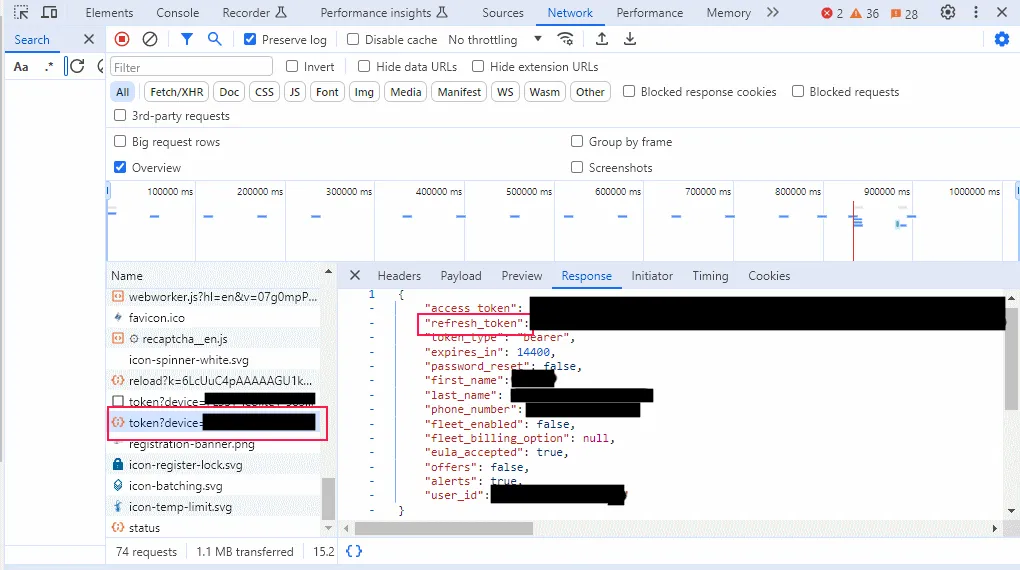
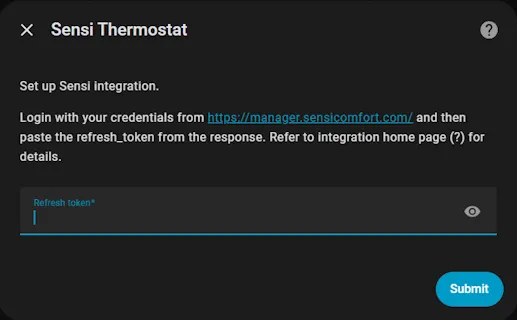
Sensi is a Home Assistant integration for displaying and controlling Sensi thermostats through the vendor's cloud. It adds a climate entity with Auto, Heat, Cool and Off modes, depending on the thermostat's configuration, and fan modes of Auto, On and Circulate. Humidification control is available on thermostats that have it enabled, and data refreshes every 30 seconds. Switches cover the display of humidity and time, continuous backlight, keypad lockout and the circulating fan, while number entities set the fan duty cycle and temperature and humidity offsets. A diagnostic sensor reports Active Savings Event status when an energy provider event is in play. Setup is done in the UI with a refresh token obtained manually, and the integration relies on reverse engineering of the mobile app, so it could stop working.
Automatic summary of the README and code of iprak/sensi. Something wrong, or are you the maintainer and want your own text here? Get in touch
Supports
Uses the vendor's cloud Needs an internet connection and an account with the vendor.
From the Marketplace Installed through the Marketplace, formerly HACS.
Actively maintained Its author released or pushed a change in the last six months.
Provides
- Climate
- Switches
- Sensors
Setting it up
Install it from the Marketplace and restart Home Assistant, then add it under Settings, Devices and services.
Sensi Thermostat
- Refresh token
Texts from the code of iprak/sensi.
Entities
- NumbersCirculating Fan Duty Cycle, Temperature Offset, Humidity Offset
- SensorsActive Savings Event
- SwitchesDisplay Humidity, Continuous Backlight, Display Time, Keypad Lockout, Circulating Fan
From the README
- Operating modes: Auto, Heat, Cool, Off (available modes depend on thermostat configuration).
- Heat, Cool modes support single target temperature
- Auto uses heat and cool set points
- Fan modes: Auto, On, Circulate (10% duty cycle). Circulation mode availability depends on thermostat.
- Humidification control
- Data is refreshed every 30 seconds.

Shows in Vulpo
Quick Toggle card, Climate card, Chart card, Apple Watch, Control Center, Climate Live Activity.Information
- Installs
- 552 sharing analytics
- GitHub stars
- 111
- Connection
- Uses the vendor's cloud
- Upkeep
- Updated in the last 6 months
- Version
- v2.2.3,
- Category
- Climate
- Kind
- Marketplace integration
- Needs
- Needs the Marketplace (HACS on 2026.10 and older)
- Domain
sensi- Source
- github.com/iprak/sensi
- Issues
- Report an issue










