Stateful Scenes
hugobloem
On Home Assistant 2026.11 or newer? Open it in the Marketplace
- Installs
- 422 sharing analytics
- GitHub stars
- 119
- Connection
- Works locally
- Upkeep
- Updated in the last 6 months
- Version
- v1.8.0,
- Category
- Helpers, Store a value
- Kind
- Marketplace integration
- Needs
- Needs the Marketplace (HACS on 2026.10 and older)
- Domain
stateful_scenes- Issues
- Report an issue
Independent directory, made by the developer of Vulpo. Not affiliated with Home Assistant or the Open Home Foundation.
Screenshots From the README of hugobloem/stateful_scenes.
About
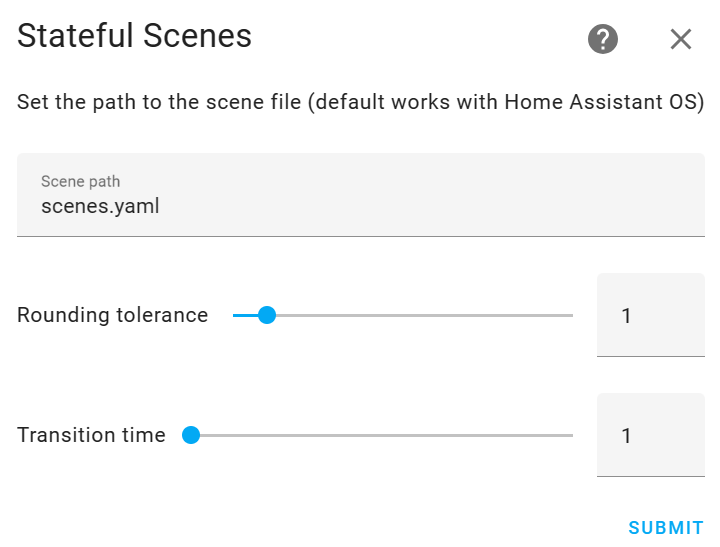
Stateful Scenes is an integration that creates a switch for each Home Assistant scene and infers whether the scene is active. It works out the scene state by checking the entities in the scene, so the switch can stay on in HomeKit instead of falling back right away. Activating a scene in Home Assistant also turns it on in HomeKit. Settings cover the scene file location, a rounding tolerance for attributes such as brightness, a default transition time, and a debounce time before the state is rechecked. Scenes can restore entity states when turned off, or use a separate opposing off scene, and unavailable entities can be ignored. It runs locally and is set up in the UI.
Automatic summary of the README and code of hugobloem/stateful_scenes. Something wrong, or are you the maintainer and want your own text here? Get in touch
Supports
Works locally Talks to your devices on your own network. No vendor cloud in between.
From the Marketplace Installed through the Marketplace, formerly HACS.
Actively maintained Its author released or pushed a change in the last six months.
Provides
- Switches
Setting it up
Install it from the Marketplace and restart Home Assistant, then add it under Settings, Devices and services.
Configure internal scenes
- Scene path
- Rounding tolerance
- Restore states on deactivation
- Transition time
- Debounce time
- Ignore entities in unavailable state
- Enable discovery
Also asked when changing the connection.
Select external scenes
- External scenes
Configure external scene entities
- Scene name
- Scene ID
- Scene entities
Learn external scene
- Activated?
Also asked when changing the connection.
Change the connection
- Rounding tolerance
- Restore states on deactivation
- Transition time
- Debounce time
- Ignore entities in unavailable state
- Scene entities
Texts from the code of hugobloem/stateful_scenes.
From the README
Do you want to use your Home Assistant scenes in HomeKit, but get annoyed when the scenes do not stay ‘on’?
Stateful Scenes solves this problem by creating a switch for each scene and inferring the state of the scene by analysing the entities in the scene. Plus, when you activate a scene in Home Assistant, the scene will also turn on in HomeKit—magic!

Shows in Vulpo
Quick Toggle card, Select card, Apple Watch, Control Center.Information
- Installs
- 422 sharing analytics
- GitHub stars
- 119
- Connection
- Works locally
- Upkeep
- Updated in the last 6 months
- Version
- v1.8.0,
- Category
- Helpers, Store a value
- Kind
- Marketplace integration
- Needs
- Needs the Marketplace (HACS on 2026.10 and older)
- Domain
stateful_scenes- Issues
- Report an issue