

Hilo
dvd-dev
On Home Assistant 2026.11 or newer? Open it in the Marketplace
- Installs
- 582 sharing analytics
- GitHub stars
- 252
- Connection
- Uses the vendor's cloud
- Upkeep
- Updated in the last 6 months
- Version
- v2026.10.3,
- Category
- Climate
- Kind
- Marketplace integration
- Needs
- Needs the Marketplace (HACS on 2026.10 and older)
- Domain
hilo- Source
- github.com/dvd-dev/hilo
- Issues
- Report an issue
Independent directory, made by the developer of Vulpo. Not affiliated with Home Assistant or the Open Home Foundation.
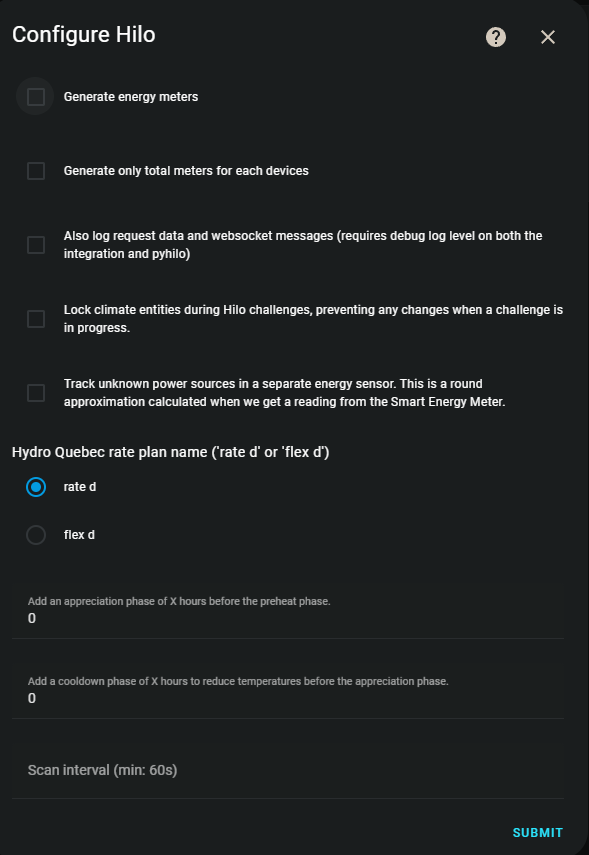
Screenshots From the README of dvd-dev/hilo.
About
Hilo is a community integration that connects Hilo devices to Home Assistant through the vendor's cloud. It provides climate, light, sensor and switch entities, covering thermostat control with temperature readings, switches and dimmers exposed as lights, and sensors for the gateway and Hilo challenges. It also tracks the energy use of Hilo devices and offers an outdoor weather sensor. Options include generating energy meters, choosing the Hydro-Québec rate plan, setting the scan interval, and locking climate entities while a challenge is running. Appreciation and cooldown phases can be added in hours around challenge events. It is set up in the user interface, signing in through the Hilo website, and the README describes it as a beta that is not affiliated with Hilo or Hydro-Québec.
Automatic summary of the README and code of dvd-dev/hilo. Something wrong, or are you the maintainer and want your own text here? Get in touch
Supports
Uses the vendor's cloud Needs an internet connection and an account with the vendor.
From the Marketplace Installed through the Marketplace, formerly HACS.
Actively maintained Its author released or pushed a change in the last six months.
Provides
- Lights
- Climate
- Switches
- Sensors
Setting it up
Install it from the Marketplace and restart Home Assistant, then add it under Settings, Devices and services.
After setup
- Generate energy meters
- Generate only total meters for each devices
- Hydro Quebec rate plan nameSelect 'rate d' or 'flex d'
- Scan interval (seconds)Minimum: 60 seconds
- Log request data and websocket messagesRequires debug log level on both the integration and pyhilo
- Lock climate entities during challengesPrevents any changes when a challenge is in progress
- Track unknown power sourcesThis is a round approximation calculated when we get a reading from the Smart Energy Meter
- Appreciation phase (hours)Add an appreciation phase of X hours before the preheat phase. Hilo uses 3 hours for AM events, 2 for PM events, chose a value you would like to automatically add and adjust your automations accordingly.
- Cooldown phase (hours)Add a cooldown phase of X hours to reduce temperatures before the appreciation phase
Texts from the code of dvd-dev/hilo.
From the README
Ceci est une version Bêta. Il y aura probablement des bogues, irritants, etc. Merci pour votre patience et d'ouvrir des "Issues".
Merci de consulter le Wiki avant de créer des "Issues", plusieurs questions communes s'y trouvent.

Shows in Vulpo
Light card, Quick Toggle card, Climate card, Chart card, Apple Watch, Control Center, Climate Live Activity.Information
- Installs
- 582 sharing analytics
- GitHub stars
- 252
- Connection
- Uses the vendor's cloud
- Upkeep
- Updated in the last 6 months
- Version
- v2026.10.3,
- Category
- Climate
- Kind
- Marketplace integration
- Needs
- Needs the Marketplace (HACS on 2026.10 and older)
- Domain
hilo- Source
- github.com/dvd-dev/hilo
- Issues
- Report an issue










