
Screenshots From the README of cgonfer/velair.
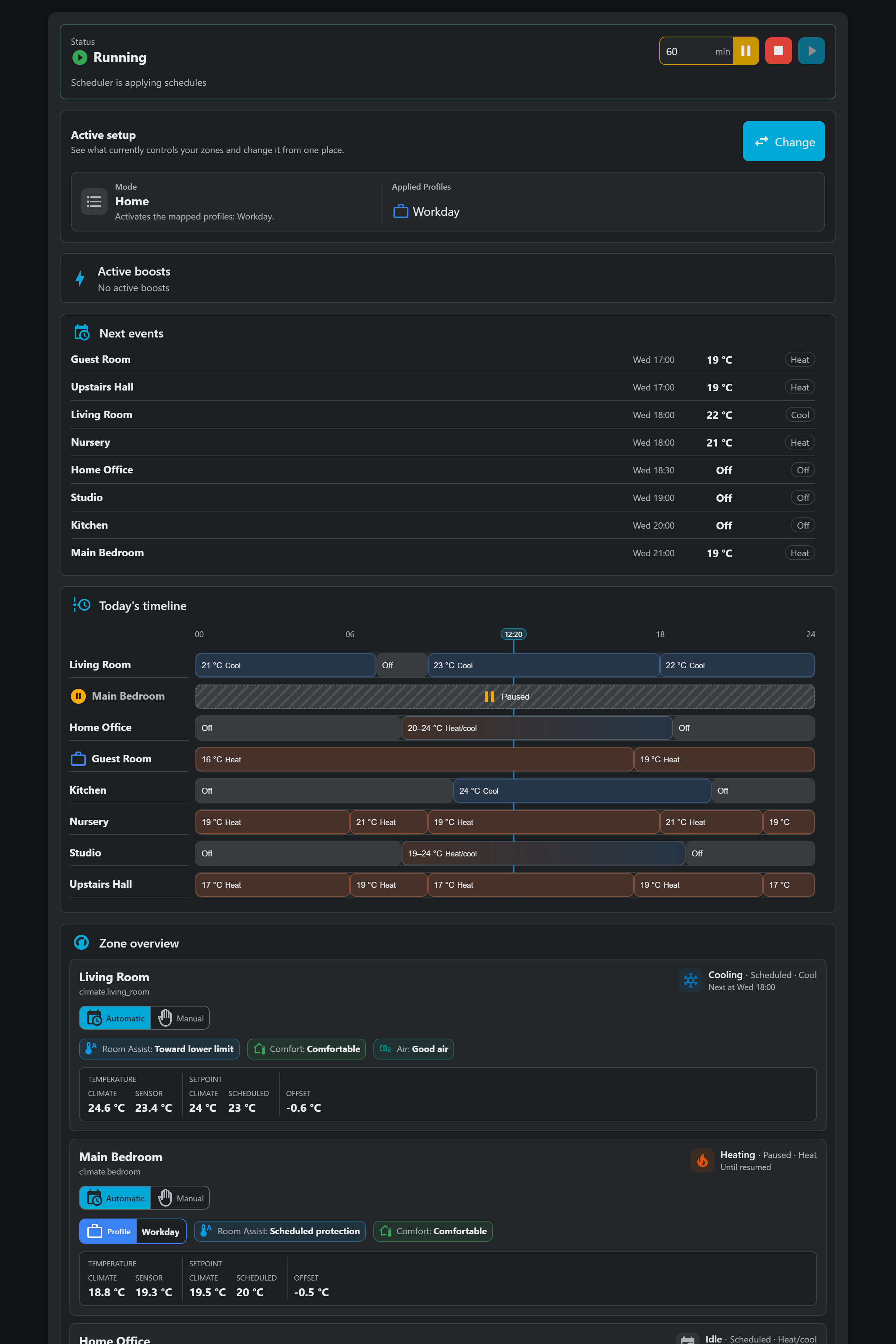
About
Velair is a Home Assistant integration for scheduling heating and cooling on existing climate entities, with the scheduler running locally. It adds a sidebar panel with a weekly schedule editor for each climate, reusable templates and profiles, and a household base profile with per-room exceptions. Schedule blocks can set a temperature or range, change only the HVAC mode, send options such as a preset, or turn the climate off. Optional features include adaptive preconditioning, room-temperature sensors, planned return for absences, and air-quality and comfort readings that are observations only. It also provides select, sensor and switch entities, actions for pausing zones, cloning days and switching profiles, and an optional dashboard card for a single climate. It works alongside the existing thermostat integration and is set up in the UI by choosing which climates it may manage.
Automatic summary of the README and code of cgonfer/velair. Something wrong, or are you the maintainer and want your own text here? Get in touch
Supports
Works locally Talks to your devices on your own network. No vendor cloud in between.
From the Marketplace Installed through the Marketplace, formerly HACS.
Actively maintained Its author released or pushed a change in the last six months.
Provides
- Switches
- Sensors
Setting it up
Install it from the Marketplace and restart Home Assistant, then add it under Settings, Devices and services.
Set up Velair
- Climate entities
- Apply the active schedule after Home Assistant starts
After setup
- Climate entities
- Apply the active schedule after Home Assistant starts
Texts from the code of cgonfer/velair.
Entities
- SelectsMode
- SensorsNext scheduled event, Scheduler status, Diagnostics status, Active target temperature, Environmental condition, Ventilation opportunity, Air quality, Override, Control, Delivery diagnostics, Preconditioning start, Room Assist
- SwitchesAutomatic scheduling
Actions
- Pause zoneAdd or update a reason that pauses automatic schedule execution for one managed climate entity. The climate can optionally be turned off while any reason remains.Fields: Until next block
- I'm leavingPlan a one-off return for a future date and time using saved Modes and Automatic scheduling. With configured occupancy sources, waits for confirmed absence unless Apply Away mode now is enabled; without sources, activates Away immediately. Works with the weekly routine disabled and updates an active absence.Fields: Return date, Return time, Apply Away mode now
- Cancel planned returnCancels a planned return or closes an inactive return notice. After Away was applied, including immediate manual Away before monitored departure confirmation, restores the Mode and Profiles selected before the episode started. A normal pending departure leaves selection unchanged. Stops automatic return for this absence. You can explicitly plan a new return afterward.
- Update Velair presetPersistently update an existing shared preset and reconcile its schedules. Omitted values are preserved in update mode.Fields: Velair preset identifier, Target temperature, Lower target temperature, Upper target temperature, Temperature only, HVAC mode, Fan mode, Device preset, Swing mode, Horizontal swing mode
- Clone day scheduleClone a saved weekday to target days and managed climates, preserving template links and Velair preset references.Fields: Source climate, Source weekday, Target weekdays, Target climates, Configuration revision
- Activate climate profileSet one saved climate profile as the complete base and clear all zone exceptions. Zones not covered by it use their default schedules. Leave the profile ID empty to return every zone to Default.Fields: Profile ID
- Deactivate climate profileReturn every zone to Default by clearing the base profiles and all zone exceptions.
- Activate climate profiles as baseReplace the complete base with non-overlapping profiles and clear all zone exceptions. An empty list selects Default. Profile selection does not guarantee simultaneous physical delivery.Fields: Profile IDs
- Apply climate profiles as exceptionsReplace exceptions only in the zones explicitly included by these profiles. Other zones keep their selection. Overlapping profiles in this request reject the whole action; an empty list does nothing. Cancels a pending Return home.Fields: Profile IDs
- Set zone profile exceptionApply only one zone from a saved profile, preserving every other zone selection. The profile must include this zone. Use YAML null for Default; use Clear profile exceptions to inherit the base. Cancels a pending Return home.Fields: Profile ID
- Clear profile exceptionsRestore the current base for the explicitly selected zones. Previous exceptions are not restored. An empty list does nothing. Cancels a pending Return home when zones are requested.Fields: Climate entities
Troubleshooting
- DiagnosticsDownloads a diagnostics file to attach to a bug report.
From the README
Climate automation that adapts to your life.
Velair brings local-first scheduling to the climate.* entities you already use in Home Assistant. Plan heating and cooling from its sidebar panel, and add the optional Lovelace card if you want to check on a room or control it from your dashboard.
- A weekly schedule editor for each climate, with reusable templates and Profiles, individual days, weekdays/weekend, or all days together.
- A household Base with room Exceptions, so selected rooms can follow another Profile or Default without creating a Mode for every combination.
- Schedule blocks that can set a temperature or range, preserve an externally controlled HVAC mode with Temperature only, change only the HVAC mode, send supported options such as a preset without a…
- Manual adjustment when you want to take direct control of a climate.
- Optional Adaptive Preconditioning and Room Assist for earlier starts and separate room-temperature sensors.
- Optional Supply control: control a shared heating or cooling switch using estimated room demand, with supply-wide hysteresis and per-thermostat overrides.
- Optional Planned Return: confirm whole-home absence and prepare for weekly or one-off arrivals, with current control context in Overview and Diagnostics.
- Environmental Comfort and air-quality readings, with optional outdoor comparisons and ventilation guidance. These are observations; Velair does not open windows or adjust the climate based on them.

Shows in Vulpo
Quick Toggle card, Select card, Chart card, Apple Watch, Control Center.Information
- Installs
- 140 sharing analytics
- GitHub stars
- 112
- Connection
- Works locally
- Upkeep
- Updated in the last 6 months
- Version
- v1.8.0,
- Category
- Climate
- Kind
- Marketplace integration
- Needs
- Needs the Marketplace (HACS on 2026.10 and older)
- Domain
velair- Issues
- Report an issue










