Screenshots From the README of calebgab/medication_tracker.
About
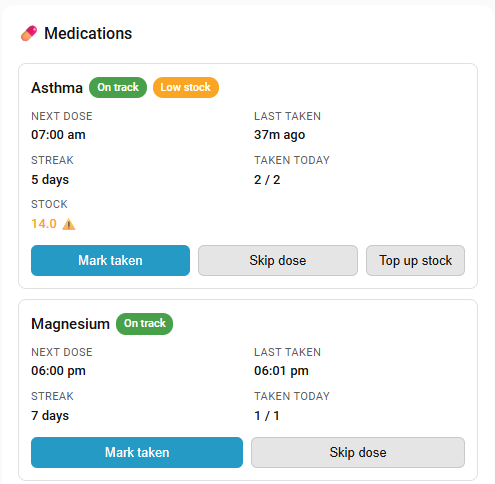
Medication Tracker is an integration that tracks medications, scheduled doses, streaks and overdue alerts locally. It supports scheduled medications with fixed times of day and as-needed medications with dose-limit tracking. Sensors report the next dose time, last taken time, streak of consecutive days and doses taken today, while binary sensors flag overdue and due-soon doses. Buttons mark a dose as taken or skipped, and optional stock tracking lowers the count with each dose and raises a low-stock alert. Notifications for due, overdue, due soon, taken and low stock are configured in the integration, with message templates and iOS and Android sound options. Medications are added, edited and removed through the Home Assistant UI, and an optional dashboard card shows them all.
Automatic summary of the README and code of calebgab/medication_tracker. Something wrong, or are you the maintainer and want your own text here? Get in touch
Supports
Works locally Talks to your devices on your own network. No vendor cloud in between.
From the Marketplace Installed through the Marketplace, formerly HACS.
Actively maintained Its author released or pushed a change in the last six months.
Provides
- Sensors
Setting it up
Install it from the Marketplace and restart Home Assistant, then add it under Settings, Devices and services.
Set up Medication Tracker
- Tracker name
After setup
- Action
- Medication name
- Dose (e.g. 10mg)
- Medication type
- Notes
- Medication name
- Dose
- Medication type
- Notes
- Select medication to remove
- Notify service (e.g. notify.persistent_notification)
- Alert when a dose is due
- Repeat reminder every N minutes until taken or skipped
- Overdue after / repeat every (minutes)
- Stop repeating after this many reminders
- Alert when a dose is due soon
- Confirm when a dose is marked taken
- Alert when stock is running low
- Next
- Notification title
- Notification message
- iOS — Sound behavior
- iOS — Time-sensitive sound name (used only when set to Time-sensitive above)
- Android — Sound behavior
- Android — Channel importance (used only when set to Critical above)
- Notification title
- Notification message
- iOS — Sound behavior
- iOS — Time-sensitive sound name (used only when set to Time-sensitive above)
- Android — Sound behavior
- Android — Channel importance (used only when set to Critical above)
- Notification title
- Notification message
- iOS — Sound behavior
- iOS — Time-sensitive sound name (used only when set to Time-sensitive above)
- Android — Sound behavior
- Android — Channel importance (used only when set to Critical above)
Texts from the code of calebgab/medication_tracker.
From the README
Track medications, scheduled doses, streaks, and overdue alerts — entirely local, no cloud, no app required.
- Two medication types — scheduled (fixed times of day) and as-needed/PRN (dose-limit tracking)
- Sensors for next dose time, last taken timestamp, streak (consecutive days taken), and doses taken today
- Binary sensors for overdue detection (with configurable grace period) and due-soon alerts (within 60 minutes) for scheduled meds; availability tracking for PRN meds
- Button entities to mark doses as taken or skipped — appear automatically on the device page
- Optional stock tracking — record a current stock level per medication and it's automatically decremented each time a dose is taken, with a low-stock sensor and alert so you never run out
- Built-in notifications — configure due, repeating overdue reminders, due soon, taken confirmation, and low stock alerts directly from the integration, with an actionable Mark taken button on iOS and…
- Per-medication notification overrides — enable or disable individual alert types per medication, overriding the global settings
- Services to mark doses taken or skipped, reset today's log, and adjust stock (e.g. after a refill)
- Full UI configuration — add, edit, and remove medications via the Home Assistant UI (no YAML required)
- Optional Lovelace card — a custom dashboard card showing all medications with status and action buttons
- Persistent storage — survives restarts; today's log is pruned automatically at midnight

Shows in Vulpo
Button card, Chart card, Apple Watch.Information
- Installs
- 91 sharing analytics
- GitHub stars
- 8
- Connection
- Works locally
- Upkeep
- Updated in the last 6 months
- Version
- 2026.7.14.3,
- Category
- Health and wellbeing
- Kind
- Marketplace integration
- Needs
- Needs the Marketplace (HACS on 2026.10 and older)
- Domain
medication_tracker- Issues
- Report an issue