Screenshots From the README of andyblac/Advanced-History-Integration.
About
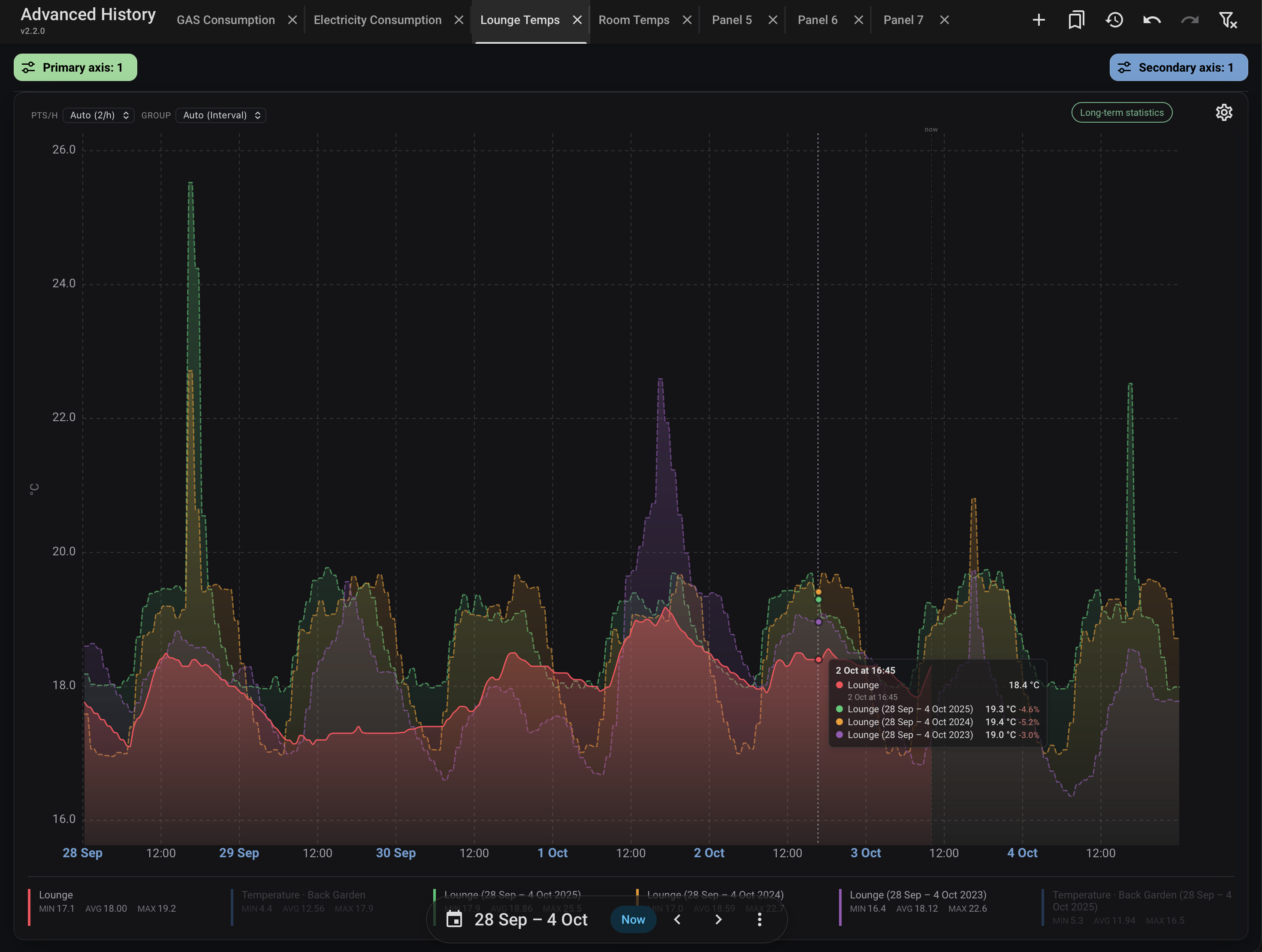
Advanced History is a Home Assistant integration that adds a configurable History panel to the sidebar. It keeps the familiar History workflow of picking areas, devices or entities with the native target picker, and draws the graphs with Statistics Graph Chart Card, which must be installed separately. Targets can be plotted on separate Y1 and Y2 scales, shown as numeric history or state timelines, and compared across periods using Energy-style date controls. Panels work independently and can be renamed and rearranged, charts can be saved as bookmarks, and Undo and Redo are available for changes. Optionally, it replaces the native History graph in entity More Info dialogs and opens the Show more link in the new panel, with separate defaults for each. Settings cover the sidebar icon, graph height, automatic detail, and who can see the panel, and setup is done in the UI.
Automatic summary of the README and code of andyblac/Advanced-History-Integration. Something wrong, or are you the maintainer and want your own text here? Get in touch
Supports
Works locally Talks to your devices on your own network. No vendor cloud in between.
From the Marketplace Installed through the Marketplace, formerly HACS.
Actively maintained Its author released or pushed a change in the last six months.
Setting it up
Install it from the Marketplace and restart Home Assistant, then add it under Settings, Devices and services.
Set up Advanced History
- Sidebar icon
- Maximum entities
- Maximum tabs
- Automatic detailSets the default automatic point scaling for numeric charts; chart options can override it. For large date ranges, it also offers Fine detail in the History panel.
- Automatic detail threshold (days)Use automatic detail when the selected range is at least this many days.
- Graph height
- Include hidden entities
- Use legacy inline target pickersUse the previous inline Y1/Y2 target picker layout instead of Home Assistant 2026.9's target sidebars.
- Administrators only
- Graph card module URLLeave empty to auto-detect the Statistics Graph Chart Card HACS resource.
- Numeric chart optionsDefaults used only by numeric charts. Open its visual editor or edit its code directly.
- State chart optionsDefaults used only by state-timeline charts. Open its visual editor or edit its code directly.
Set up More-Info
- Use Statistics Graph in More InfoReplace the native History graph in entity dialogs with Statistics Graph Chart Card.
- Show chart calendarShow the Statistics Graph Chart Card's built-in date picker in entity dialogs.
- Open Show more in Advanced HistoryOpen the History section's Show more link in Advanced History as a new panel, preserving the existing panel tabs.
- Graph card module URLLeave empty to auto-detect the Statistics Graph Chart Card HACS resource.
- Numeric chart optionsDefaults used only by numeric charts. Open its visual editor or edit its code directly.
- State chart optionsDefaults used only by state-timeline charts. Open its visual editor or edit its code directly.
- Automatic detailSets the default automatic point scaling for numeric More Info charts; chart and entity options can override it.
Also asked when changing the connection.
Reconfigure Advanced History
- Sidebar icon
- Maximum entities
- Maximum tabs
- Automatic detailSets the default automatic point scaling for numeric charts; chart options can override it. For large date ranges, it also offers Fine detail in the History panel.
- Automatic detail threshold (days)Use automatic detail when the selected range is at least this many days.
- Graph height
- Include hidden entities
- Use legacy inline target pickersUse the previous inline Y1/Y2 target picker layout instead of Home Assistant 2026.9's target sidebars.
- Graph card module URLLeave empty to auto-detect the Statistics Graph Chart Card HACS resource.
- Administrators only
- Numeric chart optionsDefaults used only by numeric charts. Open its visual editor or edit its code directly.
- State chart optionsDefaults used only by state-timeline charts. Open its visual editor or edit its code directly.
After setup
- Sidebar icon
- Maximum entities
- Maximum tabs
- Automatic detailSets the default automatic point scaling for numeric charts; chart options can override it. For large date ranges, it also offers Fine detail in the History panel.
- Automatic detail threshold (days)Use automatic detail when the selected range is at least this many days.
- Graph height
- Include hidden entities
- Use legacy inline target pickersUse the previous inline Y1/Y2 target picker layout instead of Home Assistant 2026.9's target sidebars.
- Open Show more in Advanced HistoryOpen the History section's Show more link in Advanced History as a new panel, preserving the existing panel tabs.
- Use Statistics Graph in More InfoReplace the native History graph in entity dialogs with Statistics Graph Chart Card.
- Show chart calendarShow the Statistics Graph Chart Card's built-in date picker in entity dialogs.
- Graph card module URLLeave empty to auto-detect the Statistics Graph Chart Card HACS resource.
- Administrators only
- Numeric chart optionsDefaults used only by numeric charts. Open its visual editor or edit its code directly.
- State chart optionsDefaults used only by state-timeline charts. Open its visual editor or edit its code directly.
- Use Statistics Graph in More InfoReplace the native History graph in entity dialogs with Statistics Graph Chart Card.
- Show chart calendarShow the Statistics Graph Chart Card's built-in date picker in entity dialogs.
- Open Show more in Advanced HistoryOpen the History section's Show more link in Advanced History as a new panel, preserving the existing panel tabs.
- Graph card module URLLeave empty to auto-detect the Statistics Graph Chart Card HACS resource.
- Numeric chart optionsDefaults used only by numeric charts. Open its visual editor or edit its code directly.
- State chart optionsDefaults used only by state-timeline charts. Open its visual editor or edit its code directly.
- Automatic detailSets the default automatic point scaling for numeric More Info charts; chart and entity options can override it.
Texts from the code of andyblac/Advanced-History-Integration.
From the README
A Home Assistant-style History panel with more powerful, configurable graphs.
- Select multiple areas, devices, or entities with Home Assistant's native target picker.
- Work across independent desktop panels that can be renamed, rearranged, and restored automatically.
- Plot targets on separate Y1 and Y2 scales, with the option to exclude Y2 from period comparisons.
- Display numeric history and state timelines.
- Navigate dates and compare periods with native Energy controls.
- Edit the current chart through the Statistics Graph Chart Card visual editor.
- Add the current panel to any editable dashboard through Home Assistant's native dashboard and view picker.
- Choose an entity's state, numeric attributes, and categorical attribute timelines from a per-target attribute selector, including multiple attributes from one entity.
- Preserve selected attributes and their categorical value maps when a compatible card opens in Advanced History.
- Size state-timeline graphs to their visible row count to avoid unused vertical space.
- Show Home Assistant-style current and target attributes automatically for climate, humidifier, and water-heater entities in both History and More Info.
- Define integration-wide Card Defaults through YAML or the visual editor.
Information
- Installs
- 206 sharing analytics
- GitHub stars
- 28
- Connection
- Works locally
- Upkeep
- Updated in the last 6 months
- Version
- v2.2.1,
- Category
- Helpers, Calculate a value
- Kind
- Marketplace integration
- Needs
- Needs the Marketplace (HACS on 2026.10 and older)
- Domain
advanced_history- Issues
- Report an issue