
Smartcar
wbyoung
On Home Assistant 2026.11 or newer? Open it in the Marketplace
- Installs
- 123 sharing analytics
- GitHub stars
- 50
- Connection
- Uses the vendor's cloud
- Upkeep
- Updated in the last 6 months
- Version
- v0.5.1,
- Category
- Vehicles and transport, Cars and EVs
- Kind
- Marketplace integration
- Needs
- Needs the Marketplace (HACS on 2026.10 and older)
- Domain
smartcar- Issues
- Report an issue
Independent directory, made by the developer of Vulpo. Not affiliated with Home Assistant or the Open Home Foundation.
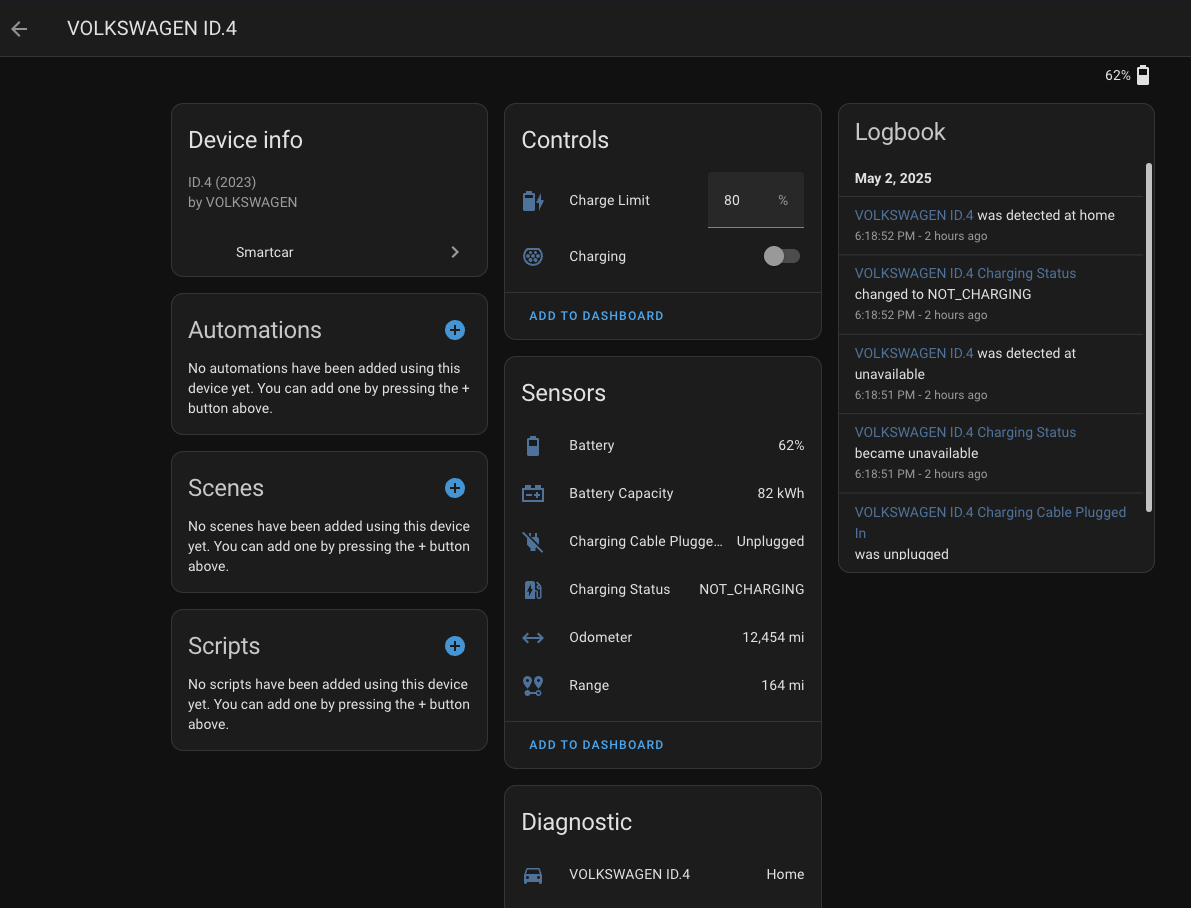
Screenshots From the README of wbyoung/smartcar.
About
Smartcar connects compatible vehicles to Home Assistant through the Smartcar cloud API. It adds sensors, binary sensors, locks, numbers, switches and presence tracking for linked cars, plus actions to lock and unlock the doors. During setup, permissions are chosen for data such as battery level and range, charging state, fuel level, oil health, tire pressure, location and distance traveled, and for charging control and door locking. Webhooks can be enabled as an option for receiving data updates, and this needs an application management token. Which features work depends on the vehicle's make, model and year, the Smartcar account plan, and the permissions granted. It is configured in the Home Assistant UI, signs in through the vendor's page, and needs a Smartcar developer account.
Automatic summary of the README and code of wbyoung/smartcar. Something wrong, or are you the maintainer and want your own text here? Get in touch
Supports
Uses the vendor's cloud Needs an internet connection and an account with the vendor.
Sign in with the vendor Connects through the vendor's own sign-in page.
From the Marketplace Installed through the Marketplace, formerly HACS.
Actively maintained Its author released or pushed a change in the last six months.
Provides
- Locks
- Switches
- Sensors
- Presence
Setting it up
Install it from the Marketplace and restart Home Assistant, then add it under Settings, Devices and services.
Smartcar configuration
- Application IDRequired for new Smartcar accounts and for v3.
- Application Management Token
- Use webhooksWebhooks are Smartcar's preferred data update delivery method.
Permission selection
- Control charging (start/stop & target charge)
- Lock or unlock vehicle
- Get EV/PHEV battery level, capacity & current range
- Get details on whether the car is plugged in and charging
- Get engine oil health
- Get fuel tank level
- Get the vehicle's location
- Get total distance traveled
- Get details on whether doors, windows & more are enabled
- Get tire pressure details
After setup
- Use webhooks
- Token: only provide if using webhooks
Texts from the code of wbyoung/smartcar.
Actions
- Lock doorsLock doors for a vehicle.Fields: Config entry, VIN
- Unlock doorsUnlock doors for a vehicle.Fields: Config entry, VIN
Troubleshooting
- DiagnosticsDownloads a diagnostics file to attach to a bug report.
- Repair noticesNotices it can show in Settings, Repairs:Smartcar v2 API deprecated
From the README
Connect your compatible vehicle to Home Assistant using the Smartcar API.
This integration provides various sensors and controls for vehicles linked through the Smartcar platform, allowing you to monitor and interact with your car directly within Home Assistant.

Shows in Vulpo
Quick Toggle card, Lock card, Chart card, Apple Watch, Control Center.Information
- Installs
- 123 sharing analytics
- GitHub stars
- 50
- Connection
- Uses the vendor's cloud
- Upkeep
- Updated in the last 6 months
- Version
- v0.5.1,
- Category
- Vehicles and transport, Cars and EVs
- Kind
- Marketplace integration
- Needs
- Needs the Marketplace (HACS on 2026.10 and older)
- Domain
smartcar- Issues
- Report an issue
You might also like



 Kia Uvo / Hyundai Bluelink6.3k installs · A Home Assistant HACS integration that supports Kia Connect(Uvo…Open
 Tesla Custom Integration4.4k installs · Tesla custom integration for Home Assistant. This requires a re…Open