
GTFS 2 (General Transit Feed Specification)
vingerha
On Home Assistant 2026.11 or newer? Open it in the Marketplace
- Installs
- 335 sharing analytics
- GitHub stars
- 137
- Connection
- Works locally
- Upkeep
- Updated in the last 6 months
- Version
- 0.5.9.10,
- Category
- Vehicles and transport, Public transport
- Kind
- Marketplace integration
- Needs
- Needs the Marketplace (HACS on 2026.10 and older)
- Domain
gtfs2- Issues
- Report an issue
Independent directory, made by the developer of Vulpo. Not affiliated with Home Assistant or the Open Home Foundation.
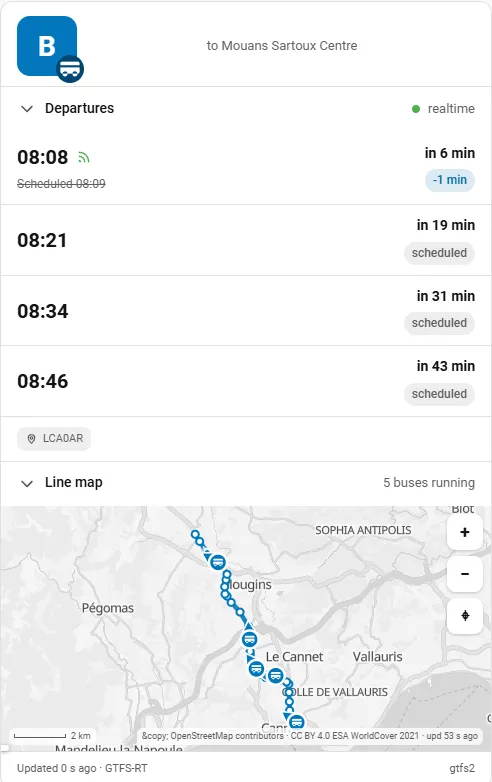
Screenshots From the README of vingerha/gtfs2.
About
GTFS 2 (General Transit Feed Specification) brings public transport schedules into Home Assistant through the interface. It adds sensors that schedule a route between self-defined start and end stops, or list departures from stops in a self-defined zone or around a device such as a person. Transit data comes from a zip file, either linked by URL or placed in a folder, with an optional API key. Realtime trip updates, vehicle positions and alerts can be added when the provider offers them, and vehicle positions can be shown on a map card through geojson files. Actions update the data sources and extract upcoming departures or arrivals for automations. It works locally and is set up in the UI.
Automatic summary of the README and code of vingerha/gtfs2. Something wrong, or are you the maintainer and want your own text here? Get in touch
Supports
Works locally Talks to your devices on your own network. No vendor cloud in between.
From the Marketplace Installed through the Marketplace, formerly HACS.
Actively maintained Its author released or pushed a change in the last six months.
Provides
- Sensors
Setting it up
Install it from the Marketplace and restart Home Assistant, then add it under Settings, Devices and services.
Start end
- Select source
Local stops
- Select source
- Object/Person to use for lat/lon
- Name of the sensor
Source
- New datasource name
- external url to gtfs data (zip) file
- API key, if required
- API key name
- the location where the key is applied
- Extract data from:
Agency
- Select the service provider (or ALL)
Route type
- Type of transport
Route
- Name of the route
Stops
- Origin Stop
Towards
- Towards
After setup
- Data refresh interval (in minutes)
- Offset in minutes
- Limit #stops to avoid possible performance impact. Increase at your own risk
- Correct source gtfs timezone (in hours)
- Setup Realtime integration? (needs data from the same source)
- Data refresh interval (in minutes)
- Checking for departures in future from 'now' (in minutes: between 15 and 120)
- experimental: avoid using new zip/source contain having no current information
- Radius to search for stops (in meters between 50 and 500)
- URL to trip data
- URL to vehicle position
- URL to alerts
- API key, if required
- API key name
- the location where the key is applied
- Add Accept:application/x-protobuf to the header
Texts from the code of vingerha/gtfs2.
Actions
- Update/create a GTFS2 datasourceEither via Link or by placing a Zip in gtfs2 folderFields: Indicate source to use zip or url, Name of the transport service, without .zip, URL, Remove feed-info
- Collects GTFS Realtime dataCan be used for Trip, Vehicle Location or AlertsFields: Name of the provider, URL, api_key, api_key_name, api_key_location, Accept, Indicate type of realtime data, SIRI RT Route, debug_output
- Update GTFS local stopse.g. for moving 'person', to be defined for each person / zoneFields: Entity that is connected to local stops
- Extract departuresExtracts next (max) 100 departures from your entity up-until tomorrow day endFields: Route from which to extract, The time after which departures are collected
- Extract arrivalsExtracts next (max) 100 arrivals from your entity up-until tomorrow day endFields: Route from which to extract, The time after which arrivals are collected
From the README
- Schedule a route between self-defined start/end stops
- Schedule all (multi-route) departures from stops in a self-defined zone/area or (dynamically) around a device
- Option to add realtime gtfs realtime trip updates, realtime vehicle location, realtime alerts, depends on the offering from your provider
- With realtime vehicle location, geojson files allow to visualize and track vehicles on a map card
- Services/actions to support automated processes, e.g. update the GTFSs of static and real time data
- Dedicated card for route-based configurations GTFS2 Live Card by Pulpyyyy
- translations: English, French, German, Spanish, Portuguese

Shows in Vulpo
Chart card, Apple Watch.Information
- Installs
- 335 sharing analytics
- GitHub stars
- 137
- Connection
- Works locally
- Upkeep
- Updated in the last 6 months
- Version
- 0.5.9.10,
- Category
- Vehicles and transport, Public transport
- Kind
- Marketplace integration
- Needs
- Needs the Marketplace (HACS on 2026.10 and older)
- Domain
gtfs2- Issues
- Report an issue
You might also like



 Kia Uvo / Hyundai Bluelink6.3k installs · A Home Assistant HACS integration that supports Kia Connect(Uvo…Open
 Tesla Custom Integration4.4k installs · Tesla custom integration for Home Assistant. This requires a re…Open