Arlo Camera Support
On Home Assistant 2026.11 or newer? Open it in the Marketplace
- Installs
- 2.2k sharing analytics
- GitHub stars
- 485
- Connection
- Uses the vendor's cloud
- Upkeep
- Updated in the last 6 months
- Version
- v0.8.1.27,
- Category
- Security and safety, Cameras
- Kind
- Marketplace integration
- Brand
- Arlo
- Needs
- Needs the Marketplace (HACS on 2026.10 and older)
- Domain
aarlo- Issues
- Report an issue
Independent directory, made by the developer of Vulpo. Not affiliated with Home Assistant or the Open Home Foundation.
Screenshots From the README of twrecked/hass-aarlo.
About
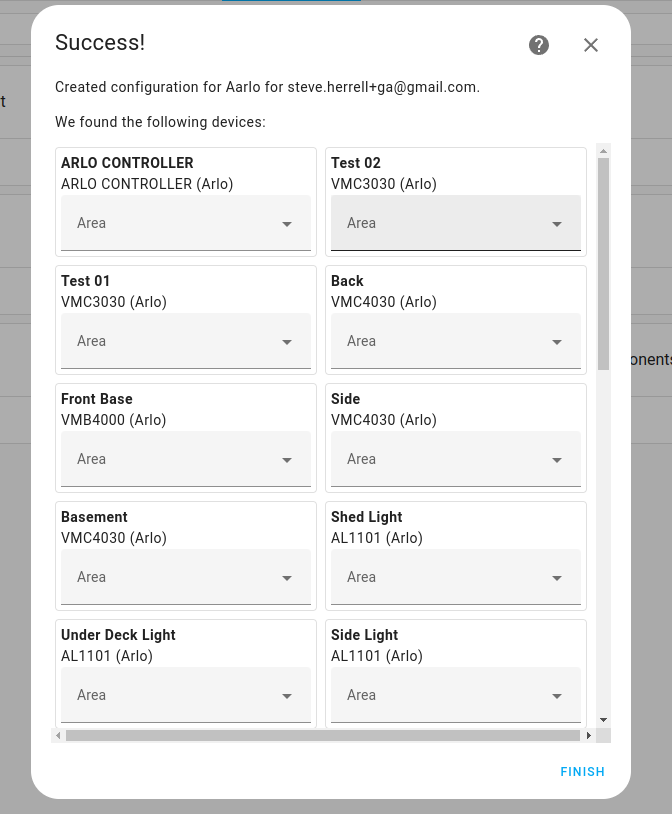
Arlo Camera Support (Aarlo) is a custom integration that connects Home Assistant to the Arlo camera system through the vendor's cloud. It covers cameras, base stations, sirens, doorbells and lights, and exposes alarms, binary sensors, media, sensors and switches. Motion, sound and button press events arrive asynchronously, and cameras can take snapshots, record video to a file, and stream directly. Actions also change the base station mode, restart a device, and turn one or all sirens on or off at a set volume and duration. Options let each sensor type be enabled separately, and alarm mode names and codes can be customised. It needs a dedicated Arlo account with two factor authentication, and setup is done in the UI.
Automatic summary of the README and code of twrecked/hass-aarlo. Something wrong, or are you the maintainer and want your own text here? Get in touch
Supports
Uses the vendor's cloud Needs an internet connection and an account with the vendor.
From the Marketplace Installed through the Marketplace, formerly HACS.
Actively maintained Its author released or pushed a change in the last six months.
Provides
- Lights
- Cameras
- Alarms
- Media
- Switches
- Sensors
Setting it up
Install it from the Marketplace and restart Home Assistant, then add it under Settings, Devices and services.
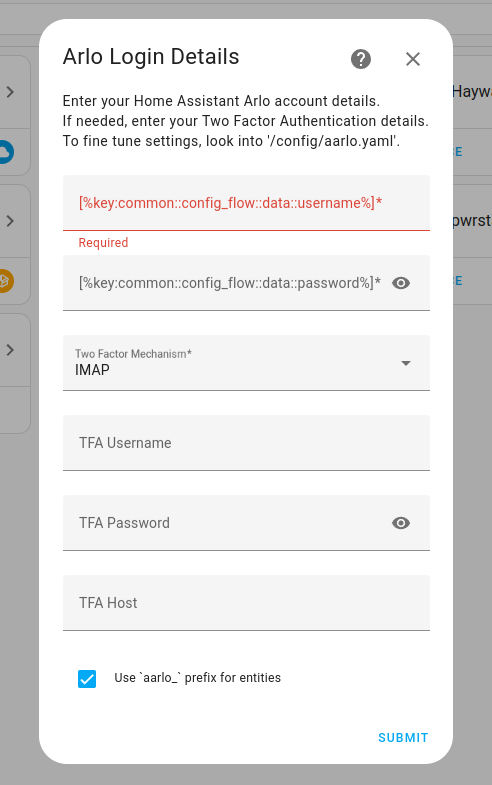
Arlo Login Details
- Username
- Password
- Two Factor Mechanism
- TFA Host
- TFA Username
- TFA Password
- Use aarlo_ prefix for entities
After setup
- Alarm/disarm code
- Disarmed mode name
- Home mode name
- Away mode name
- Night mode name
- Command template
- Trigger time
- Alarm volume
- Arm code required
- Disarm code required
- Sound detection
- Motion detection
- Doorbell presses
- Cry detection
- Device connectivity
- Open/close sensors
- Brightness sensors
- Tamper detection
- Leak detection
- Last capture time
- Total number of cameras detected
- Recent activity detected
- Number of videos/snapshots captured today
- Device battery level
- WiFi signal strength
- Room temperature
- Room humidity
- Air quality
- Switches to turn sirens on
- A switch turn all sirens on
- Allow sirens to be turned off.
- Siren switch volume
- Siren switch duration
- Switches to request cameras take a snapshot
- Camera snapshot timeout
- Switches to silence doorbell chimes
Texts from the code of twrecked/hass-aarlo.
Actions
- Camera Request SnapshotAsk a camera to take a snapshot.
- Camera Request Snapshot to FileAsk a camera to take a snapshot and save it to a file.Fields: File Name
- Camera Request Video to FileAsk a camera to take a video and save it to a file.Fields: File Name
- Camera Stop ActivityAsk a camera to stop doing whatever it is doing.
- Camera Start RecordingAsk a camera start recording to library.Fields: Duration
- Camera Stop RecordingAsk a camera to stop recording.
- Attempt to Restart a DeviceAsk a device to restart (requires admin permissions).
- Alarm Set ModeChange Basestation Mode.Fields: Mode
- Siren OneTurn a siren on at a given volume and for a given duration.Fields: Volume, Duration
- Siren OffTurn a siren off.
- Sirens OnTurn all the sirens on at a given volume and for a given duration.Fields: Volume, Duration
- Sirens OffTurn all the sirens off.
- Inject a Fake PacketFor testing, inject a fake packet into the event stream.Fields: File Name
From the README
Aarlo is a custom component for Home Assistant, that provides access to the Arlo system.

Shows in Vulpo
Light card, Quick Toggle card, Media Player card, Alarm Panel card, Apple Watch, Control Center.Information
- Installs
- 2.2k sharing analytics
- GitHub stars
- 485
- Connection
- Uses the vendor's cloud
- Upkeep
- Updated in the last 6 months
- Version
- v0.8.1.27,
- Category
- Security and safety, Cameras
- Kind
- Marketplace integration
- Brand
- Arlo
- Needs
- Needs the Marketplace (HACS on 2026.10 and older)
- Domain
aarlo- Issues
- Report an issue