
Screenshots From the README of spagonic/ha-hi3510.
About
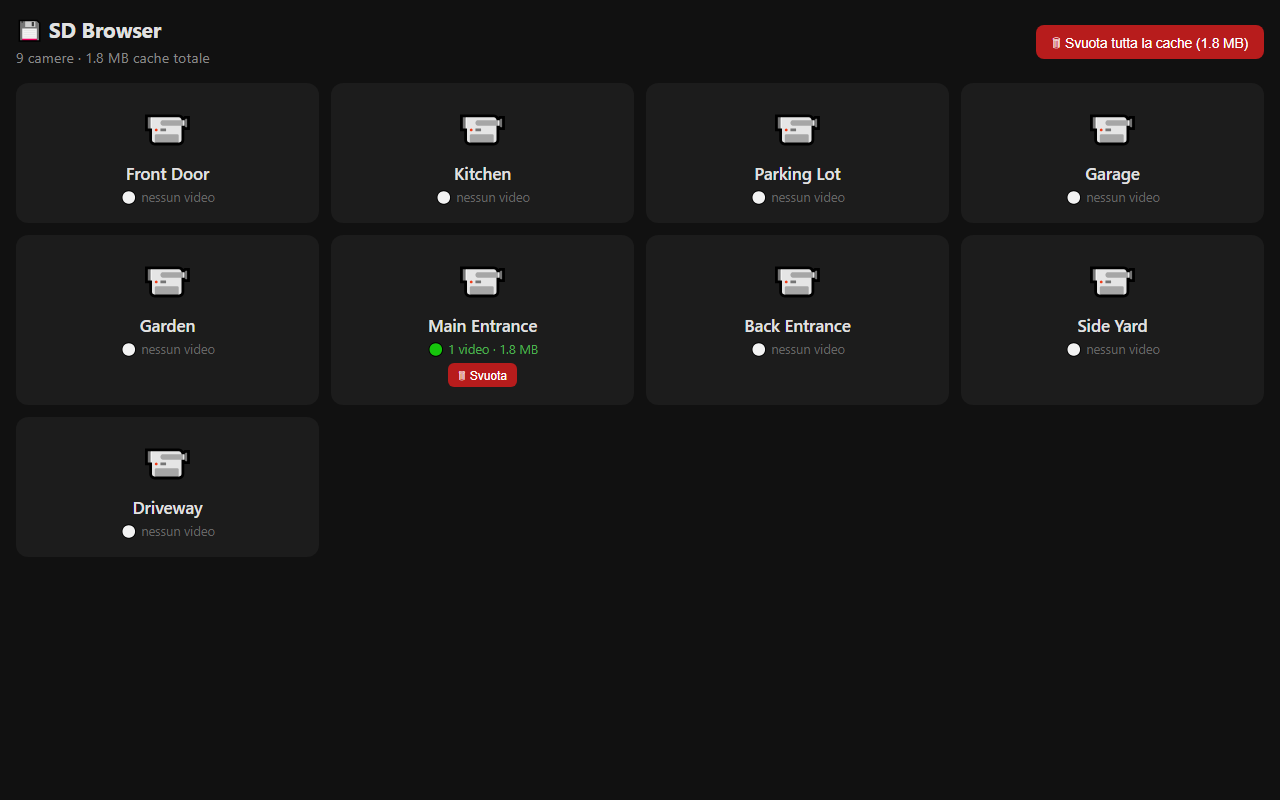
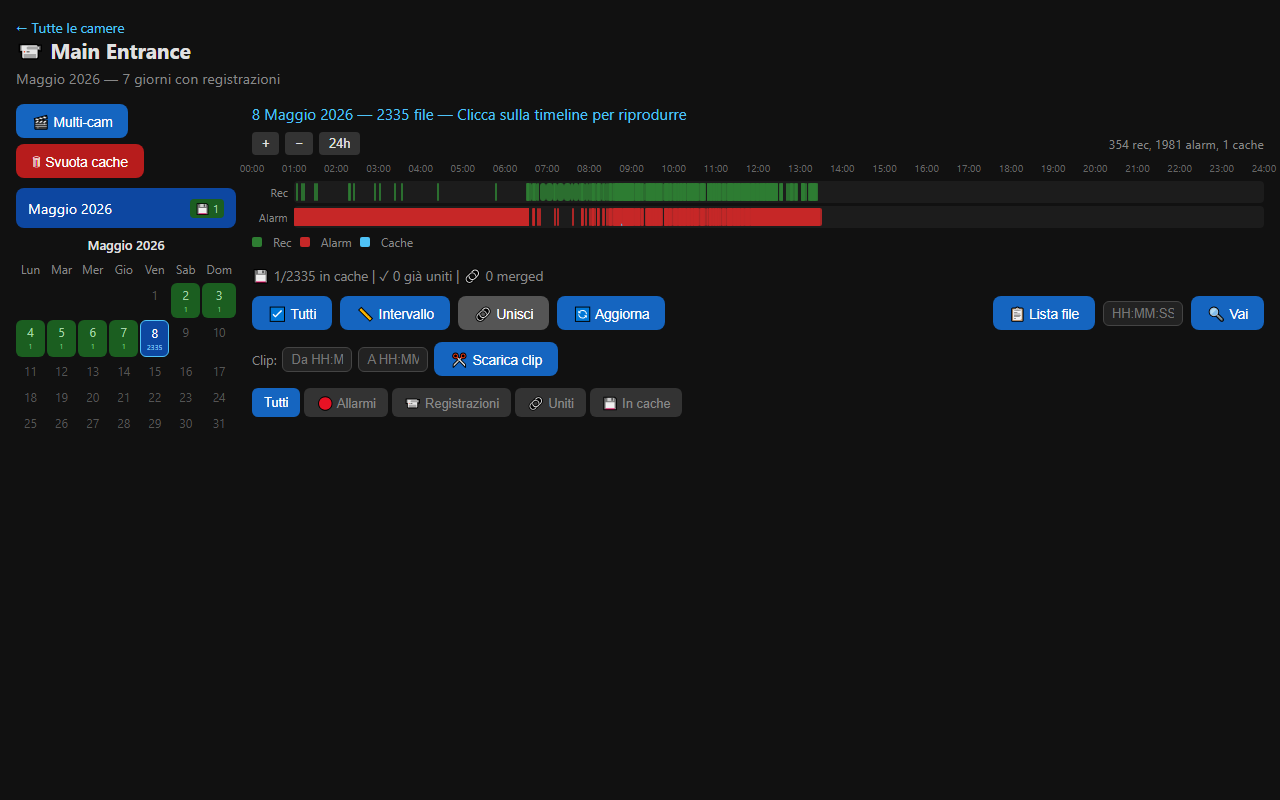
Hi3510 IP Camera is an integration for IP cameras that use the Hi3510 CGI protocol on HiSilicon chips. It talks to the camera over the local network with HTTP Basic Auth and RTSP, without a cloud service. Each camera gets a live RTSP stream and JPEG snapshots, plus a motion binary sensor, switches for ONVIF, SD recording, flip and mirror, and number controls for image settings and audio volume. Motorized cameras get PTZ buttons, a preset selector and two services for moving the camera or going to and saving presets. Sensors report SD card space and status, firmware, model and cached recordings, and recordings on the SD card can be browsed and played back in Home Assistant. Setup runs in the UI with either a network scan or manual entry, and options cover cache retention, allowed networks, and polling and motion check intervals.
Automatic summary of the README and code of spagonic/ha-hi3510. Something wrong, or are you the maintainer and want your own text here? Get in touch
Supports
Works locally Talks to your devices on your own network. No vendor cloud in between.
From the Marketplace Installed through the Marketplace, formerly HACS.
Actively maintained Its author released or pushed a change in the last six months.
Provides
- Cameras
- Switches
- Sensors
Setting it up
Install it from the Marketplace and restart Home Assistant, then add it under Settings, Devices and services.
Hi3510 IP Camera
- Setup method
Manual Camera Setup
- HostIP address or hostname of the camera
- HTTP PortHTTP port (default 80)
- Username
- Password
- RTSP PortRTSP streaming port (default 554)
- PTZ enabled (motorized camera)
Camera Credentials
- Username
- Password
- RTSP Port
- PTZ enabled (motorized camera)
Select Camera
- Camera
After setup
- Host
- HTTP Port
- Username
- Password
- RTSP Port
- Cache retention (days)Cached video files older than this will be automatically deleted (1-365)
- Allowed networks (CIDR, comma separated)Only requests from these networks can access the cache browser without authentication
- Polling interval (seconds)How often to poll camera parameters (10-300, default 30)
- Motion detection interval (seconds)How often to check for motion events (1-60, default 3)
- PTZ enabled (motorized camera)
Texts from the code of spagonic/ha-hi3510.
Entities
- Binary sensorsMotion
- ButtonsReboot, PTZ Left, PTZ Right, PTZ Up, PTZ Down, PTZ Home, PTZ Zoom In, PTZ Zoom Out
- NumbersBrightness, Contrast, Saturation, Sharpness, Audio Input Volume, Audio Output Volume
- SelectsInfrared Mode, OSD Timestamp Position, OSD Name Position, PTZ Preset
- SensorsIP Address, Firmware, Model, Last Boot, SD Free Space, SD Total Space, SD Status, Cached Recordings
- SwitchesONVIF, SD Recording, Flip, Mirror, OSD Timestamp, OSD Camera Name
- TextsOSD Text Region 1
Troubleshooting
- DiagnosticsDownloads a diagnostics file to attach to a bug report.
From the README
Custom integration for Home Assistant to control IP cameras that use the Hi3510 CGI protocol (/cgi-bin/hi3510/param.cgi).
This protocol is used by hundreds of camera models based on HiSilicon (now HiStar) SoCs. Despite the "Hi3510" name, the protocol is shared across multiple chip generations including Hi3510, Hi3518A, Hi3518C, Hi3518EV100, Hi3518EV200/201, Hi3516CV100/200/300, Hi3516EV200/300, and others. These cameras are manufactured by dozens of Chinese OEMs and sold worldwide under many brand names.
- Live video stream via RTSP (rtsp://host:rtsp_port/11)
- JPEG snapshots from /tmpfs/auto.jpg
- Configurable RTSP port (default: 554)

Shows in Vulpo
Quick Toggle card, Camera card, Button card, Select card, Apple Watch, Control Center.Information
- Installs
- 60 sharing analytics
- GitHub stars
- 4
- Connection
- Works locally
- Upkeep
- Updated in the last 6 months
- Version
- v1.7.4,
- Category
- Security and safety, Cameras
- Kind
- Marketplace integration
- Needs
- Needs the Marketplace (HACS on 2026.10 and older)
- Domain
hi3510- Issues
- Report an issue











