Screenshots From the README of rolandzeiner/wiener-linien-austria.
About
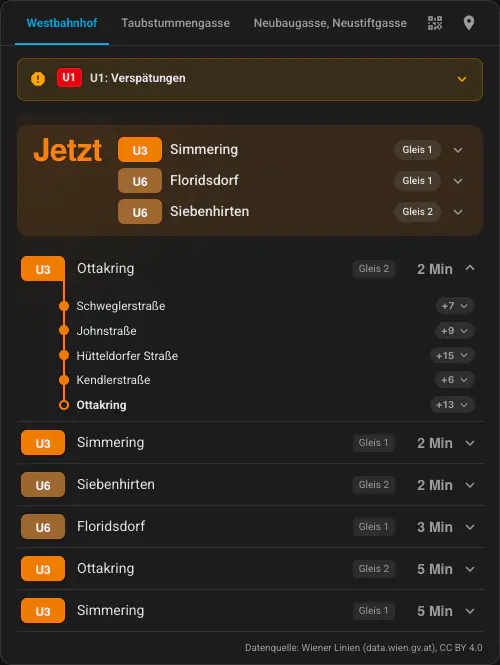
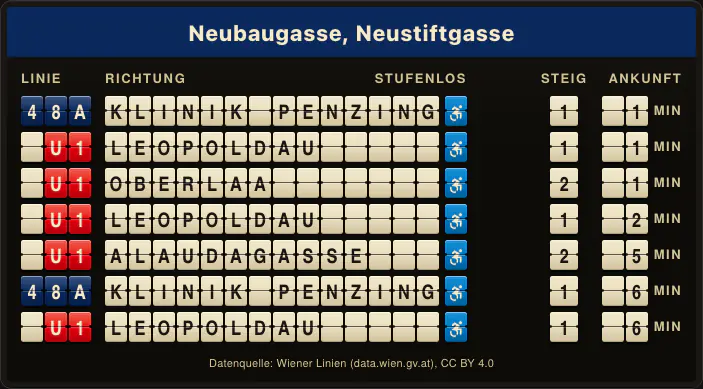
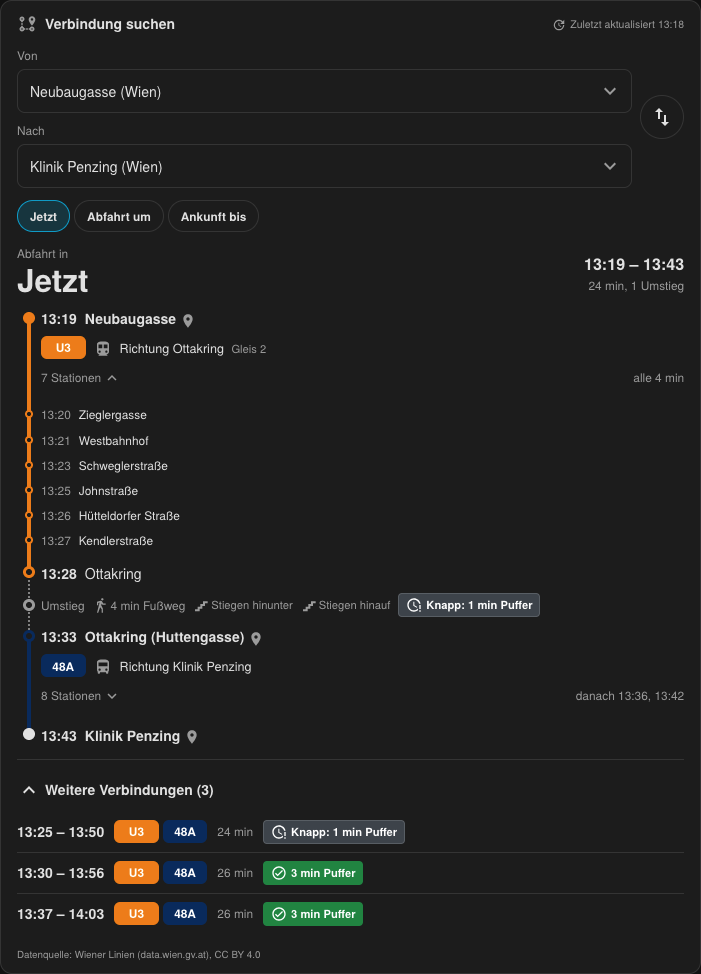
Wiener Linien Austria shows Vienna public transport departures in Home Assistant. It reads real-time data from the Wiener Linien cloud service and is set up in the UI by picking a stop and the lines to track. Sensors cover departures and the next connection on a planned route, and binary sensors flag stale departure data, a connection at risk and when it is time to leave. Routes between two stops can be configured with preferences such as fewest changes, walking speed, transfer buffer and step-free planning. A plan trip action finds trips for a configured route or between two stops, soonest first. Repair notices appear when the rate limit is hit or departures stop arriving, and a diagnostics download is available.
Automatic summary of the README and code of rolandzeiner/wiener-linien-austria. Something wrong, or are you the maintainer and want your own text here? Get in touch
Supports
Uses the vendor's cloud Needs an internet connection and an account with the vendor.
From the Marketplace Installed through the Marketplace, formerly HACS.
Actively maintained Its author released or pushed a change in the last six months.
Provides
- Sensors
Setting it up
Install it from the Marketplace and restart Home Assistant, then add it under Settings, Devices and services.
Wiener Linien Austria
- StopStart typing to filter the full stop list — the ones nearest your Home Assistant location are shown first. Partial names work: submit and pick from the matches.
Pick a stop
- Stop
Select lines
- Lines to track
- Update interval (seconds)Minimum 30 seconds — twice the conventional 15-second floor circulated for the OGD endpoint, for safety margin under shared-IP scenarios.
Route
- FromStart typing to filter. Stops nearest your Home Assistant location come first.
- ToStart typing to filter.
Route options
- Prefer
- Most changes
- Walking speed
- Transfer bufferChanges with less time to spare than this are marked tight.
- Avoid
- Step-freePlan only with lifts or ramps instead of stairs and escalators, and with low-floor vehicles.
- Time-to-leave alertMinutes before the best connection leaves that the “Time to leave” sensor turns on.
- Refresh fromOptional. Outside this window the route doesn't refresh. Set both times or neither.
- Refresh until
- Refresh onLeave empty for every day.
- Update interval (seconds)Minimum 120 seconds. The route also refreshes right after the best connection leaves.
After setup
- Update interval (seconds)
Texts from the code of rolandzeiner/wiener-linien-austria.
Entities
- Binary sensorsDeparture data stale, Connection at risk, Time to leave
- SensorsDepartures, Next connection
Actions
- Plan tripFinds trips for a configured route or between two stops, soonest first.Fields: Route, From, To, Time, Arrive by
Troubleshooting
- DiagnosticsDownloads a diagnostics file to attach to a bug report.
- Repair noticesNotices it can show in Settings, Repairs:Wiener Linien rate limit hit, Wiener Linien stop catalogue unavailable, Wiener Linien isn't delivering departures
From the README
Vienna public transport departures for Home Assistant. Start typing your stop, choose the lines you care about — done. Uses the official Wiener Linien OGD real-time API: no API key, no YAML, no RBL lookups.

Shows in Vulpo
Chart card, Apple Watch.Information
- Installs
- 63 sharing analytics
- GitHub stars
- 24
- Connection
- Uses the vendor's cloud
- Upkeep
- Updated in the last 6 months
- Version
- v2.3.0,
- Category
- Vehicles and transport, Public transport
- Kind
- Marketplace integration
- Needs
- Needs the Marketplace (HACS on 2026.10 and older)
- Domain
wiener_linien_austria- Issues
- Report an issue
You might also like



 Kia Uvo / Hyundai Bluelink6.3k installs · A Home Assistant HACS integration that supports Kia Connect(Uvo…Open
 Tesla Custom Integration4.4k installs · Tesla custom integration for Home Assistant. This requires a re…Open