
Volkswagen Connect
robinostlund
On Home Assistant 2026.11 or newer? Open it in the Marketplace
- Installs
- 1.3k sharing analytics
- GitHub stars
- 709
- Connection
- Uses the vendor's cloud
- Upkeep
- Updated in the last 6 months
- Version
- v5.5.1,
- Category
- Vehicles and transport, Cars and EVs
- Kind
- Marketplace integration
- Needs
- Needs the Marketplace (HACS on 2026.10 and older)
- Domain
volkswagencarnet- Issues
- Report an issue
Independent directory, made by the developer of Vulpo. Not affiliated with Home Assistant or the Open Home Foundation.
Screenshots From the README of robinostlund/homeassistant-volkswagencarnet.
About
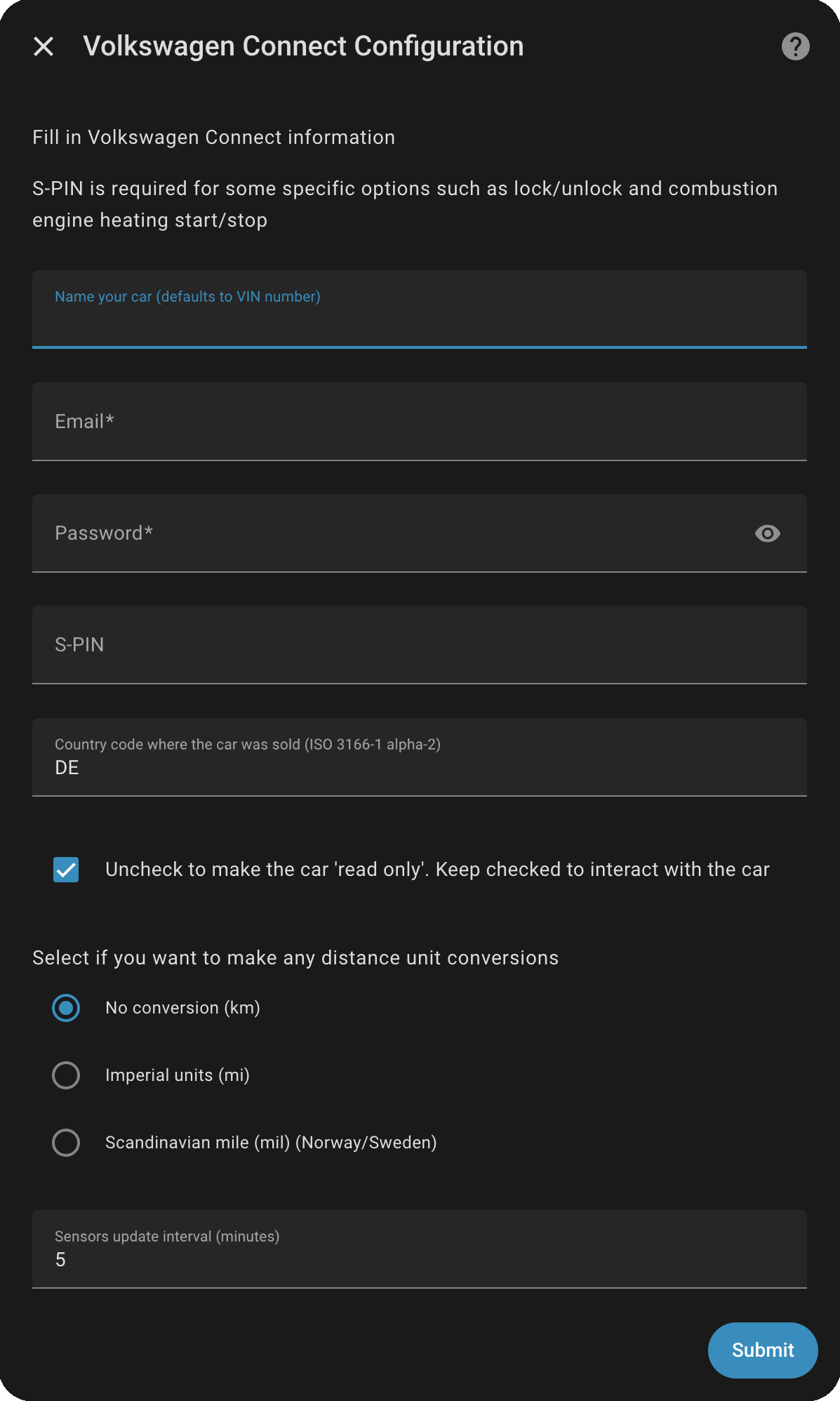
Volkswagen Connect is a custom integration that links Home Assistant to the Volkswagen Connect cloud service for a car. It adds binary sensors, climate, presence tracking, locks, numbers, selects, sensors and switches for the selected vehicle. A read-only mode can be chosen, and an S-PIN is needed for functions such as locking, unlocking and heating. Distance can be shown in kilometres, Scandinavian miles or imperial miles, and the sensor update interval can be set from 0 to 60 minutes. The Volkswagen API limits calls per day, so a shorter interval leaves fewer calls for the VW app. It has only been reported to work with cars sold in the EU, and it is set up in the UI with Volkswagen Connect credentials.
Automatic summary of the README and code of robinostlund/homeassistant-volkswagencarnet. Something wrong, or are you the maintainer and want your own text here? Get in touch
Supports
Uses the vendor's cloud Needs an internet connection and an account with the vendor.
From the Marketplace Installed through the Marketplace, formerly HACS.
Actively maintained Its author released or pushed a change in the last six months.
Provides
- Climate
- Locks
- Switches
- Sensors
- Presence
Setting it up
Install it from the Marketplace and restart Home Assistant, then add it under Settings, Devices and services.
Volkswagen Connect Configuration
- Password
- Uncheck to make the car 'read only'. Keep checked to interact with the car
- Country code where the car was sold (ISO 3166-1 alpha-2)
- S-PIN
- Name your car (defaults to VIN number)
- Enable full debug logs from API (requires debug logging enabled in config)
- Select if you want to make any distance unit conversions
- Sensors update interval (minutes)
- Spoof browser identity (enable if login is blocked)
Vehicle
- VIN Number
Resources
- Resources to monitor
Sign in again
- Re-authenticate with your Volkswagen Connect account. Make sure to accept any new EULA in the Volkswagen Connect portal before proceeding.
- Password
After setup
- S-PIN (required for lock/unlock and heating)
- Region (The country where the car was sold)
- Enable car control (uncheck for read-only mode)
- Select if you want to make any distance unit conversions
- Sensors update interval (minutes)
- Spoof browser identity (enable if login is blocked)
- Resources to monitor
Texts from the code of robinostlund/homeassistant-volkswagencarnet.

Shows in Vulpo
Quick Toggle card, Climate card, Lock card, Select card, Apple Watch, Control Center, Climate Live Activity.Information
- Installs
- 1.3k sharing analytics
- GitHub stars
- 709
- Connection
- Uses the vendor's cloud
- Upkeep
- Updated in the last 6 months
- Version
- v5.5.1,
- Category
- Vehicles and transport, Cars and EVs
- Kind
- Marketplace integration
- Needs
- Needs the Marketplace (HACS on 2026.10 and older)
- Domain
volkswagencarnet- Issues
- Report an issue
You might also like



 Kia Uvo / Hyundai Bluelink6.3k installs · A Home Assistant HACS integration that supports Kia Connect(Uvo…Open
 Tesla Custom Integration4.4k installs · Tesla custom integration for Home Assistant. This requires a re…Open