

OpenDisplay
OpenDisplay
On Home Assistant 2026.11 or newer? Open it in the Marketplace
- Installs
- 160 sharing analytics
- GitHub stars
- 89
- Connection
- Works locally
- Upkeep
- Updated in the last 6 months
- Version
- 3.1.0,
- Kind
- Marketplace integration
- Needs
- Needs the Marketplace (HACS on 2026.10 and older)
- Domain
opendisplay- Issues
- Report an issue
Independent directory, made by the developer of Vulpo. Not affiliated with Home Assistant or the Open Home Foundation.
Screenshots From the README of OpenDisplay/Home_Assistant_Integration.
About
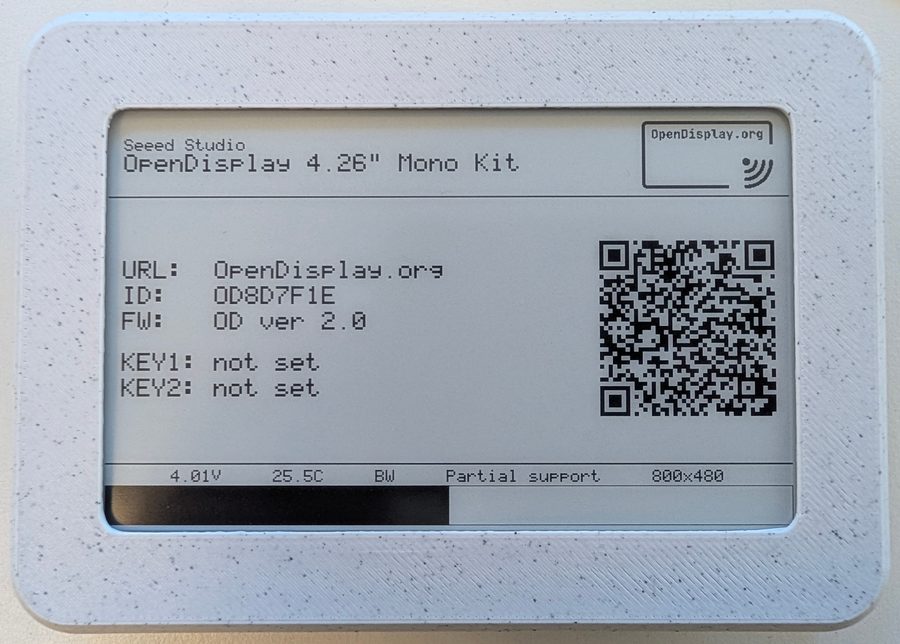
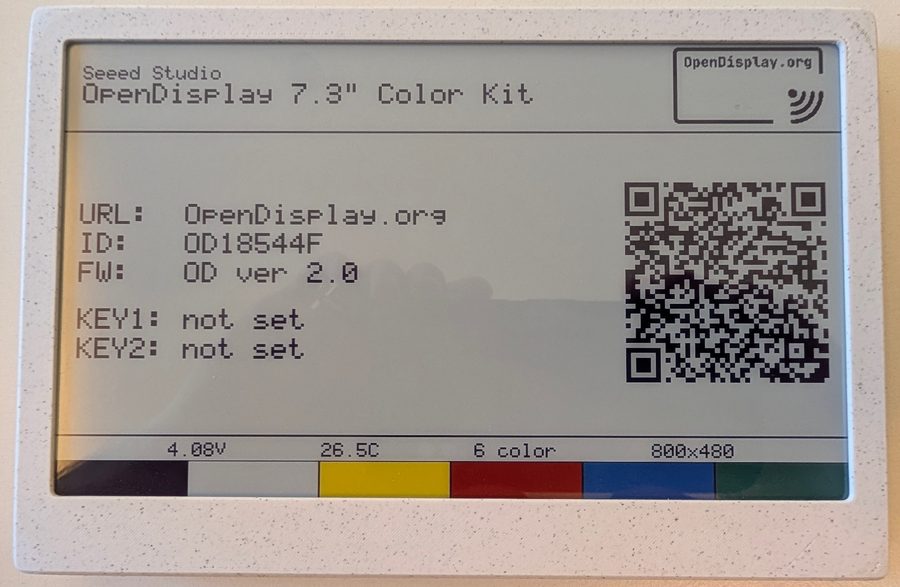
OpenDisplay is an integration for controlling and monitoring OpenDisplay E-Paper displays from Home Assistant. Devices are found automatically over Bluetooth, or over mDNS when on WiFi, and the integration works locally. Each device gets an image entity for its display content, sensors for chip temperature, battery voltage, signal strength and last seen, a firmware update entity, and binary sensors for pending updates and WiFi. Actions cover uploading an image, drawing a custom image on one or several devices, flashing the LED, sounding the buzzer or playing a melody, and writing an NFC tag. Battery-powered tags in deep sleep have content queued until the next wake, and options control sleep handling, queue timeout and upload speed. Encrypted devices ask for their AES key during setup.
Automatic summary of the README and code of OpenDisplay/Home_Assistant_Integration. Something wrong, or are you the maintainer and want your own text here? Get in touch
Supports
Works locally Talks to your devices on your own network. No vendor cloud in between.
Found by itself Home Assistant spots it on the network and offers to add it.
From the Marketplace Installed through the Marketplace, formerly HACS.
Actively maintained Its author released or pushed a change in the last six months.
Provides
- Sensors
Setting it up
Install it from the Marketplace and restart Home Assistant, then add it under Settings, Devices and services.
Connect
- DeviceSelect the Bluetooth device to set up.
Encryption required
- Encryption keyEnter the 32-character hexadecimal AES-128 encryption key for this device.
Also asked when signing in again.
After setup
- Deep sleep handlingAutomatic follows the device's own power configuration (battery power with deep sleep enabled). Force on or off to override.
- Missed wake cycles before unavailableHow many expected wake-ups the device may miss before its entities are marked unavailable.
- Queued content timeout (hours)How long content queued for a sleeping device waits for a wake before it expires.
- Try connecting before queueingBefore queueing an image for a sleeping device, make one quick connection attempt in case it is actually awake (missed advertisements, always-on radios). Adds at most a few seconds when the device really is asleep.
- Blocks sent per acknowledgmentHow many image frames the device receives before it sends one acknowledgment during a fast (sliding-window) upload. Higher values reduce round trips; the effective value is capped by the device and the maximum frames in flight.
- Maximum upload frames in flightMaximum number of image frames kept in flight at once during a fast (sliding-window) upload. Higher values raise throughput on slow (proxy) links. Set to 1 to disable fast transfer and use the classic one-frame-at-a-time upload.
Texts from the code of OpenDisplay/Home_Assistant_Integration.
Entities
- Binary sensorsUpdate pending, WiFi
- ImagesDisplay content
- SensorsChip temperature, Battery voltage, Signal strength (RSSI), Last seen
- UpdatesFirmware
Actions
- Upload imageUploads an image to an OpenDisplay device.Fields: Device, Dither mode, Fit mode, Image, Refresh mode, Rotation, Tone compression, Use measured palette, Refine dithering
- Activate LEDTriggers an LED flash pattern on an OpenDisplay device.Fields: Device, LED instance, Brightness, Repeats, Color 1, Flash count 1, Flash delay 1, Step delay 1, Color 2, Flash count 2
- Activate buzzerTriggers a buzzer tone on an OpenDisplay device. For multi-note melodies, see Play buzzer melody.Fields: Device, Buzzer instance, Frequency, Duration, Repeats
- Write NFC tagWrites an NDEF record (URL, text, or MIME data such as a vCard) to the NFC chip of an OpenDisplay device.Fields: Device, Record type, Content, MIME type
- Play buzzer melodyPlays a multi-note melody on an OpenDisplay device's buzzer.Fields: Device, Buzzer instance, Notes, Tempo, Repeats, Default note duration, Default length
- Draw custom imageDraws a custom image on one or more OpenDisplay devices.Fields: Payload, Background color, Rotation, Dither mode, Refresh type, Use measured palette, Dry run
Troubleshooting
- DiagnosticsDownloads a diagnostics file to attach to a bug report.
From the README
Home Assistant Integration for the OpenDisplay project, enabling control and monitoring of E-Paper displays through Home Assistant.
The OpenDisplay 4.26" mono and 7.3" colour kits

Shows in Vulpo
Chart card, Apple Watch.Information
- Installs
- 160 sharing analytics
- GitHub stars
- 89
- Connection
- Works locally
- Upkeep
- Updated in the last 6 months
- Version
- 3.1.0,
- Kind
- Marketplace integration
- Needs
- Needs the Marketplace (HACS on 2026.10 and older)
- Domain
opendisplay- Issues
- Report an issue










