
SMHI Alert
On Home Assistant 2026.11 or newer? Open it in the Marketplace
- Installs
- 196 sharing analytics
- GitHub stars
- 22
- Connection
- Uses the vendor's cloud
- Upkeep
- Updated in the last 6 months
- Version
- v3.11.0,
- Category
- Weather and alerts, Forecasts
- Kind
- Marketplace integration
- Brand
- SMHI
- Needs
- Needs the Marketplace (HACS on 2026.10 and older)
- Domain
smhi_alerts- Issues
- Report an issue
Independent directory, made by the developer of Vulpo. Not affiliated with Home Assistant or the Open Home Foundation.
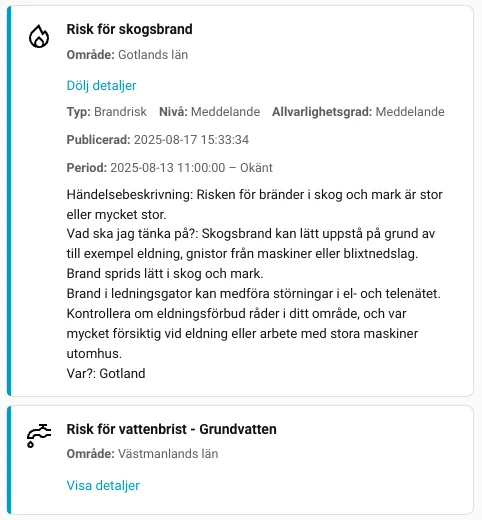
Screenshots From the README of Nicxe/home-assistant-smhialerts.
About
SMHI Alert brings Swedish Meteorological and Hydrological Institute weather warnings and risk messages into Home Assistant. Warnings can be filtered by administrative district or by a map position with a radius, and sea warnings can be excluded. It provides sensors and binary sensors, and an option adds messages alongside warnings, with a choice of message categories. Optional local forecasts cover forest and grass fire risk, thunderstorm probability, and winter conditions, each with its own forecast point. Further sensors report wind gusts, precipitation and observed snow depth from a chosen station. Seven dashboard cards are bundled with the integration, and it is set up in the UI using SMHI's cloud data.
Automatic summary of the README and code of Nicxe/home-assistant-smhialerts. Something wrong, or are you the maintainer and want your own text here? Get in touch
Supports
Uses the vendor's cloud Needs an internet connection and an account with the vendor.
From the Marketplace Installed through the Marketplace, formerly HACS.
Actively maintained Its author released or pushed a change in the last six months.
Provides
- Sensors
Setting it up
Install it from the Marketplace and restart Home Assistant, then add it under Settings, Devices and services.
SMHI Alert
- Filter modeChoose to filter by administrative district or by a coordinate + radius.
- District
- Location (map)Pick a position on the map. Defaults to your Home Assistant home location.
- Radius (km)Defaults to 10 km. Alerts are matched if their area passes within this radius.
- Exclude sea warningsExclude marine warnings (e.g., sea level, wind at sea).
- Language
- Show messagesThe integration always shows warnings. Enable this option to also show messages, which can, for example, be a risk.
- Include geometry (map polygons)Attach GeoJSON geometry for each warning area to the sensor attributes so UI cards can draw the affected area. This can increase entity state size.
- Message categoriesChoose which message categories to include when Show messages is enabled.
- Enable local fire risk forecastsCreate separate sensors for forest fire risk, grass fire risk and forest fuel drying, with daily forecasts. These forecasts do not affect issued warning counts and do not indicate whether a fire ban applies.
- Fire risk location (map)Choose or confirm the exact forecast point, also when warnings use a district. The initial suggestion is your Home Assistant home location. SMHI provides this product for land and inland waters in Sweden; other points can have no data. The warning radius does not apply.
- Enable local thunderstorm probabilityShow thunderstorm probability at the next forecast time and the forecast for the coming 48 hours. This is a local forecast, not an issued warning.
- Thunderstorm probability location (map)Choose or confirm the exact forecast point. The initial suggestion is your Home Assistant home location. This point is independent of the warning filter and fire risk location; the warning radius does not apply. Points outside SMHI’s forecast area can have no data.
- Enable local winter forecastsShow precipitation type, frozen precipitation probability and temperature at the next forecast time, with a forecast for the coming 48 hours. These are local forecasts, not snow depth, road conditions or issued warnings.
- Winter forecast location (map)Choose or confirm the exact forecast point. The initial suggestion is your Home Assistant home location. This point is independent of the warning filter and other local forecasts; the warning radius does not apply. Points outside SMHI’s forecast area can have no data.
Also asked when changing the connection.
Snow depth observation station
- Station and observation sourceLabels show station name, distance from home and SMHI’s source description. Confirm your selection; the nearest station is never chosen automatically.
After setup
- Filter modeChoose to filter by administrative district or by a coordinate + radius.
- District
- Location (map)Pick a position on the map. Defaults to your Home Assistant home location.
- Radius (km)Defaults to 10 km. Alerts are matched if their area passes within this radius.
- Exclude sea warningsExclude marine warnings (e.g., sea level, wind at sea).
- Language
- Show messagesThe integration always shows warnings. Enable this option to also show messages, which can, for example, be a risk.
- Include geometry (map polygons)Attach GeoJSON geometry for each warning area to the sensor attributes so UI cards can draw the affected area. This can increase entity state size.
- Message categoriesChoose which message categories to include when Show messages is enabled.
- Enable local fire risk forecastsCreate separate sensors for forest fire risk, grass fire risk and forest fuel drying, with daily forecasts. These forecasts do not affect issued warning counts and do not indicate whether a fire ban applies.
- Fire risk location (map)Choose or confirm the exact forecast point, also when warnings use a district. The initial suggestion is your Home Assistant home location. SMHI provides this product for land and inland waters in Sweden; other points can have no data. The warning radius does not apply.
- Enable local thunderstorm probabilityShow thunderstorm probability at the next forecast time and the forecast for the coming 48 hours. This is a local forecast, not an issued warning.
- Thunderstorm probability location (map)Choose or confirm the exact forecast point. The initial suggestion is your Home Assistant home location. This point is independent of the warning filter and fire risk location; the warning radius does not apply. Points outside SMHI’s forecast area can have no data.
- Enable local winter forecastsShow precipitation type, frozen precipitation probability and temperature at the next forecast time, with a forecast for the coming 48 hours. These are local forecasts, not snow depth, road conditions or issued warnings.
- Winter forecast location (map)Choose or confirm the exact forecast point. The initial suggestion is your Home Assistant home location. This point is independent of the warning filter and other local forecasts; the warning radius does not apply. Points outside SMHI’s forecast area can have no data.
- Station and observation sourceLabels show station name, distance from home and SMHI’s source description. Confirm your selection; the nearest station is never chosen automatically.
Texts from the code of Nicxe/home-assistant-smhialerts.
Entities
- SensorsForest fire risk, Grass fire risk, Forest fuel drying, Thunderstorm probability, Winter precipitation type, Frozen precipitation probability, Winter forecast temperature, Observed snow depth, Wind gust forecast, Highest forecast gust, next 24 hours, Precipitation probability, Precipitation amount forecast, and 2 more

Shows in Vulpo
Chart card, Apple Watch.Information
- Installs
- 196 sharing analytics
- GitHub stars
- 22
- Connection
- Uses the vendor's cloud
- Upkeep
- Updated in the last 6 months
- Version
- v3.11.0,
- Category
- Weather and alerts, Forecasts
- Kind
- Marketplace integration
- Brand
- SMHI
- Needs
- Needs the Marketplace (HACS on 2026.10 and older)
- Domain
smhi_alerts- Issues
- Report an issue