

AutoSnooze
mossipcams
On Home Assistant 2026.11 or newer? Open it in the Marketplace
- Installs
- 96 sharing analytics
- GitHub stars
- 45
- Connection
- Works locally
- Upkeep
- Updated in the last 6 months
- Version
- v0.4.1,
- Kind
- Marketplace integration
- Needs
- Needs the Marketplace (HACS on 2026.10 and older)
- Domain
autosnooze- Issues
- Report an issue
Independent directory, made by the developer of Vulpo. Not affiliated with Home Assistant or the Open Home Foundation.
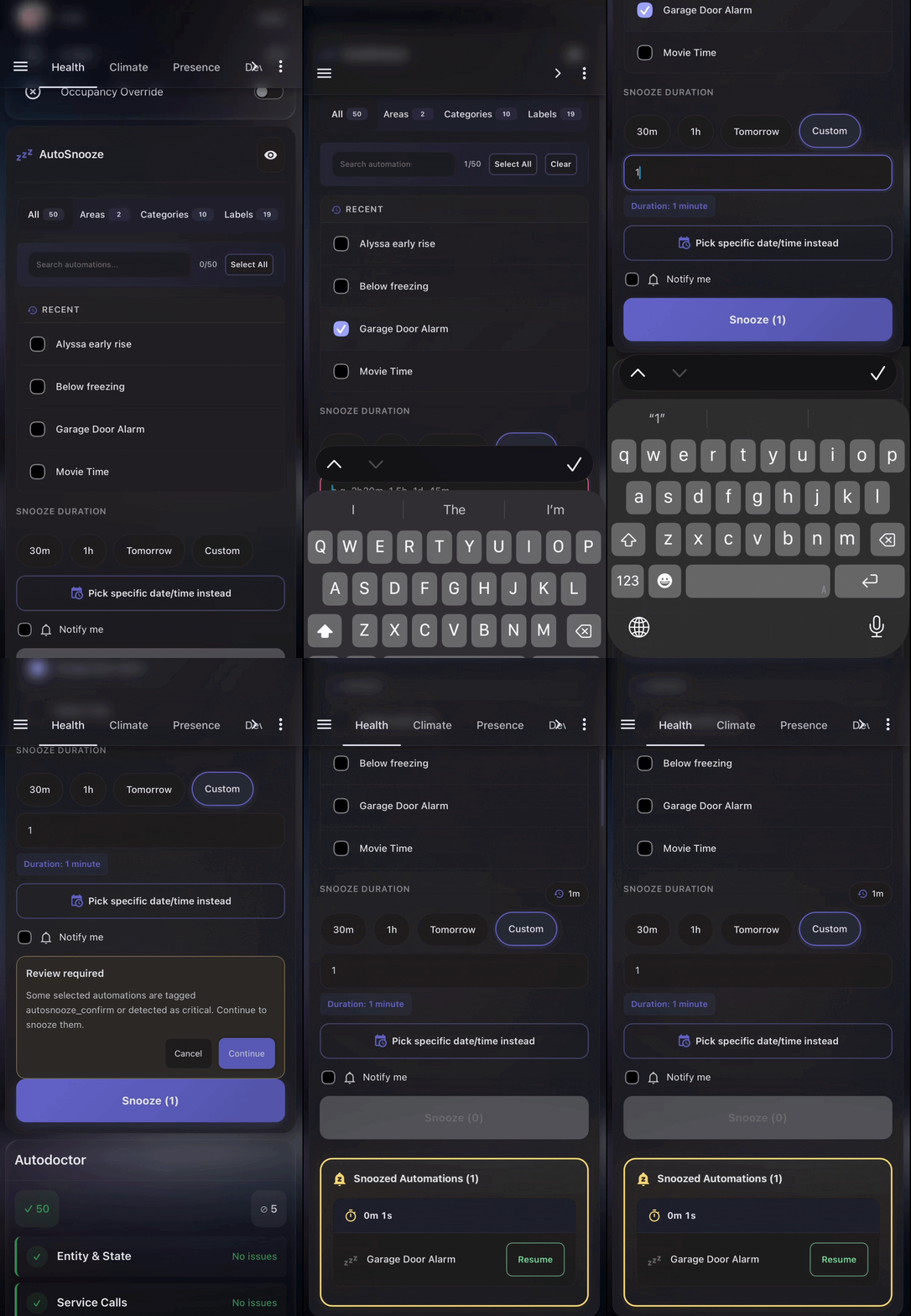
Screenshots From the README of mossipcams/autosnooze.
About
AutoSnooze is a Home Assistant integration that pauses automations for a set time and then re-enables them. It adds actions to snooze automations for a duration or until a chosen time, to snooze by area or label, to schedule a snooze for later, and to adjust or cancel a snooze. Snoozes can be ended early one at a time or all at once, and each automation returns to its configured resume state. A sensor lists the snoozed automations for use in other automations and dashboards, and timers persist through restarts. A bundled dashboard card shows countdowns, and a read-only card lists only what is currently snoozed. Automations with keywords such as alarm, lock or smoke in their name ask for confirmation before snoozing, and up to four preset durations can be set in the options.
Automatic summary of the README and code of mossipcams/autosnooze. Something wrong, or are you the maintainer and want your own text here? Get in touch
Supports
Works locally Talks to your devices on your own network. No vendor cloud in between.
From the Marketplace Installed through the Marketplace, formerly HACS.
Actively maintained Its author released or pushed a change in the last six months.
Provides
- Sensors
Setting it up
Install it from the Marketplace and restart Home Assistant, then add it under Settings, Devices and services.
After setup
- Send product usage dataHelp improve AutoSnooze with product usage events (feature counts, not your home's configuration). A random install ID is hashed so events can be grouped per install. You can turn this off at any time.
- Button 1e.g., 30m, 1h, 2h30m, or 1d
- Button 2e.g., 30m, 1h, 2h30m, or 1d
- Button 3e.g., 30m, 1h, 2h30m, or 1d
- Button 4e.g., 30m, 1h, 2h30m, or 1d
Texts from the code of mossipcams/autosnooze.
Entities
- SensorsSnoozed Automations
Actions
- SnoozeSnooze entities for a specified duration or until a specific time. The configured resume state is applied when the snooze ends.Fields: Days, Hours, Minutes, Disable At, Resume At, Resume At Time, Resume Preset, Resume State, Notification Trigger, Notification Lead Minutes
- WakeEnd snoozes immediately and apply each entity's configured resume state.Fields: Entity
- Wake AllEnd all snoozes immediately and apply each entity's configured resume state.
- Clear NotificationRemove notification settings from currently snoozed entities.Fields: Entity
- Snooze by AreaSnooze all automations in a specific area.Fields: Area, Days, Hours, Minutes, Disable At, Resume At, Resume At Time, Resume Preset, Notification Trigger, Notification Lead Minutes
- Snooze by LabelSnooze all automations with a specific label.Fields: Label, Days, Hours, Minutes, Disable At, Resume At, Resume At Time, Resume Preset, Notification Trigger, Notification Lead Minutes
- Cancel Scheduled SnoozeCancel a scheduled snooze before it activates.Fields: Entity
- Adjust SnoozeAdd or subtract time from an active snooze.Fields: Entity, Days, Hours, Minutes
- Report TelemetryReport product telemetry events from the dashboard card.Fields: Event, Properties, Source, Card Type, Platform
From the README
Pause Home Assistant automations on a timer. Snooze one and it re-enables itself, so you stop accumulating automations you disabled and forgot.
- Filter by Area, Label, or name to find automations fast
- Hide snoozed: one toggle drops already-snoozed automations out of the picker
- Preset durations: 30m and 1h out of the box, or up to four you set yourself
- Live countdown timers on every snoozed automation
- Survives restarts: timers persist through reboots and power outages
- Wake early: cancel individual snoozes or wake everything at once
- Schedule mode: snooze until a specific date/time, or start the snooze later
- Adjust on the fly: extend or shorten active snoozes
- Notifications: get told when a snooze starts, ends, or is about to end
- Critical guards: auto-detects security/safety automations and asks for confirmation
- Sensor entity: sensor.autosnooze_snoozed_automations for use in other automations and dashboards

Shows in Vulpo
Chart card, Apple Watch.Information
- Installs
- 96 sharing analytics
- GitHub stars
- 45
- Connection
- Works locally
- Upkeep
- Updated in the last 6 months
- Version
- v0.4.1,
- Kind
- Marketplace integration
- Needs
- Needs the Marketplace (HACS on 2026.10 and older)
- Domain
autosnooze- Issues
- Report an issue










