
Scrypted
koush
Not in the Marketplace catalog. Add https://github.com/koush/ha_scrypted as a custom repository in the Marketplace.
- Installs
- 1.2k sharing analytics
- GitHub stars
- 74
- Connection
- Works locally
- Upkeep
- Updated in the last 6 months
- Version
- 0.1.0,
- Category
- Security and safety, Cameras
- Kind
- Marketplace integration
- Brand
- Scrypted
- Needs
- Added as a custom repository in the Marketplace
- Domain
scrypted- Issues
- Report an issue
Independent directory, made by the developer of Vulpo. Not affiliated with Home Assistant or the Open Home Foundation.
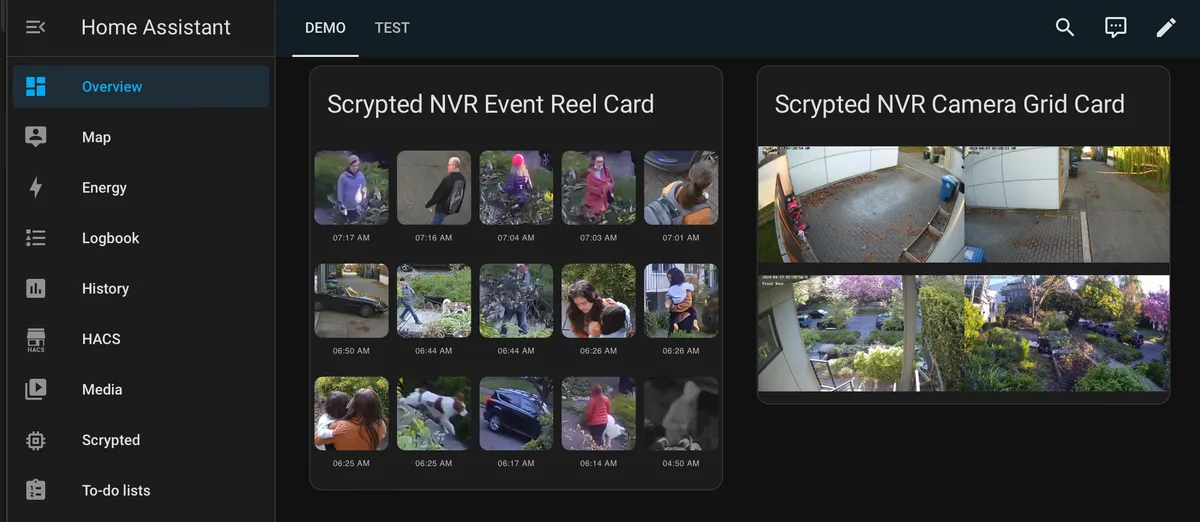
Screenshots From the README of koush/ha_scrypted.
About
Scrypted is a Home Assistant integration that manages a Scrypted server and mirrors its devices as entities. It connects locally, is set up in the UI with host, username and password, and pushes state updates instead of polling. By default only camera and doorbell device types become entities, and further Scrypted device types can be chosen in the options, along with plugins to exclude. Camera entities provide snapshots, while live streaming works only through the Scrypted NVR cards. Smart motion and occupancy sensors from the object detection plugin are always included and trigger only on chosen object classes. Event entities cover object detection and doorbell presses, and intercom-capable devices become speaker entities. With Scrypted NVR, detection clips appear in the media browser, and options can swap the sidebar and register the card resources.
Automatic summary of the README and code of koush/ha_scrypted. Something wrong, or are you the maintainer and want your own text here? Get in touch
Supports
Works locally Talks to your devices on your own network. No vendor cloud in between.
From the Marketplace Installed through the Marketplace, formerly HACS.
Actively maintained Its author released or pushed a change in the last six months.
Provides
- Lights
- Climate
- Fans
- Covers
- Cameras
- Locks
- Media
- Vacuums
- Switches
- Sensors
Setting it up
Add its repository to the Marketplace as a custom repository and install it, then restart Home Assistant and add it under Settings, Devices and services.
Connect
- Host
- Icon
- Name
- Password
- Username
- Replace Scrypted Management Console sidebar with Scrypted NVR sidebar. Requires Scrypted NVR.
- Automatically register Lovelace resources for the Scrypted NVR cards. Requires Scrypted NVR and recommended if so.
Also asked when at the upgrade step.
Sign in
- Host
- Icon
- Name
- Password
- Username
After setup
- Automatically register Scrypted NVR Lovelace resources
- Replace Scrypted Management Console sidebar with Scrypted NVR sidebar. Requires Scrypted NVR.
- Create entities for Scrypted devices
- Scrypted device types to create entities forSmart Motion and Smart Occupancy Sensors from Scrypted's object detection plugin are always included. Other Sensor devices are often bridged from integrations Home Assistant already has, such as Ring, UniFi Protect or MQTT. Selecting Notifier adds a switch that mutes each Scrypted app's notifications; anyone with Home Assistant access can then mute any household member's phone.
- Scrypted plugins to excludeDevices from these plugins never get entities, whatever their type. Use it for plugins that bridge devices Home Assistant already integrates. Excluding the object detection plugin also hides its smart sensors.
Texts from the code of koush/ha_scrypted.
From the README
The Scrypted Custom Component for Home Assistant adds support for managing Scrypted from your Home Assistant Dashboard, and creation of Scrypted NVR cards.
Visit the Scrypted Documentation for setup instructions. Requires Home Assistant 2026.7 or newer.

Shows in Vulpo
Light card, Quick Toggle card, Cover card, Climate card, Apple Watch, Control Center, Climate Live Activity, Vacuum Live Activity.Information
- Installs
- 1.2k sharing analytics
- GitHub stars
- 74
- Connection
- Works locally
- Upkeep
- Updated in the last 6 months
- Version
- 0.1.0,
- Category
- Security and safety, Cameras
- Kind
- Marketplace integration
- Brand
- Scrypted
- Needs
- Added as a custom repository in the Marketplace
- Domain
scrypted- Issues
- Report an issue