
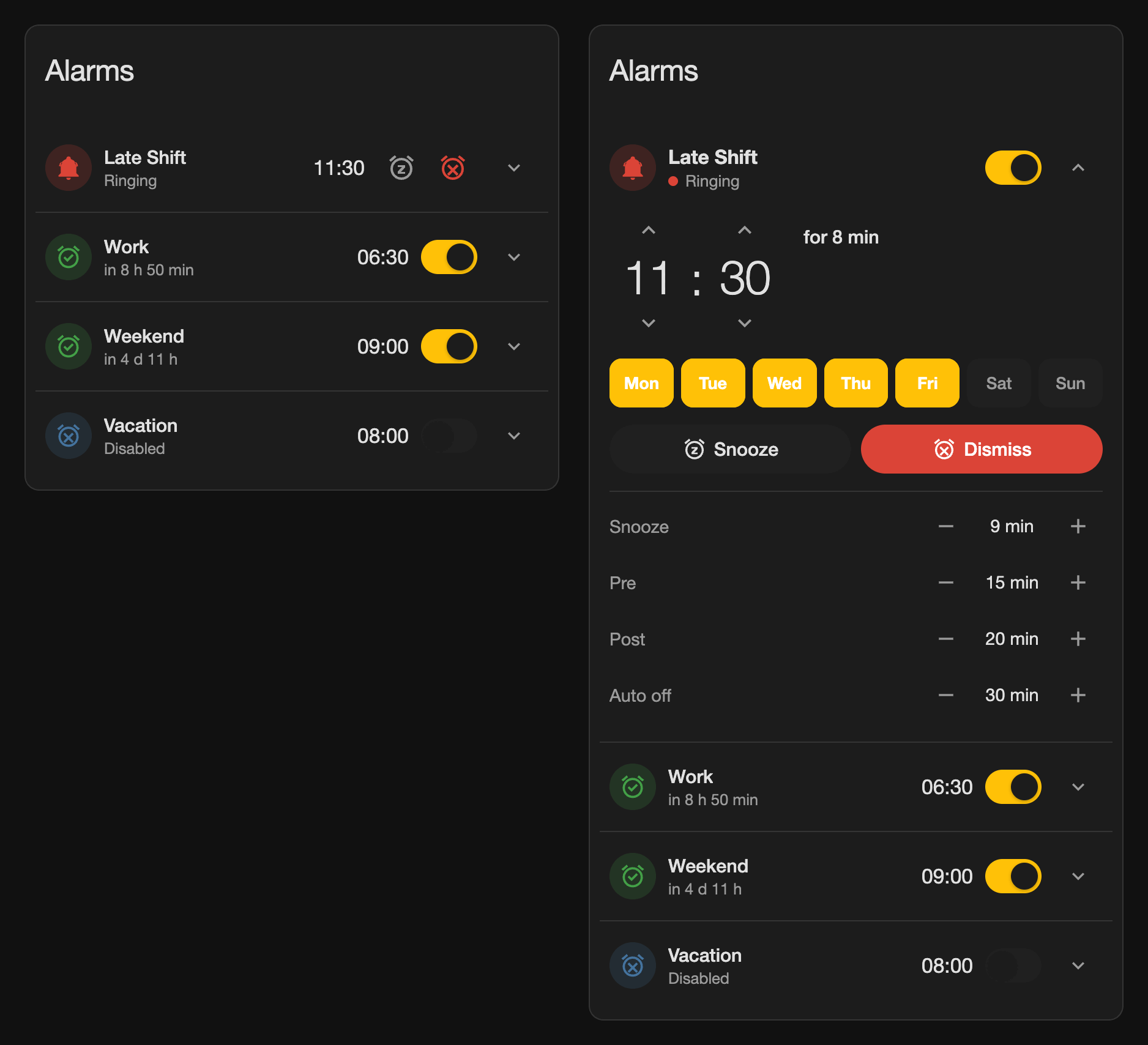
Screenshots From the README of julezdean/ha-alarm-clocks.
About
Alarm Clocks & Wake-up Routines adds alarm clocks with snooze, auto dismiss and assignable wake-up routines to Home Assistant. Each alarm clock is its own device with an alarm time, weekday switches, snooze duration, pre offset, post delay and an auto dismiss setting, plus snooze and dismiss buttons. A wake-up runs through five phases, and each phase can hold its own action sequence and also fires an event. The integration only decides when things happen and has no built-in siren, media player or light control, so sound and light come from the user's own actions. An alarm with no weekday selected acts as a one-shot alarm, and a running snooze survives a Home Assistant restart. It works locally and is added in the UI.
Automatic summary of the README and code of julezdean/ha-alarm-clocks. Something wrong, or are you the maintainer and want your own text here? Get in touch
Supports
Works locally Talks to your devices on your own network. No vendor cloud in between.
From the Marketplace Installed through the Marketplace, formerly HACS.
Actively maintained Its author released or pushed a change in the last six months.
Provides
- Switches
- Sensors
Setting it up
Install it from the Marketplace and restart Home Assistant, then add it under Settings, Devices and services.
Add alarm clock
- NameUsed as the device name, for example "Alarm 1".
Rename alarm clock
- Name
After setup
- Actions
- Actions
- Actions
- Actions
- Actions
- Time limitPost actions still running after this many minutes are stopped, so that a sequence that never ends cannot keep a one-shot alarm clock switched on.
Texts from the code of julezdean/ha-alarm-clocks.
Entities
- Binary sensorsRinging
- ButtonsSnooze, Dismiss
- NumbersSnooze duration, Pre offset, Post delay, Auto dismiss after
- SensorsNext alarm, Snooze until, Post actions due, Status
- SwitchesEnabled, Monday, Tuesday, Wednesday, Thursday, Friday, Saturday, Sunday
- TimesAlarm time
Actions
- SnoozeSnoozes a ringing alarm or extends a running snooze.Fields: Duration
- DismissStops a ringing alarm or a running snooze and starts the post phase. It has no effect during the pre and the post phase; only switching the alarm clock off ends those.
- Trigger alarmTriggers the alarm immediately, for example for testing.
- Set alarmSets the alarm time and/or the weekdays.Fields: Alarm time, Weekdays
From the README
A native Home Assistant integration for alarm clocks with snooze, automatic dismiss and freely assignable actions before, during and after the wake-up.
Every alarm clock is its own device with its own entities. Adding another one is a single click on Add integration, with no configuration files and no restart.
- Alarm time, seven weekdays, snooze duration, pre offset, post offset and auto dismiss deadline as individual entities, usable in dashboards and automations
- An alarm without any selected weekday acts as a one-shot alarm and disables itself after it has rung
- Every phase can be switched off individually by setting its value to zero
- Snooze and dismiss as buttons, and every action as a service
- Five phases with an action sequence each, every one of which also fires an event
- Event driven: no polling and no per-minute tick, just one timer per relevant point in time. The next alarm is a timestamp sensor, from which the frontend renders the remaining time as "in 7 hours"
- A running snooze and a pending post action survive a restart of Home Assistant
- Daylight saving time is handled as wall clock time; times that do not exist on a given day are moved to the first valid point in time

Shows in Vulpo
Quick Toggle card, Button card, Chart card, Apple Watch, Control Center.Information
- Installs
- 60 sharing analytics
- GitHub stars
- 10
- Connection
- Works locally
- Upkeep
- Updated in the last 6 months
- Version
- v3.0.0,
- Kind
- Marketplace integration
- Needs
- Needs the Marketplace (HACS on 2026.10 and older)
- Domain
alarm_clocks- Issues
- Report an issue










