
Screenshots From the README of italo-lombardi/Home-Assistant-EntityAvailability.
About
Entity Availability monitors which Home Assistant entities are offline, stale or degraded and keeps availability history. Entities are organized into groups, and groups can be merged into a combined group that provides aggregate sensors for cross-group automations. Each group gets binary sensors such as any offline, any low battery, any stale and any poor signal, plus sensors for offline lists, recently offline or recovered entities, and availability over today, 3, 5 and 7 days. Settings cover which states count as offline, a cooldown before marking an entity offline, a staleness threshold, a low battery threshold and optional signal strength monitoring. Entities can be marked non-essential, so they show on the card but stay out of the statistics and alerts. It also fires events on the Home Assistant event bus for use as automation triggers, and a custom dashboard card shows the status. It runs locally and is set up in the UI.
Automatic summary of the README and code of italo-lombardi/Home-Assistant-EntityAvailability. Something wrong, or are you the maintainer and want your own text here? Get in touch
Supports
Works locally Talks to your devices on your own network. No vendor cloud in between.
From the Marketplace Installed through the Marketplace, formerly HACS.
Actively maintained Its author released or pushed a change in the last six months.
Provides
- Sensors
Setting it up
Install it from the Marketplace and restart Home Assistant, then add it under Settings, Devices and services.
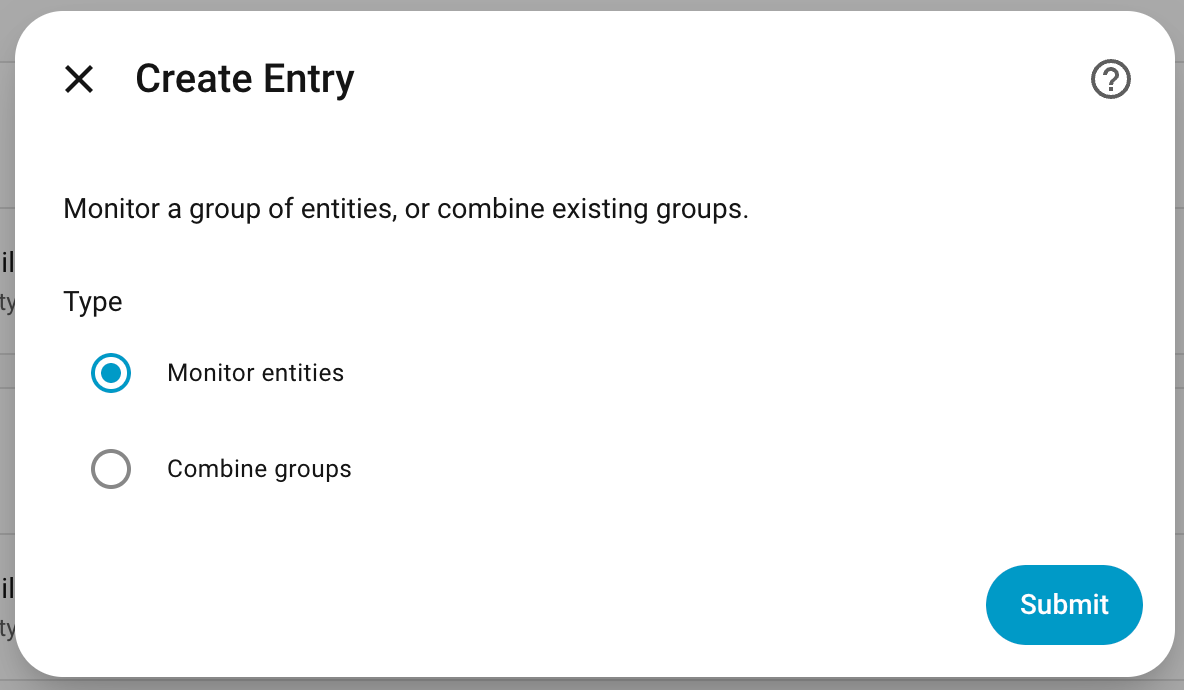
Create Entry
- Type
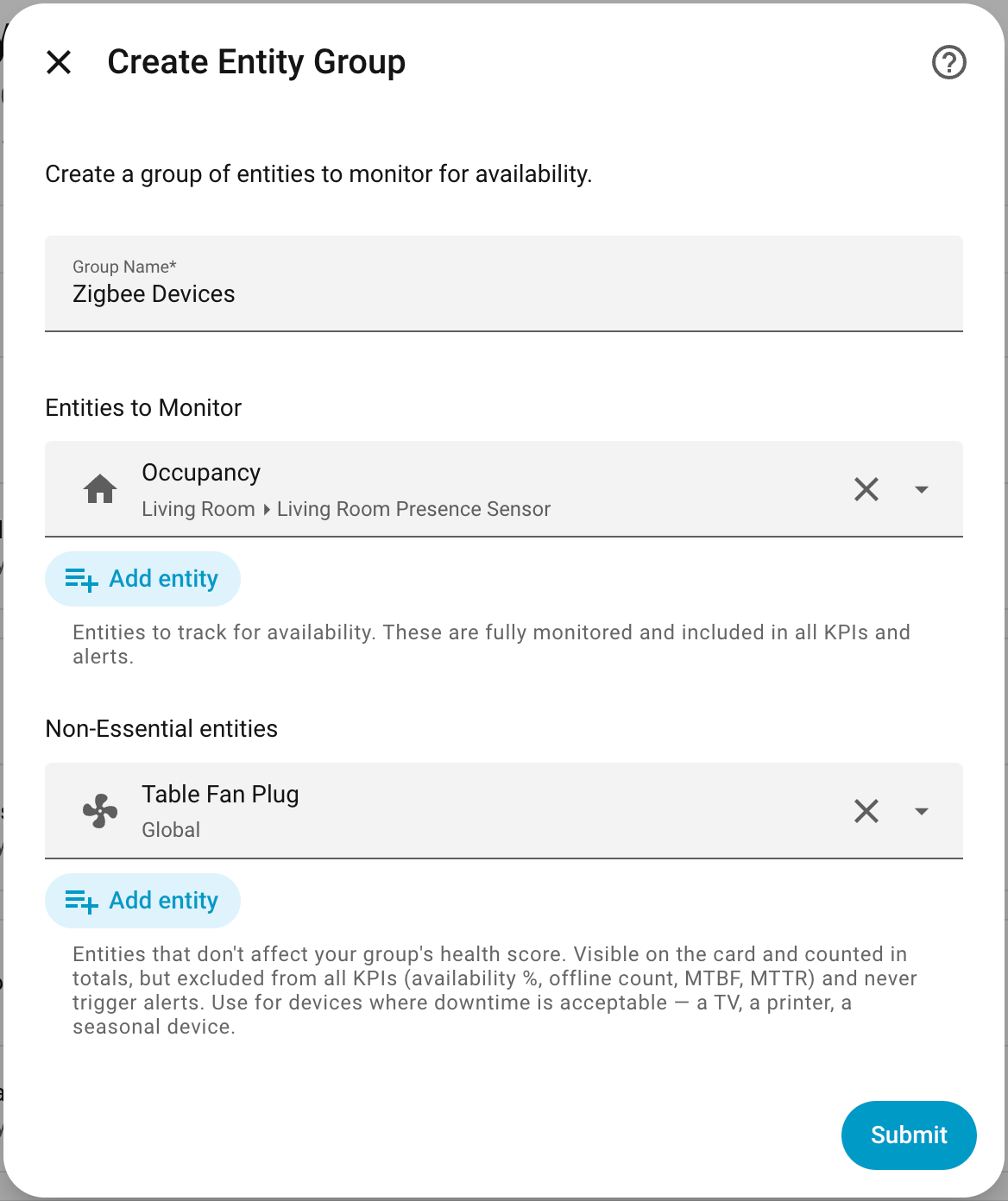
Create Entity Group
- Group Name
- Entities to MonitorEntities to track for availability. These are fully monitored and included in all KPIs and alerts.
- Non-Essential entitiesEntities that don't affect your group's health score. Visible on the card and counted in totals, but excluded from all KPIs (availability %, offline count, MTBF, MTTR) and never trigger alerts. Use for devices where downtime is acceptable — a TV, a printer, a seasonal device.
Create Combined Group
- Combined Group Name
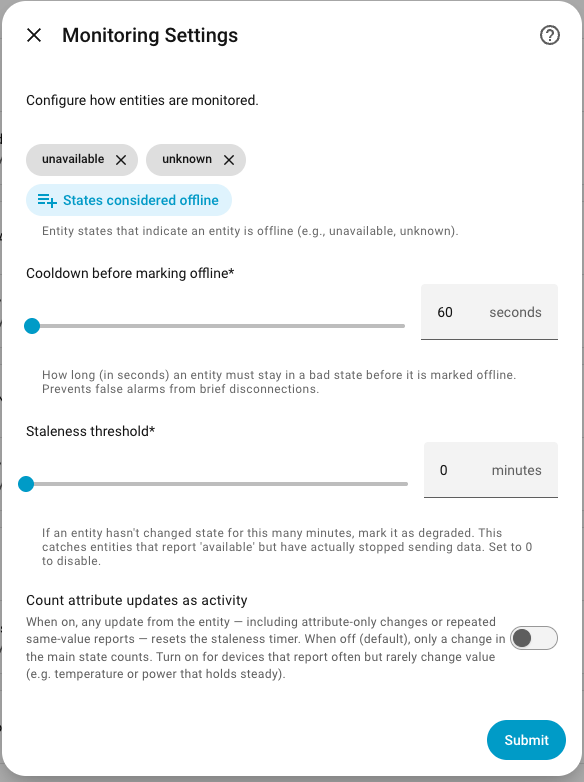
Monitoring Settings
- States considered offlineEntity states that indicate an entity is offline (e.g., unavailable, unknown).
- Cooldown before marking offlineHow long (in seconds) an entity must stay in a bad state before it is marked offline. Prevents false alarms from brief disconnections.
- Staleness thresholdIf an entity hasn't changed state for this many minutes, mark it as degraded. This catches entities that report 'available' but have actually stopped sending data. Set to 0 to disable.
- Count attribute updates as activityWhen on, any update from the entity — including attribute-only changes or repeated same-value reports — resets the staleness timer. When off (default), only a change in the main state counts. Turn on for devices that report often but rarely change value (e.g. temperature or power that holds steady).
Advanced Settings
- Low battery threshold (%, 0 = disabled)Flag entities whose battery falls below this percentage. The 'low' state is also automatically detected. Volt-based entities are not supported. Use entities that report battery as a percentage or support the 'low' state.
- Enable signal strength monitoringTrack signal strength for monitored entities and alert when signal quality drops to 'poor'. Supports dBm-based networks (Wi-Fi, Zigbee, Z-Wave, Bluetooth, etc.) and percentage-based sensors. After enabling, you will be asked to bind a signal sensor and select the network type for each entity.
- Availability tracking windowsTime windows for tracking group availability history (e.g. today, 3d, 7d).
- Recovery windowHow long (in minutes) an entity stays in the Recently Offline or Recently Recovered sensors after a state transition.
- Show device namesShow the HA device name instead of the entity friendly name in offline/recovered sensor states. Falls back to friendly name for entities not linked to a device.
- Collapse entities by deviceOnly works when 'Show device names' is enabled. When on, multiple entities that belong to the same physical device are counted as one across every sensor value, list and event (offline, low battery, stale, poor signal). Entities only merge when they share the same device, battery level and signal — entities not linked to a device are never merged, and entities on the same device with different battery or signal readings stay separate. Availability %, MTBF and MTTR stay per-entity. Note: if this group is included in a combined group, its collapse setting is applied automatically in the combined view — no extra configuration needed.
After setup
- Entities to MonitorEntities to track for availability. These are fully monitored and included in all KPIs and alerts.
- Non-Essential entitiesEntities that don't affect your group's health score. Visible on the card and counted in totals, but excluded from all KPIs (availability %, offline count, MTBF, MTTR) and never trigger alerts. Use for devices where downtime is acceptable — a TV, a printer, a seasonal device.
- States considered offlineEntity states that indicate an entity is offline (e.g., unavailable, unknown).
- Cooldown (seconds)How long (in seconds) an entity must stay in a bad state before it is marked offline. Prevents false alarms from brief disconnections.
- Staleness threshold (minutes, 0 = disabled)If an entity hasn't changed state for this many minutes, mark it as degraded. Set to 0 to disable.
- Low battery threshold (%, 0 = disabled)Flag entities whose battery falls below this percentage. The 'low' state is also automatically detected. Volt-based entities are not supported.
- Enable signal strength monitoringTrack signal strength for monitored entities and alert when signal quality drops to 'poor'. Supports dBm-based networks (Wi-Fi, Zigbee, Z-Wave, Bluetooth, etc.) and percentage-based sensors. After enabling, you will be asked to bind a signal sensor and select the network type for each entity.
- Availability tracking windowsTime windows for tracking group availability history (e.g. today, 3d, 7d).
- Recovery window (minutes)How long (in minutes) an entity stays in the Recently Offline or Recently Recovered sensors after a state transition.
- Show device namesShow the HA device name instead of the entity friendly name in offline/recovered sensor states. Falls back to friendly name for entities not linked to a device.
- Collapse entities by deviceOnly works when 'Show device names' is enabled. When on, multiple entities that belong to the same physical device are counted as one across every sensor value, list and event (offline, low battery, stale, poor signal). Entities only merge when they share the same device, battery level and signal — entities not linked to a device are never merged, and entities on the same device with different battery or signal readings stay separate. Availability %, MTBF and MTTR stay per-entity. Note: if this group is included in a combined group, its collapse setting is applied automatically in the combined view — no extra configuration needed.
- Count attribute updates as activityWhen on, any update from the entity — including attribute-only changes or repeated same-value reports — resets the staleness timer. When off (default), only a change in the main state counts. Turn on for devices that report often but rarely change value (e.g. temperature or power that holds steady).
- Combined Group Name
Texts from the code of italo-lombardi/Home-Assistant-EntityAvailability.
Entities
- Binary sensorsAny Offline, All Offline, All Offline (Non-Essential), Any Offline (Non-Essential), Any Low Battery, Any Stale, Any Poor Signal, Any Poor Signal (Non-Essential), Any Low Battery (Non-Essential)
- SensorsOffline Count, Offline Entities, Low Battery, Low Battery Count, Group Summary, Recently Offline, Recently Recovered, Combined Summary, Availability (Today), Availability (3 Days), Availability (5 Days), Availability (7 Days), and 18 more
Troubleshooting
- DiagnosticsDownloads a diagnostics file to attach to a bug report.
From the README
Monitor entity availability in Home Assistant. Track offline entities, availability history, and degraded states with a custom dashboard card.
- Multi-group support -- organize entities by function (Security, Climate, Media, etc.)
- Combined groups -- merge multiple groups into a single aggregate sensor set for cross-group automations (offline count, low battery, any-offline binary sensor)
- Configurable bad states -- define which states count as offline (unavailable, unknown, or custom)
- Cooldown timer -- ignore brief blips before marking an entity offline
- Availability % sensors -- track uptime over today, 3-day, 5-day, and 7-day windows
- Reliability sensors (MTBF + MTTR) -- flag devices that keep flaking out: separate diagnostic sensors for how often each device breaks (MTBF) and how long each outage lasts (MTTR), so a genuinely…
- Bus events -- fires entity_availability_offline / entity_availability_recovered / entity_availability_low_battery / entity_availability_battery_ok / entity_availability_stale /…
- Battery monitoring -- auto-detect or manually map battery entities; supports numeric (%) and text states (low)
- Degraded entity detection -- flag entities with low battery or stale data
- Recently offline / recovered sensors -- track which entities went offline or recovered within a configurable time window
- Device name display -- optionally show the HA device name instead of entity friendly name in offline/recovered sensor states

Shows in Vulpo
Chart card, Apple Watch.Information
- Installs
- 101 sharing analytics
- GitHub stars
- 36
- Connection
- Works locally
- Upkeep
- Updated in the last 6 months
- Version
- v0.6.2,
- Kind
- Marketplace integration
- Needs
- Needs the Marketplace (HACS on 2026.10 and older)
- Domain
entity_availability- Issues
- Report an issue










