
Home Performance
Hugofromfrance
On Home Assistant 2026.11 or newer? Open it in the Marketplace
- Installs
- 61 sharing analytics
- GitHub stars
- 38
- Connection
- Works locally
- Upkeep
- Updated in the last 6 months
- Version
- v1.4.2,
- Kind
- Marketplace integration
- Needs
- Needs the Marketplace (HACS on 2026.10 and older)
- Domain
home_performance- Issues
- Report an issue
Independent directory, made by the developer of Vulpo. Not affiliated with Home Assistant or the Open Home Foundation.
Screenshots From the README of Hugofromfrance/home_performance.
About
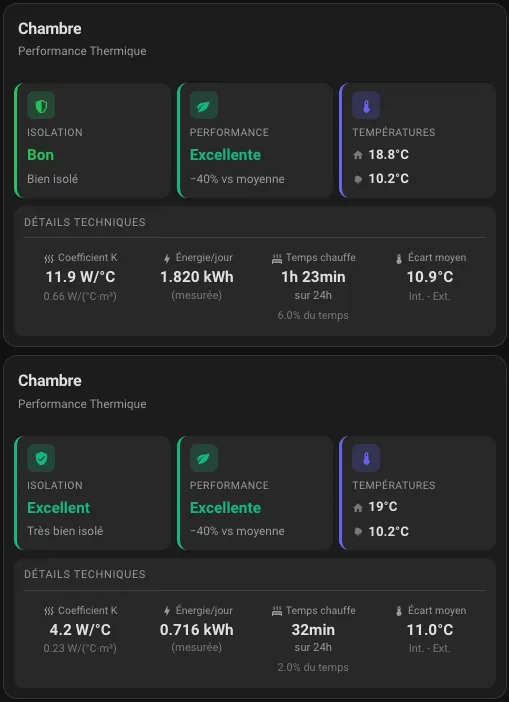
Home Performance is an integration that analyzes the thermal performance and insulation quality of rooms from real heating data. Each room is set up as a zone with an indoor and outdoor temperature sensor and a heating entity, and it works with electric heaters, heat pumps, gas boilers and gas furnaces. It measures a heat loss coefficient per room, also per floor area and per volume, and reports daily estimated and measured energy, heating time and an energy performance rating. Optional inputs include a power sensor, an energy meter, a window or door contact sensor, a weather entity for wind data and the room orientation. Binary sensors show window open, heating active and data readiness, and an optional push notification warns when a window is open while heating runs. Two actions reset a zone's rolling history or all of its calibration data, and it runs locally and is configured in the UI.
Automatic summary of the README and code of Hugofromfrance/home_performance. Something wrong, or are you the maintainer and want your own text here? Get in touch
Supports
Works locally Talks to your devices on your own network. No vendor cloud in between.
From the Marketplace Installed through the Marketplace, formerly HACS.
Actively maintained Its author released or pushed a change in the last six months.
Provides
- Sensors
Setting it up
Install it from the Marketplace and restart Home Assistant, then add it under Settings, Devices and services.
Zone Configuration
- Zone nameUnique name to identify this room (e.g., Bedroom, Living Room)
- Indoor temperature sensorSensor measuring the room temperature
- Outdoor temperature sensorSensor measuring the outdoor temperature
- Heating entitySwitch, thermostat, climate or select entity controlling the heating
- Heating active statesComma-separated list of states that indicate active heating (for select entities). Default: heating, heat, on
- Heat source typeType of heating system
- Heater powerNominal heater power in Watts (required for electric, optional for others)
- Efficiency factorConverts consumed energy to thermal output. Electric: 1.0, Heat pump: 2.5-4.0 (COP), Gas boiler: 0.85-0.95, Gas furnace: 0.78-0.90
Dimensions and optional sensors
- Floor AreaFloor area to calculate K coefficient per m²
- Room volumeVolume to calculate K coefficient per m³
- Power sensor (optional)Real-time power sensor (W) for precise heating detection and energy integration
- Heating detection thresholdPower in Watts above which heating is considered active (default: 50W)
- Energy meter (optional)Daily energy counter (kWh) that resets at midnight (e.g., Utility Meter). Most accurate for K calculation. Required for heat pump/gas, falls back to power_sensor or heater_power if not set
- Window/Door sensor (optional)Physical window/door contact sensor for accurate open detection (instead of temperature-based)
- Weather entity (optional)Weather entity for wind data (shared between zones)
- Room orientation (optional)Main facade orientation to determine wind exposure
Window Alert Notifications
- Enable window open alertsSend a push notification when window is open and heating is active
- Mobile device for notificationsSelect the mobile device to receive notifications
- Delay before sending notificationWait this many minutes before alerting (avoids alerts for quick openings)
After setup
- Heat source typeType of heating system
- Heating active statesComma-separated list of states that indicate active heating (for select entities). Default: heating, heat, on
- Heater powerNominal heater power in Watts (required for electric, optional for others)
- Efficiency factorConverts consumed energy to thermal output. Electric: 1.0, Heat pump: 2.5-4.0 (COP), Gas boiler: 0.85-0.95, Gas furnace: 0.78-0.90
- Floor AreaFloor area to calculate K coefficient per m²
- Room volumeVolume to calculate K coefficient per m³
- Power sensorReal-time power sensor (W) for precise heating detection
- Heating detection thresholdPower in Watts above which heating is considered active (default: 50W)
- Energy meterDaily energy counter (kWh) that resets at midnight (e.g., Utility Meter). Most accurate for K calculation. Required for heat pump/gas, takes priority
- Window/Door sensorPhysical window/door contact sensor for accurate open detection
- Enable window open alertsSend push notification when window is open and heating is active
- Mobile device for notificationsSelect the mobile device to receive notifications
- Delay before notificationWait this many minutes before alerting (avoids alerts for quick openings)
- Weather entityWeather entity for wind data (shared between zones)
- Room orientationMain facade orientation to determine wind exposure
- Enable dynamic COP calculationCalculate real COP from measured energy data instead of using static efficiency factor. Requires an energy sensor.
- Enable window open alertsSend push notification when window is open and heating is active
- Mobile deviceSelect the mobile device to receive notifications
- Delay before notificationWait this many minutes before alerting (avoids alerts for quick openings)
Texts from the code of Hugofromfrance/home_performance.
Entities
- Binary sensorsWindow Open, Heating Active, Data Ready
- SensorsK Coefficient, K per m², K per m³, Daily Estimated Energy, Daily Measured Energy, Heating Time (24h), Heating Ratio (24h), Energy Performance, Average ΔT (24h), Data Hours, Analysis Time Remaining, Analysis Progress, and 7 more
Actions
- Reset HistoryReset the 7-day rolling history for a zone. Use this after insulation work or to clear anomalous data. The insulation rating will be recalculated from scratch.Fields: Zone Name
- Reset All DataCompletely reset ALL calibration data for a zone. Use when measurements were taken during unusual conditions (many guests, oven running, etc.) or to start fresh calibration.Fields: Zone Name
From the README
A Home Assistant integration to analyze and monitor the thermal performance of your home.
- 📋 List View - All zones with expandable details (click to expand)
- 🏆 Compare View - Ranking by K/m³ performance with percentage difference
- 🔄 Toggle - Switch between List and Compare views
- 📊 Sparklines - Mini trend graphs for each zone
- 🎯 Average Score - Overall home performance at a glance

Shows in Vulpo
Chart card, Apple Watch.Information
- Installs
- 61 sharing analytics
- GitHub stars
- 38
- Connection
- Works locally
- Upkeep
- Updated in the last 6 months
- Version
- v1.4.2,
- Kind
- Marketplace integration
- Needs
- Needs the Marketplace (HACS on 2026.10 and older)
- Domain
home_performance- Issues
- Report an issue










