
Verisure OWA
On Home Assistant 2026.11 or newer? Open it in the Marketplace
- Installs
- Not shown: shared domain securitas
- GitHub stars
- 137
- Connection
- Uses the vendor's cloud
- Upkeep
- Updated in the last 6 months
- Version
- v5.10.0,
- Category
- Security and safety, Alarm systems
- Kind
- Marketplace integration
- Brand
- Verisure
- Needs
- Needs the Marketplace (HACS on 2026.10 and older)
- Domain
securitas- Issues
- Report an issue
Independent directory, made by the developer of Vulpo. Not affiliated with Home Assistant or the Open Home Foundation.
Screenshots From the README of guerrerotook/securitas-direct-new-api.
About
Verisure OWA is an integration that connects Verisure alarm systems (formerly Securitas Direct) to Home Assistant through the vendor's cloud. It provides alarm control where the five Home Assistant alarm buttons can be mapped to Verisure modes, with an optional local PIN and separate sub-panels for interior, perimeter and annex circuits. It also adds smart locks that can lock automatically on arming and disarm before unlocking, cameras with on-demand capture, and sensors for temperature, humidity and air quality. The activity log from the Verisure app appears as an event entity, a sensor and a card, and actions taken in Home Assistant are tagged with the Home Assistant user. Setup runs in the UI, including text message two-factor login and selection of an installation, and repair notices can flag problems such as a blocked account or a sign-in that needs renewing.
Automatic summary of the README and code of guerrerotook/securitas-direct-new-api. Something wrong, or are you the maintainer and want your own text here? Get in touch
Supports
Uses the vendor's cloud Needs an internet connection and an account with the vendor.
From the Marketplace Installed through the Marketplace, formerly HACS.
Actively maintained Its author released or pushed a change in the last six months.
Provides
- Cameras
- Locks
- Sensors
Setting it up
Install it from the Marketplace and restart Home Assistant, then add it under Settings, Devices and services.
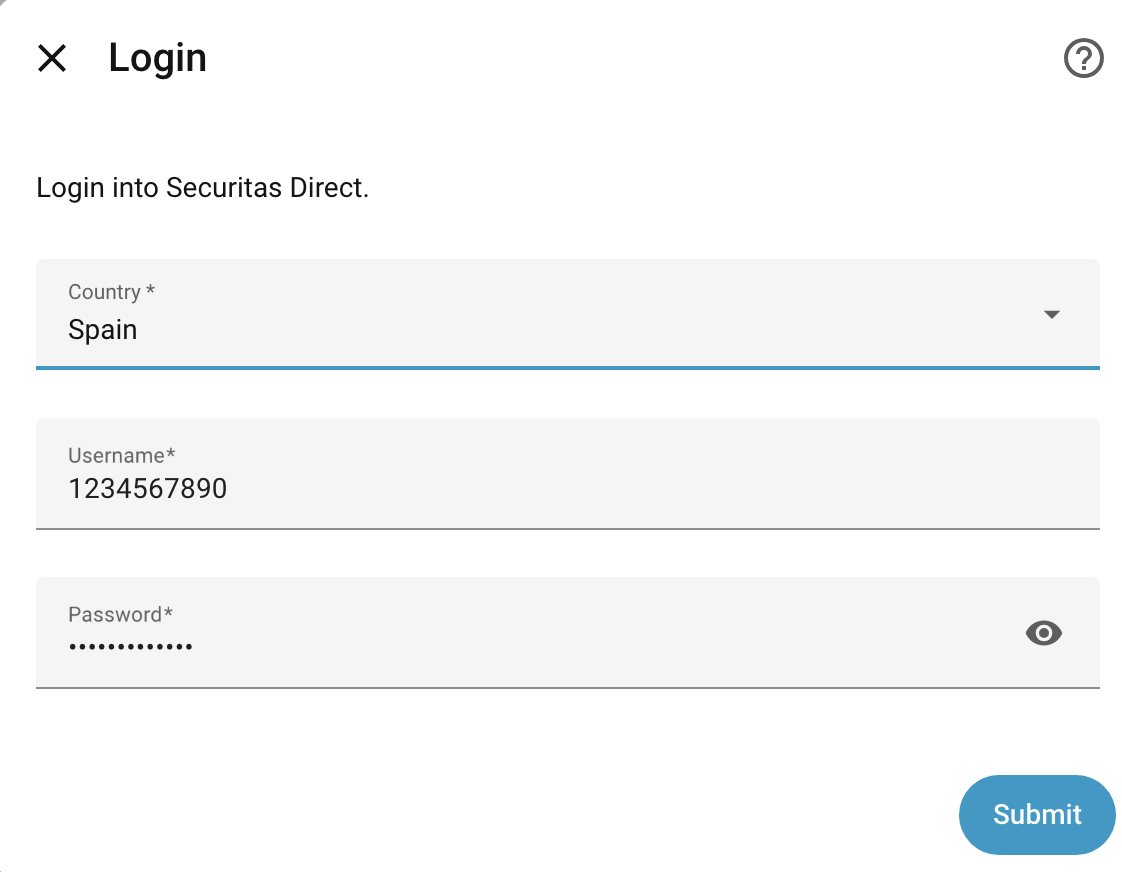
Login
- Country
- Username
- Password
- Keep my password so the integration can sign in again by itselfIf ticked, your password is stored unencrypted in Home Assistant's configuration files, where anyone who can read those files or a backup of them can read it. Leave it unticked to keep only the saved sign-in, which is not your password and so is no use anywhere else you use that password.
Verisure 2FA
- Phone number
Select Installation
- Installation
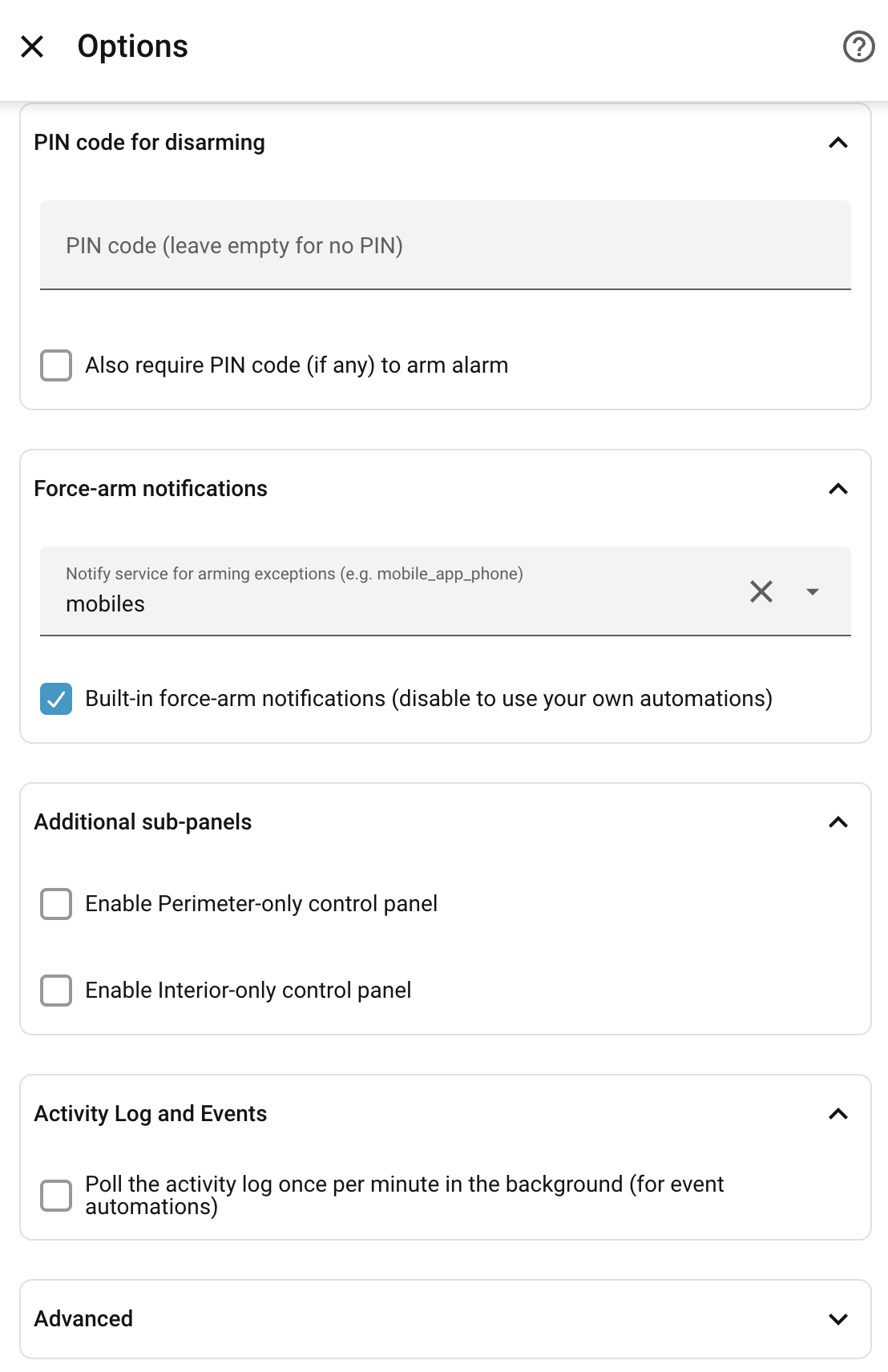
Options
- PIN code (leave empty for no PIN)
- Also require PIN code (if any) to arm alarm
- Also require PIN code (if any) for lock/unlock operations
- Notify service for arming exceptions (e.g. mobile_app_phone)
- Built-in force-arm notifications (disable to use your own automations)
- Offer an auto-force-arm tick box in the alarm controlsWhen enabled, the alarm's More Info dialog and a Tile card with Alarm modes and the Verisure OWA Open Sensors feature (and the deprecated alarm card) show a tick box that automatically force-arms past open doors/windows instead of waiting for you to confirm. It acts only on an arm started from the buttons next to it. The choice is remembered per device in the browser. Leave off where your panel does not support force-arming.
- Enable Perimeter-only control panel
- Enable Annex-only control panel
- Enable Interior-only control panel
- Poll the activity log once per minute in the background (for event automations)
- Update scan interval in seconds (0 disables auto-updates)
- Delay between API requests (sec)
- Operation poll timeout (seconds)How long to wait for the panel to confirm an arm/disarm action. Raise this if you get timeout warnings.
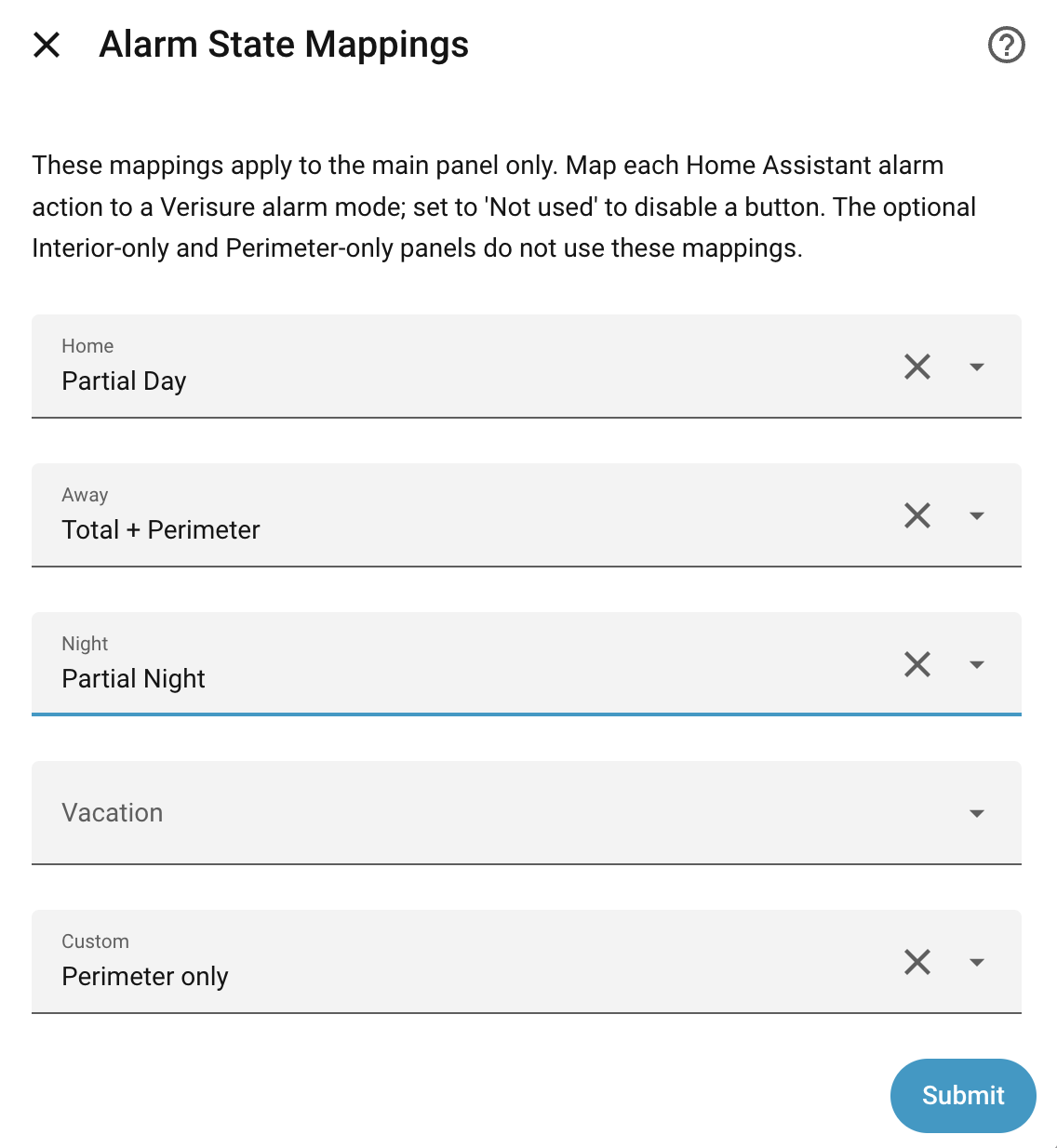
Alarm State Mappings
- Home
- Away
- Night
- Vacation
- Custom
Reauthenticate Verisure
- Username
- Password
- Keep my password so the integration can sign in again by itselfIf ticked, your password is stored unencrypted in Home Assistant's configuration files, where anyone who can read those files or a backup of them can read it. Leave it unticked to keep only the saved sign-in, which is not your password and so is no use anywhere else you use that password.
Also asked when changing the connection.
After setup
- PIN code (leave empty for no PIN)
- Also require PIN code (if any) to arm alarm
- Also require PIN code (if any) for lock/unlock operations
- Notify service for arming exceptions (e.g. mobile_app_phone)
- Built-in force-arm notifications (disable to use your own automations)
- Offer an auto-force-arm tick box in the alarm controlsWhen enabled, the alarm's More Info dialog and a Tile card with Alarm modes and the Verisure OWA Open Sensors feature (and the deprecated alarm card) show a tick box that automatically force-arms past open doors/windows instead of waiting for you to confirm. It acts only on an arm started from the buttons next to it. The choice is remembered per device in the browser. Leave off where your panel does not support force-arming.
- Enable Perimeter-only control panel
- Enable Annex-only control panel
- Enable Interior-only control panel
- Poll the activity log once per minute in the background (for event automations)
- Keep my password so the integration can sign in again by itselfUntick and save to delete the stored password at once, without signing in. To keep your password again, use Reconfigure, where you type it.
- Update scan interval in seconds (0 disables auto-updates)
- Delay between API requests (sec)
- Operation poll timeout (seconds)How long to wait for the panel to confirm an arm/disarm action. Raise this if you get timeout warnings.
- Home
- Away
- Night
- Vacation
- Custom
- Lock automatically when arming Interior alarm
- Lock automatically when arming Perimeter alarm
- Lock automatically when arming Annex alarm
- Disarm Interior alarm before unlocking
- Disarm Perimeter alarm before unlocking
- Disarm Annex alarm before unlocking
- Lock automatically when arming Interior alarm
- Lock automatically when arming Perimeter alarm
- Lock automatically when arming Annex alarm
- Disarm Interior alarm before unlocking
- Disarm Perimeter alarm before unlocking
- Disarm Annex alarm before unlocking
- Lock automatically when arming Interior alarm
- Lock automatically when arming Perimeter alarm
- Lock automatically when arming Annex alarm
Texts from the code of guerrerotook/securitas-direct-new-api.
Entities
- EventsActivity
Actions
- Force armDeprecated — use verisure_owa.force_arm instead. Force-arm the alarm, overriding non-blocking exceptions (e.g. open windows) from a previous failed arm attempt.Fields: PIN code
- Cancel force armDeprecated — use verisure_owa.force_arm_cancel instead. Cancel a pending force-arm and dismiss the arming-exception notification.
Troubleshooting
- Repair noticesNotices it can show in Settings, Repairs:Leftover verisure_owa folder, Installation added twice, Unrecognised alarm state, Sign in to Verisure again, Verisure has blocked your account, Verisure keeps refusing the saved sign-in, Home Assistant can't reach Verisure
From the README
A Home Assistant integration for Verisure (formerly Securitas Direct in some markets), supporting Argentina, Brazil, Chile, France, Ireland, Italy, Peru, Portugal, Spain, and the United Kingdom.
Upgrading from a previous version? See CHANGES.md for what's new and the breaking changes in this release.

Shows in Vulpo
Lock card, Camera card, Button card, Chart card, Apple Watch.Information
- Installs
- Not shown: shared domain securitas
- GitHub stars
- 137
- Connection
- Uses the vendor's cloud
- Upkeep
- Updated in the last 6 months
- Version
- v5.10.0,
- Category
- Security and safety, Alarm systems
- Kind
- Marketplace integration
- Brand
- Verisure
- Needs
- Needs the Marketplace (HACS on 2026.10 and older)
- Domain
securitas- Issues
- Report an issue