
Screenshots From the README of eyalgal/album_slideshow.
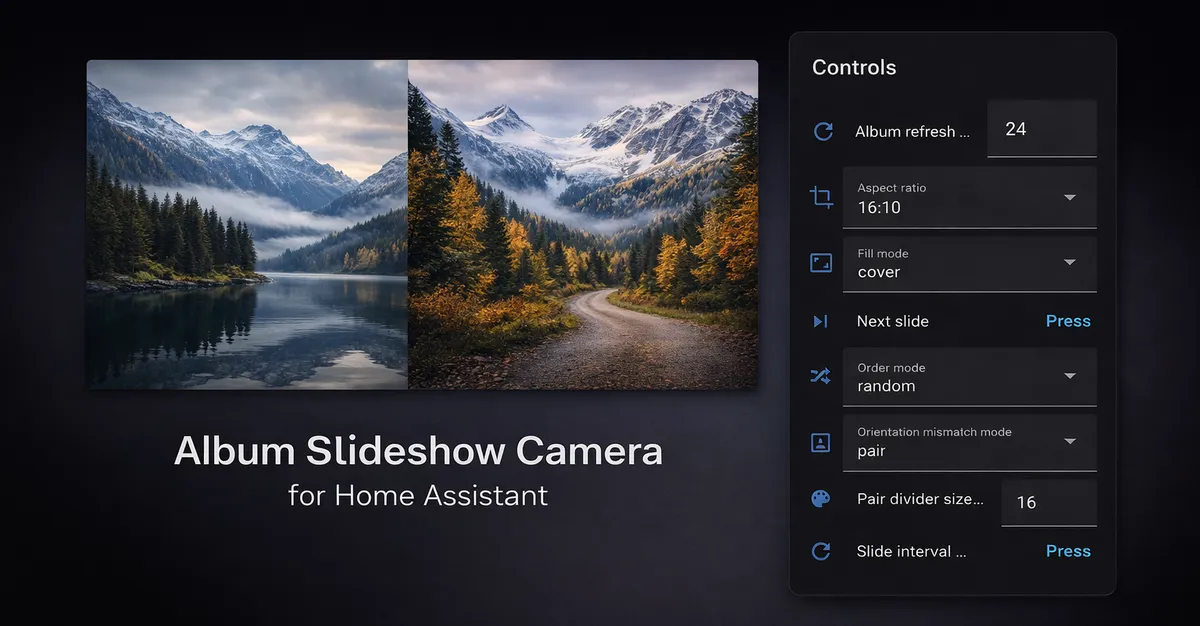
About
Album Slideshow Camera turns photo albums, self-hosted libraries, or local folders into a Home Assistant camera slideshow. Sources include Immich, Google Photos, PhotoPrism, local folders, and Media Source, and it connects to the vendor's cloud where a hosted service is used. It adds a camera along with buttons, numbers, selects, sensors, switches, and text entities, so timing, ordering, and date filters can be changed live. A bundled dashboard card handles transitions, captions for date, location, description, clock, and weather, and optional navigation controls. Photos can be hidden and restored per slideshow without changing the source library. Location lookups through OpenStreetMap are opt-in, with an option to hide the home country, and Immich videos and Live Photos can play in the card. Setup is done in the UI.
Automatic summary of the README and code of eyalgal/album_slideshow. Something wrong, or are you the maintainer and want your own text here? Get in touch
Supports
Uses the vendor's cloud Needs an internet connection and an account with the vendor.
From the Marketplace Installed through the Marketplace, formerly HACS.
Actively maintained Its author released or pushed a change in the last six months.
Provides
- Cameras
- Switches
- Sensors
Setting it up
Install it from the Marketplace and restart Home Assistant, then add it under Settings, Devices and services.
Add album slideshow
- Source
Google Photos
- Album name
- Shared album link
Local Folder
- Album name
- Folder path
- Include subfolders
Media Source
- Album name
- Media Source id (media-source://...)
Immich
- Immich URL (e.g. http://192.168.1.10:2283)
- API key
Immich source
- Name
- Albums
- People
- Include favorites
- Extra search filter (JSON, optional)
- Image quality
- Include videos (played by the Album Slideshow card)
- Play Live Photo motion (played by the Album Slideshow card)
PhotoPrism
- PhotoPrism URL (e.g. http://192.168.1.10:2342)
- Authentication
- App password (for App password)
- Username (for Username + password)
- Password (for Username + password)
PhotoPrism source
- Name
- Albums
- People
- Include favorites
- Extra search query (optional)
- Image quality
After setup
- Fetch photo metadata (experimental)
- Read original photo GPS (opt-in)
- Look up GPS place names via OpenStreetMap (opt-in)
- Hide the country for places in your home country
- Reverse-geocode EXIF GPS coordinates via OpenStreetMap
- Hide the country for places in your home country
- Name
- Albums
- People
- Include favorites
- Extra search filter (JSON, optional)
- Image quality
- Include videos (played by the Album Slideshow card)
- Play Live Photo motion (played by the Album Slideshow card)
- Look up EXIF GPS locations via OpenStreetMap
- Hide the country for places in your home country
- Immich URL (e.g. http://192.168.1.10:2283)
- API key
- Shared album link
Texts from the code of eyalgal/album_slideshow.
From the README
Turn a photo album, self-hosted library, or local/NAS folder into a Home Assistant camera slideshow. The included dashboard card adds smooth transitions, captions, and optional photo controls. Adjust slideshow settings live through Home Assistant entities.
- Automatic slideshows with adjustable timing, album refresh, and manual Previous/Next.
- Pause/resume, an optional pause while no dashboard is showing the slideshow, and a configurable rendered-frame buffer for quick navigation.
- Hide and restore photos per slideshow without changing the source library.
- Optional on-demand or always-visible navigation and photo-management controls.
- Pair portrait or landscape photos, choose cover/contain/blur, and set the aspect ratio.
- Browser-side transitions and date, location, or description captions when the source provides them.
- Clock, date, and weather captions, with optional colored weather icons.
- Random or album order, capture/upload date ordering, and date filters including On this day.
- Optional Immich video and Live Photo playback in the dashboard card, with sound.

Shows in Vulpo
Quick Toggle card, Camera card, Button card, Select card, Apple Watch, Control Center.Information
- Installs
- 613 sharing analytics
- GitHub stars
- 47
- Connection
- Uses the vendor's cloud
- Upkeep
- Updated in the last 6 months
- Version
- v1.16.0,
- Category
- Security and safety, Cameras
- Kind
- Marketplace integration
- Needs
- Needs the Marketplace (HACS on 2026.10 and older)
- Domain
album_slideshow- Issues
- Report an issue











