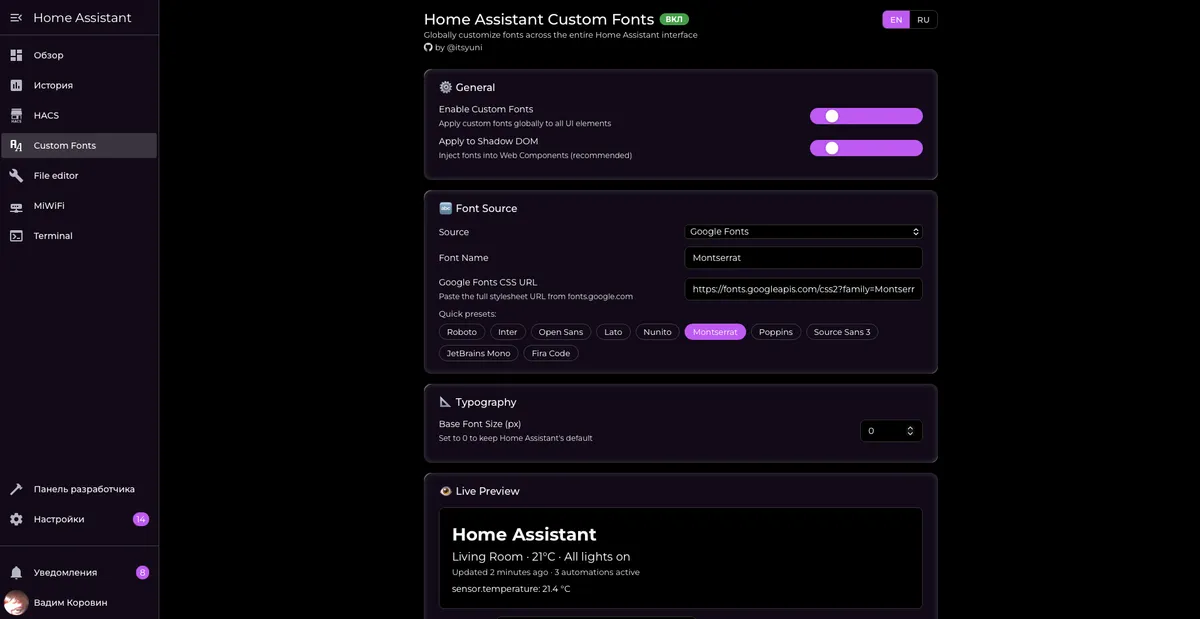
Screenshots From the README of etoyuni/homeassistant-customfonts.
About
Global font replacement across the entire Home Assistant (Lovelace) interface
Description from etoyuni/homeassistant-customfonts
Installs over time
50
Oct 21Nov 5
#1,506 of 1,516 Marketplace integrations. Installs sharing analytics.
Supports
- Works locallyTalks to your devices on your own network. No vendor cloud in between.
- From the MarketplaceInstalled through the Marketplace, formerly HACS.
- Actively maintainedIts author released or pushed a change in the last six months.
Setting it up
Install it from the Marketplace and restart Home Assistant, then add it under Settings, Devices and services.
Home Assistant Custom Fonts Setup
- Enable Home Assistant Custom Fonts
- Font Source
- Font Family Name
- Font URL (Google Fonts CSS or custom URL)For Google Fonts, paste the full CSS URL from fonts.google.com
- Base Font Size in px (0 = keep default)Set to 0 to keep the original Home Assistant font size
- Force font into Shadow DOM (legacy fallback)Leave OFF. Only enable for very old themes that ignore HA's CSS variables. Forcing the font may break custom cards (flipdown-timer-card, scheduler-card, bubble-card, etc.) and badge spacing on the Android Companion App.
After setup
- Enable Home Assistant Custom Fonts
- Font Source
- Font Family Name
- Font URL
- Base Font Size in px (0 = keep default)
- Force font into Shadow DOM (legacy fallback)Leave OFF. Only enable for very old themes that ignore HA's CSS variables. Forcing the font may break custom cards (flipdown-timer-card, scheduler-card, bubble-card, etc.) and badge spacing on the Android Companion App.
Texts from the code of etoyuni/homeassistant-customfonts.
From the README
Global font replacement across the entire Home Assistant (Lovelace) interface — Google Fonts, custom font uploads, system fonts. Full Shadow DOM support included.
- Google Fonts — paste a Google Fonts URL or pick from 10 built-in presets
- Custom font upload — upload.woff2,.woff,.ttf,.otf directly through the UI
- System fonts — use the OS default font with a proper fallback chain
- Shadow DOM traversal — fonts are injected into every Web Component, not just the document root
- Live preview — see the font change in real time before saving
- Enable / Disable toggle — turn the plugin off without removing it
- Custom base font size — adjust the global font size in pixels
- 🌐 Bilingual UI — English and Russian interface in the settings panel
- Zero config required — works out of the box after installation
Information
- Installs
- 50 sharing analytics
- GitHub stars
- 6
- Connection
- Works locally
- Upkeep
- Updated in the last 6 months
- Version
- v1.0.2,
- Kind
- Marketplace integration
- Needs
- Needs the Marketplace (HACS on 2026.10 and older)
- Domain
font_manager- Issues
- Report an issue