On Home Assistant 2026.10 or older? Open it in HACS
- Installs
- 51 sharing analytics
- GitHub stars
- 36
- Connection
- Works locally
- Upkeep
- Updated in the last 6 months
- Version
- v0.98.20,
- Category
- AI and voice, AI models
- Kind
- Marketplace integration
- Needs
- Needs the Marketplace (HACS on 2026.10 and older)
- Domain
sentient- Issues
- Report an issue
Independent directory, made by the developer of Vulpo. Not affiliated with Home Assistant or the Open Home Foundation.
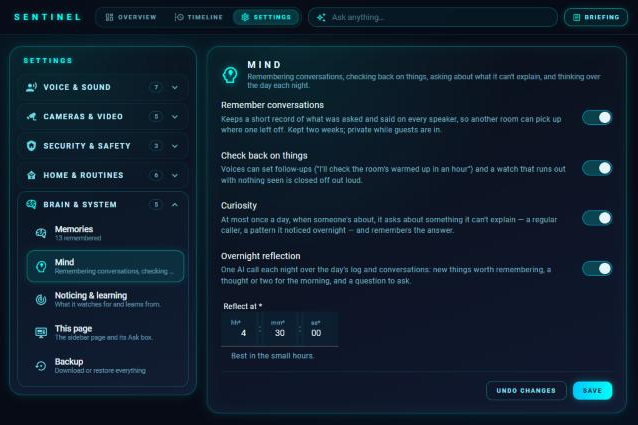
Screenshots From the README of conahmorgan2304/sentient.

About
Sentient is a Home Assistant integration that gives every voice assistant and automation one shared memory and set of house rules. It decides when and in which room to speak, following quiet hours and room awareness, and can route speech to Assist speakers or media players. It learns routines from recent history, and a learned routine can be adopted so the house runs it by itself, or deleted for good. Other actions cover remembering and forgetting, watching a device or camera, reminders, spoken briefings, and a hush mode. It uses the conversation agent and AI task already in Home Assistant, so it needs no separate API key, and it works locally. It adds sensors and switches, is configured in the UI, and requires the Marketplace.
Automatic summary of the README and code of conahmorgan2304/sentient. Something wrong, or are you the maintainer and want your own text here? Get in touch

Shows in Vulpo
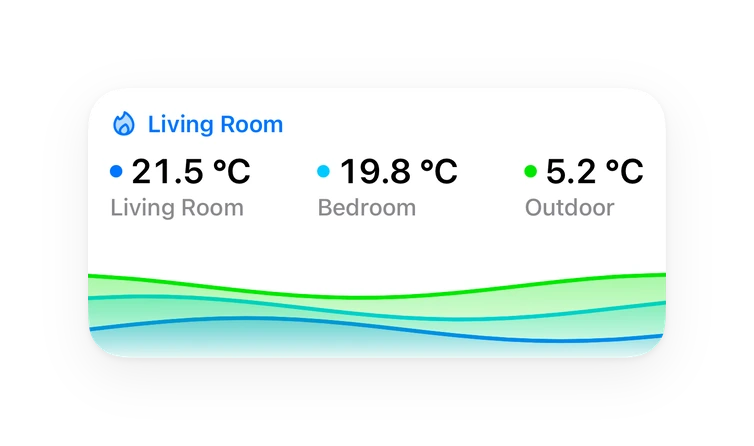
Quick Toggle card, Chart card, Apple Watch, Control Center.Supports
- Works locallyTalks to your devices on your own network. No vendor cloud in between.
- From the MarketplaceInstalled through the Marketplace, formerly HACS.
- Actively maintainedIts author released or pushed a change in the last six months.
Provides
- Switches
- Sensors
Setting it up
Install it from the Marketplace and restart Home Assistant, then add it under Settings, Devices and services.
Meet your home's brain
- Name
How should the house speak?
- Speakers
- Default speaker
- Quiet hours start
- Quiet hours end
- Stay quiet while busyWhile any of these is on (a meeting calendar, a Focus switch, a phone in Do Not Disturb), Sentient holds back speech that can wait, as if hushed. Safety alerts and replies you ask for still come through. Leave empty to turn this off.
- Room awareness windowHow many minutes of motion history to weigh up when deciding where people are.
- Never use these words (comma separated)
- Stay quiet after these automations or scriptse.g. your doorbell announcement, so background remarks don't talk over it.
- Stay quiet for
- Memories to share with voice assistantsHow many memories are given to the voice assistant up front. The rest can still be searched.
- Pass-through areasHallways, landings and stairs. Walking through these counts for much less, so a passer-by doesn't steal an announcement.
- Speak in every occupied roomOn: everyone who's home hears it. Off: only the busiest room.
- AI for background jobsThe AI task used for camera looks, briefings, the nightly think and the look at tomorrow. Empty uses Home Assistant's preferred AI task.
- Minimum gap between camera checksA camera watch looks again at most this often, to keep AI costs down.
- Backup-only speakersOnly used when nobody is in any other speaker's room, e.g. a living room you'd rather not disturb.
After setup
- Name
- SpeakersAssist speakers or media players (Echos through Alexa Media Player).
- Default speaker
- Quiet hours start
- Quiet hours end
- Stay quiet while busyWhile any of these is on (a meeting calendar, a Focus switch, a phone in Do Not Disturb), Sentient holds back speech that can wait, as if hushed. Safety alerts and replies you ask for still come through. Leave empty to turn this off.
- Room awareness windowHow many minutes of motion history to weigh up when deciding where people are.
- Never use these words (comma separated)
- Stay quiet after these automations or scriptse.g. your doorbell announcement, so background remarks don't talk over it.
- Stay quiet for
- Memories to share with voice assistantsHow many memories are given to the voice assistant up front. The rest can still be searched.
- Pass-through areasHallways, landings and stairs. Walking through these counts for much less, so a passer-by doesn't steal an announcement.
- Speak in every occupied roomOn: everyone who's home hears it. Off: only the busiest room.
- AI for background jobsThe AI task used for camera looks, briefings, the nightly think and the look at tomorrow. Empty uses Home Assistant's preferred AI task.
- Minimum gap between camera checksA camera watch looks again at most this often, to keep AI costs down.
- Edit a memory
- Forget
- Add a memory
- Category for the new memory
- Memory
- Category
- Briefings onOff turns off the button, the voice tool and the service.
- Include
- Weather fromLeave empty to use the first weather entity.
- To-do lists
- Calendars
- System sensors to reporte.g. CPU temperature, disk use, the NAS. Pending updates are always counted.
- Outside informationSensors from other integrations read into the briefing and the evening look at tomorrow: today's electricity price, a weather warning, parcels on the way, the next school inset day. Empty, zero and 'off' readings are left out. Text from these is treated as information only.
- Parcel trackersWhen one says a parcel is out for delivery, it says so once and watches the door for it all day (even if parcel alerts are off); if it says delivered before anything's seen at the door, it says that too. Empty: off.
- Daily briefing atOptional. Only spoken if someone's home and it isn't quiet hours.
- Daily digest atOptional: once a day the AI sums up the timeline in a few sentences. It goes on the timeline (and to phones if chosen). Not spoken.
- Briefing when someone's first upOnce a day before noon, in the room someone's in, as soon as the house sees them up and about (or, without that, the first time someone's moving after quiet hours end).
- Morning briefing roomsOptional: only give it the first time someone comes into one of these rooms in the morning, on that room's speaker — get up, wash and dress, then hear it in the kitchen or living room. Empty: wherever they are.
Texts from the code of conahmorgan2304/sentient.
Entities
- conversationWith backup, For Alexa
- SensorsMemories, Last spoken, Likely room, Watches, Routines, Visitors, House health, Drive, Mind, House, Screen
- SwitchesHush, Guest mode, Chime, Light show, Echo speakers, Echos: alarms and reminders only, Away lights, Tablet screen, Holiday mode
Actions
- SaySpeak through the house, following quiet hours and room awareness.
- Message
- Priority
- Speaker
- RememberAdd something to the house's long-term memory.
- Text
- Category
- ForgetRemove a memory by id or by matching text.
- What
- WatchKeep an eye on a device, sensor or camera and speak up when something happens.
- What
- Entity
- To state
- Above
- Below
- Question
- Look for
- Message
- Until
- Minutes
- Cancel watchStop a watch.
- What
- RemindSay something at a time, in the room where people are.
- Message
- At
- Minutes
- Speaker
- Priority
- AskAsk a question out loud and listen for the answer, in the room where people are.
- Question
- Priority
- Speaker
- Extra instructions
- Chime first
- Learn nowLook for routines in recent history straight away instead of waiting for tonight.
- BriefingA short briefing of what matters right now, spoken where people are.
- Speak it
- Priority
- Tidy memoriesMerge duplicates and drop nonsense from memory now (also runs every Sunday night).
- Delete learned routineDelete a learned routine or habit for good — the house stops doing it and never learns or offers it again. With Restore on, bring deleted ones back (one, or all if Routine is empty).
- Routine
- Restore
- Adopt routineHave the house do a learned routine by itself, or stop. Leave Adopt empty to toggle.
- Routine
- Adopt
- HushSay nothing that isn't urgent for a while. 0 minutes stops hushing.
- Minutes
- Run routineRun a named routine (set up on the sidebar page's Settings → Routines).
- Name
- Speak
- Details
- Weekly reportPut together what the house learned and noticed in the last week, and keep it on the timeline.
- Light showStart or stop a light show (disco, Halloween, Christmas…). Lights go back exactly as they were when it stops.
- On
- Style
- Minutes
- Room
- Lights
- Reflect nowThink over the last day now, as it does overnight: new memories, morning thoughts and a question.
- Check the driveTake one AI look at the drive spot now and update what's parked there.
- WonderAdd a question for curiosity to ask, drop one, or ask the next one now.
- Question
- Ask now
- Dismiss
- Follow upCheck back on something later and say how it went.
- Minutes
- About
- Entity
- State
- Above
- Below
- If done
- If not
- Speaker
Troubleshooting
- DiagnosticsDownloads a diagnostics file to attach to a bug report.
From the README
An evolving AI brain for Home Assistant.
Sentient gives your home one shared brain. Every voice assistant and automation in the house uses the same memory, follows the same house rules about when and where to speak, and gets smarter the longer it runs. It learns your habits (including ones that follow sunset or getting up), can say why it did or said anything, lets you choose how much it does by itself, and keeps a record of what it sends to AI services.
Information
- Installs
- 51 sharing analytics
- GitHub stars
- 36
- Connection
- Works locally
- Upkeep
- Updated in the last 6 months
- Version
- v0.98.20,
- Category
- AI and voice, AI models
- Kind
- Marketplace integration
- Needs
- Needs the Marketplace (HACS on 2026.10 and older)
- Domain
sentient- Issues
- Report an issue