

Geek Magic
aydarik
On Home Assistant 2026.11 or newer? Open it in the Marketplace
- Installs
- 117 sharing analytics
- GitHub stars
- 44
- Connection
- Works locally
- Upkeep
- Updated in the last 6 months
- Version
- 2.1.5,
- Kind
- Marketplace integration
- Needs
- Needs the Marketplace (HACS on 2026.10 and older)
- Domain
geek_magic- Issues
- Report an issue
Independent directory, made by the developer of Vulpo. Not affiliated with Home Assistant or the Open Home Foundation.
Screenshots From the README of aydarik/hass-geekmagic.
About
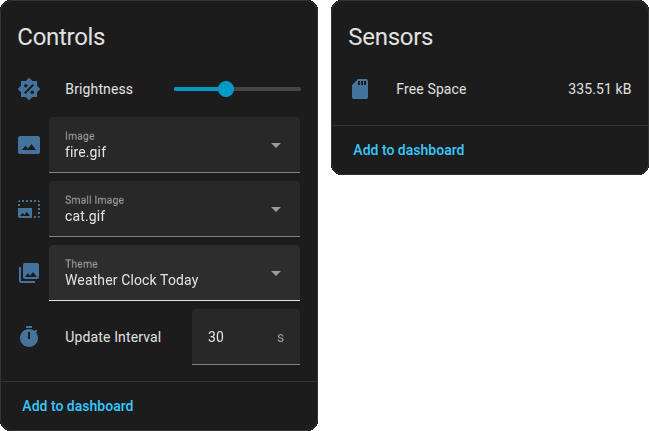
Geek Magic is a Marketplace integration that connects Home Assistant to a GeekMagic SmallTV smart display over the local network. It adds controls for changing themes, adjusting brightness and selecting images, plus a sensor that monitors free space on the device. Services send text or raw HTML that is rendered to an image and uploaded, and send an image from a local path or URL, resized by the chosen mode. On custom firmware it can also send custom messages, start countdown timers and attach sticky notes to the clock screen. HTML rendering relies on an external render service, and a predefined one is included, though a self-hosted renderer is recommended because the content is sent to a server. Setup is done in the UI with the device address, and the render service address, HTML template and update interval can be set as options.
Automatic summary of the README and code of aydarik/hass-geekmagic. Something wrong, or are you the maintainer and want your own text here? Get in touch
Supports
Works locally Talks to your devices on your own network. No vendor cloud in between.
From the Marketplace Installed through the Marketplace, formerly HACS.
Actively maintained Its author released or pushed a change in the last six months.
Provides
- Sensors
Setting it up
Install it from the Marketplace and restart Home Assistant, then add it under Settings, Devices and services.
Geek Magic Setup
- IP Address or Hostname
- HTML Render Service URL
- HTML Template
After setup
- HTML Render Service URL
- HTML Template
- Update Interval (seconds)
Texts from the code of aydarik/hass-geekmagic.
From the README
This custom component enables integration with the Geek Magic smart display device in Home Assistant.
The latest tested and supported official firmware version is Ultra-V9.0.45.
- Controls:
- Change themes.
- Adjust brightness.
- Select images.
- Sensors: Monitor free space on the device.
- On custom firmwares:
- Send custom messages.
- Start countdown timers.
- Attach sticky notes.
- HTML Rendering & Upload: Send text or raw HTML to the device, which is rendered to an image and uploaded automatically.
- Image Upload: Send an image from a local path (e.g., camera snapshot) or URL to the device. The image will be automatically resized based on the selected mode.

Shows in Vulpo
Select card, Chart card, Apple Watch.Information
- Installs
- 117 sharing analytics
- GitHub stars
- 44
- Connection
- Works locally
- Upkeep
- Updated in the last 6 months
- Version
- 2.1.5,
- Kind
- Marketplace integration
- Needs
- Needs the Marketplace (HACS on 2026.10 and older)
- Domain
geek_magic- Issues
- Report an issue










