
Audi Connect
audiconnect
On Home Assistant 2026.11 or newer? Open it in the Marketplace
- Installs
- 1.3k sharing analytics
- GitHub stars
- 376
- Connection
- Uses the vendor's cloud
- Upkeep
- Updated in the last 6 months
- Version
- v2.5.1,
- Category
- Vehicles and transport, Cars and EVs
- Kind
- Marketplace integration
- Needs
- Needs the Marketplace (HACS on 2026.10 and older)
- Domain
audiconnect- Issues
- Report an issue
Independent directory, made by the developer of Vulpo. Not affiliated with Home Assistant or the Open Home Foundation.
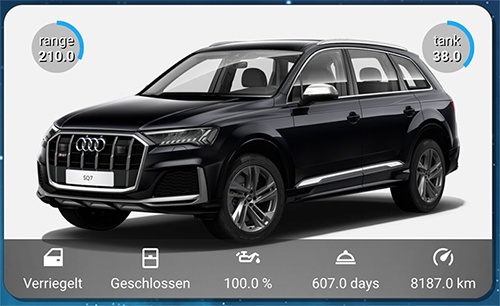
Screenshots From the README of audiconnect/audi_connect_ha.
About
Audi Connect is an integration that links Home Assistant to the Audi Connect cloud service for Audi vehicles. It adds presence detection, sensors such as range, mileage and fuel level, and controls like locks, climate, numbers, selects and switches. Car actions include locking and unlocking, starting climate control or auxiliary heating, and refreshing vehicle or cloud data. Charge targets can be set globally, for the current location, or per location profile, and the profiles are read from what the car reports. An optional S-PIN is needed for lock and engine actions, and the region, scan interval and excluded vehicles are configurable. Setup is done in the Home Assistant UI with an Audi account login.
Automatic summary of the README and code of audiconnect/audi_connect_ha. Something wrong, or are you the maintainer and want your own text here? Get in touch
Supports
Uses the vendor's cloud Needs an internet connection and an account with the vendor.
From the Marketplace Installed through the Marketplace, formerly HACS.
Actively maintained Its author released or pushed a change in the last six months.
Provides
- Climate
- Locks
- Switches
- Sensors
- Presence
Setting it up
Install it from the Marketplace and restart Home Assistant, then add it under Settings, Devices and services.
Audi Connect
- S-PINOptional S-PIN, required for vehicle actions such as lock/unlock and engine start.
- Region
- Scan interval
- API LevelFor Audi vehicles, the API request data structure varies by model. Newer vehicles use an updated data structure compared to older models. This can be changed later via the Reconfigure option.
Sign in to Audi
- Username
- Password
Also asked when signing in again.
Update Audi Connect Configuration
- S-PINOptional S-PIN for vehicle actions such as lock/unlock.
- RegionThe region associated with your Audi Connect account.
- API LevelFor Audi vehicles, the API request data structure varies by model. Newer vehicles use an updated data structure compared to older models.
After setup
- Cloud Update at StartupPerform a cloud update immediately upon startup.
- Refresh Vehicle Data After ActionSend a vehicle refresh command after every service action (e.g. climate, lock). This is typically not required as the vehicle will check in with the cloud on its own after a command. Each vehicle refresh counts against the API rate limit. To improve responsiveness, increase the Cloud Refresh Delay instead.
- Cloud Refresh DelaySeconds to wait after a service action before refreshing cloud data. A longer delay gives the vehicle more time to report its updated state to the cloud.
- Scan IntervalMinutes between cloud polling updates.
- Excluded VINsComma-separated VIN list to exclude from setup and updates.
Texts from the code of audiconnect/audi_connect_ha.
Actions
- Refresh Vehicle DataRequests an update of the vehicle state directly, as opposed to the normal update mechanism which only retrieves data from the cloud.Fields: Vehicle
- Execute Vehicle ActionPerforms various actions on the vehicle.Fields: Vehicle, Action
- Start Climate ControlStart the climate control with options for temperature, glass surface heating, and auto seat comfort.Fields: Vehicle, Target Temperature (Fahrenheit), Target Temperature (Celsius), Glass Surface Heating, Auto Seat Comfort: Front-Left, Auto Seat Comfort: Front-Right, Auto Seat Comfort: Rear-Left, Auto Seat Comfort: Rear-Right, Climatisation at Unlock, Climatisation Mode
- Refresh Cloud DataRetrieves current cloud data without triggering a vehicle refresh. Data may be outdated if the vehicle has not checked in recently.
- Start Auxiliary HeatingStart auxiliary heating the vehicle, with option for duration.Fields: Vehicle, Duration
- Set Location Charge TargetSet a location charging profile's target state of charge. This is the value that actually governs where a charge stops at that location, unlike the global target. It is a persistent setting: it applies to every charge at that location until changed.Fields: Vehicle, Profile, Target State of Charge
- Set Charge ModeSet which mode the vehicle charges in. This is a preference and does not start or stop a charge in progress.Fields: Vehicle, Charge Mode
- Set Target State of ChargeSet the target state of charge (battery %) for the vehicle.Fields: Vehicle, Target State of Charge
Troubleshooting
- System healthAdds its status to Home Assistant's system information.

Shows in Vulpo
Quick Toggle card, Climate card, Lock card, Button card, Apple Watch, Control Center, Climate Live Activity.Information
- Installs
- 1.3k sharing analytics
- GitHub stars
- 376
- Connection
- Uses the vendor's cloud
- Upkeep
- Updated in the last 6 months
- Version
- v2.5.1,
- Category
- Vehicles and transport, Cars and EVs
- Kind
- Marketplace integration
- Needs
- Needs the Marketplace (HACS on 2026.10 and older)
- Domain
audiconnect- Issues
- Report an issue
You might also like



 Kia Uvo / Hyundai Bluelink6.3k installs · A Home Assistant HACS integration that supports Kia Connect(Uvo…Open
 Tesla Custom Integration4.4k installs · Tesla custom integration for Home Assistant. This requires a re…Open