On Home Assistant 2026.10 or older? Open it in HACS
- Installs
- 127 sharing analytics
- GitHub stars
- 25
- Connection
- Works locally
- Upkeep
- Updated in the last 6 months
- Version
- v0.4.14,
- Category
- Security and safety, Cameras
- Kind
- Marketplace integration
- Brand
- eufy
- Needs
- Needs the Marketplace (HACS on 2026.10 and older)
- Domain
eufy_home_security- Issues
- Report an issue
Shows in Vulpo Quick Toggle card, Alarm Panel card, Camera card, Button card, Apple Watch, Control Center.
Independent directory, made by the developer of Vulpo. Not affiliated with Home Assistant or the Open Home Foundation.
Screenshots From the README of alaraun/homeassistant-eufy-home-security.
About
eufy Security in Home Assistant: HomeBases, cameras, doorbells and sensors, local over the LAN
Description from alaraun/homeassistant-eufy-home-security

Shows in Vulpo
Quick Toggle card, Alarm Panel card, Camera card, Button card, Apple Watch, Control Center.Supports
- Works locallyTalks to your devices on your own network. No vendor cloud in between.
- From the MarketplaceInstalled through the Marketplace, formerly HACS.
- Actively maintainedIts author released or pushed a change in the last six months.
Provides
- Cameras
- Alarms
- Switches
- Sensors
Setting it up
Install it from the Marketplace and restart Home Assistant, then add it under Settings, Devices and services.
Add a eufy account
- Email addressThe email address of the eufy account that owns the HomeBase, or of an account the home is shared with.
- PasswordUsed for this sign-in. eufy limits how often an account may sign in, so Home Assistant reuses the stored session afterwards instead of signing in again.
- CountryThe country your eufy app signs in with (shown on its sign-in screen). eufy lists a device only under the country it was set up or shared under. Empty means Home Assistant's country.
Enter the eufy verification code
- Verification codeThe code from eufy's e-mail. Use the newest one if several arrived.
Enter the eufy password again
- PasswordThe current password of the eufy account. Repeated failed sign-ins lock the account for 24 hours, so check it before submitting.
Sign in to eufy again
- PasswordOptional. Leave empty to sign in with the saved password. Enter the account's current password to check it with eufy and save it in place of the old one.
After setup
- Detection hold (seconds)5–300 s, 10 by default. A detection sensor turns off this long after the detection's own time. A detection that arrives after its hold has run out still fires its event.
- Alarm safety-net timeout (minutes)1–60 min, 10 by default. A safety net for an alarm whose end the HomeBase never reports: the panel then leaves Triggered or Pending, shows the guard mode last reported and reads it again.
- Repair when a security mode holds detections backOn by default. A repair names the cameras whose Notification action is off in the armed security mode in force, so the station sends none of their detections. Off removes these repairs and raises none; the cameras, the modes and their notifications are unchanged, and each camera's Detections in current mode sensor still shows it.
- Event image
- Refresh event image keyframe1–5; 1 by default. Which keyframe of the HomeBase recording Refresh event image shows, unless Event image is Thumbnail only. A later keyframe can help when the first picture is dark or blurred, but the refresh takes longer and other cameras' images on the same HomeBase wait meanwhile. A recording with fewer keyframes uses its last one. The time between keyframes varies. Does not affect detection images, thumbnails or live captures, and never wakes the camera.
- Live snapshot for cameras without a detection imageOff by default. A camera with no detection image yet shows one live picture instead, at most every 5 minutes. Wakes a battery camera, which costs battery.
- Sessions per HomeBase
- Recording length (seconds)5–300 s, 30 by default. Length of a Record clip when the action names none. Wakes a battery camera for that long.
- Event history (days)0–365, 7 by default. Saves every image a camera or preset shows, named with date, time, camera and what it shows. Older days are deleted; 0 saves nothing. In Home Assistant Container, mount a host directory at /media to keep them across updates.
- Save event videosOff by default. Copies each recording a HomeBase makes from now on into the event history as an MP4, next to its image. Played from the HomeBase's storage, so no camera wakes. Needs Event history above 0 days; videos take far more space than images. Not for a camera without a HomeBase.
- eufy sign-in countryThe country your eufy app signs in with (shown on its sign-in screen). eufy lists a device only under the country it was set up or shared under. Empty means Home Assistant's country. A change asks eufy once for the devices, which can cost a sign-in.
- Check the eufy session every 6 hoursOn by default. A minute after start and every 6 hours, one device-list read with the saved session, never a sign-in. When another app or device has ended Home Assistant's session, the repair then shows within that time. Off: noticed at the next command that needs eufy or the next restart.
- Cloud push for detectionsOff by default. Needed for detections from a station that does not send them over the local network: a HomeBase 2, a camera without a HomeBase (such as the T8170 Battery SoloCam) or a model not yet checked; a repair names each one. A HomeBase 3 sends its cameras' detections locally, and one that arrives both ways fires once. Home Assistant listens for eufy's push messages like the phone app, which keeps working. The messages pass through eufy's and Google's servers and can arrive late or not at all.
- Extra eufy sign-in countriesEmpty by default. eufy lists a home shared with this account only to a sign-in with the country of the account that shared it. Add that country when it differs from the sign-in country. A change asks eufy once for the devices under every country.
- Look for devices under every sign-in country on each refreshOff by default. A sign-in country that listed no devices is not asked again. On: every device list asks each of them (Refresh device list, the session check, the hourly refresh for a camera without a HomeBase), so a device added later shows up; asking one whose session has run out signs in to it.
Texts from the code of alaraun/homeassistant-eufy-home-security.
Entities
- Binary sensorsMotion, Person, Pet, Vehicle, Disk problem, Disk formatting, eMMC problem, Solar charging, Battery low, Storage problem
- ButtonsCapture live image, Refresh event image, Refresh device list, Refresh presets, Pan left, Pan right, Tilt up, Tilt down, Save current view
- EventsDetection, Alarm, Arming, Doorbell
- ImagesLast event
- NumbersLive view zoom
- SelectsDefault preset, Live view preset, Security mode
- SensorsFirmware, eMMC used, Disk used, Disk free, Disk size, Disk used percentage, Disk temperature, eMMC wear, eMMC used space, eMMC free, eMMC size, Model, and 6 more
- SirensSiren
- UpdatesFirmware update
Actions
- Capture preset imageTurns a pan/tilt camera to one of its preset positions and takes a live image of that view, shown by that preset's image entity. Wakes a battery camera and leaves it at the preset.
- Preset
- Pan or tiltMoves a pan/tilt camera one fixed step, as its Pan and Tilt buttons do. Wakes a battery camera; it returns to its default preset once idle.
- Direction
- Go to presetTurns a pan/tilt camera to one of its preset positions once, without taking an image. Wakes a battery camera; it returns to its default preset once idle. The live view preset is not changed.
- Preset
- ZoomZooms the live view one step in or out, as the Live view zoom slider does. With a live view open the camera zooms at once; otherwise the next live view opens at that zoom.
- Direction
- Save presetStores what a pan/tilt camera shows now as a preset: in its lowest free slot, or over the given one. Use it while the live view runs, or within a few seconds of the last pan or tilt: the camera returns to its default view a few seconds after the last move. Returns the slot index when a response is asked for.
- Preset
- Make default
- Delete presetClears one preset slot of a pan/tilt camera. Its entities go unavailable; deleting the default preset leaves the camera without one until another is chosen.
- Preset
- Record clipRecords a clip of the camera's live stream and saves it as an MP4 in the event history, next to the camera's images. Wakes a battery camera for the clip's length. Shares a running live view instead of opening a second stream. Returns the saved file's media id, its length and whether it is complete when a response is asked for.
- Duration
- Stop recordingEnds the clip the camera is recording now. The part recorded so far is saved in the event history as a complete clip, and the Record clip action returns.
Troubleshooting
- DiagnosticsDownloads a diagnostics file to attach to a bug report.
- Repair noticesNotices it can show in Settings, Repairs:Rejects its key, Stamps its events with another eufy account, Camera event history is not kept across container updates
From the README
Local control of eufy Security HomeBase systems and standalone eufy battery cameras: alarm panel, detections, camera stills, live video, pan/tilt presets and device settings. The HomeBase is reached over its local P2P protocol; the eufy cloud is used for sign-in, the device list and device keys, and, when switched on, for the cloud push that detections from standalone cameras and a HomeBase 2 need. The protocol work is done by the eufy-home-security library (source), which Home Assistant installs automatically. Library bugs that show without Home Assistant go to
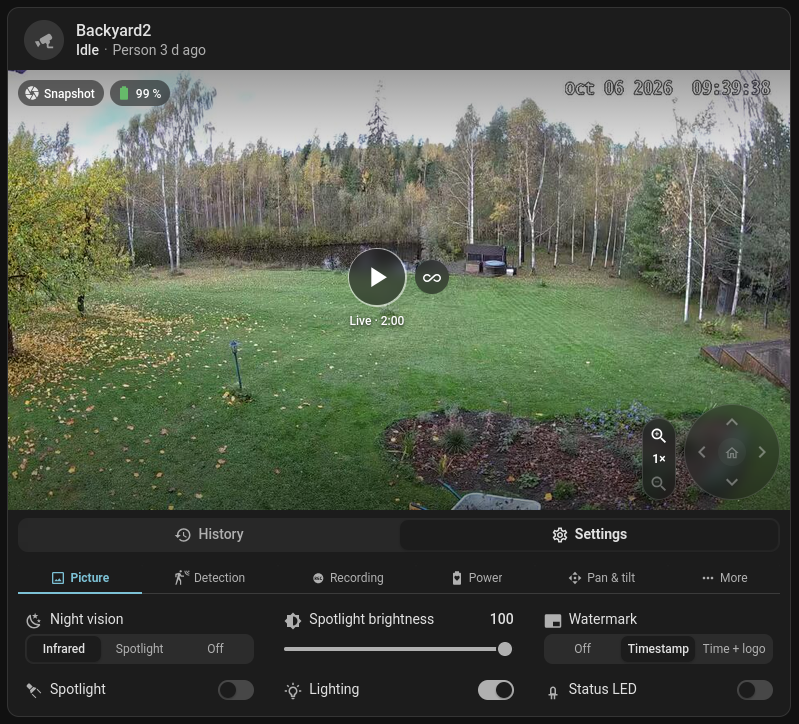
The camera card that comes with the integration: one or several cameras, live view, pan/tilt, presets, history and settings.
Information
- Installs
- 127 sharing analytics
- GitHub stars
- 25
- Connection
- Works locally
- Upkeep
- Updated in the last 6 months
- Version
- v0.4.14,
- Category
- Security and safety, Cameras
- Kind
- Marketplace integration
- Brand
- eufy
- Needs
- Needs the Marketplace (HACS on 2026.10 and older)
- Domain
eufy_home_security- Issues
- Report an issue