Bermuda BLE Trilateration
agittins
On Home Assistant 2026.11 or newer? Open it in the Marketplace
- Installs
- 10.4k sharing analytics
- GitHub stars
- 2.1k
- Connection
- Works locally
- Upkeep
- Updated in the last 6 months
- Version
- v0.8.7,
- Category
- Presence and location
- Kind
- Marketplace integration
- Needs
- Needs the Marketplace (HACS on 2026.10 and older)
- Domain
bermuda- Issues
- Report an issue
Independent directory, made by the developer of Vulpo. Not affiliated with Home Assistant or the Open Home Foundation.
Screenshots From the README of agittins/bermuda.
About
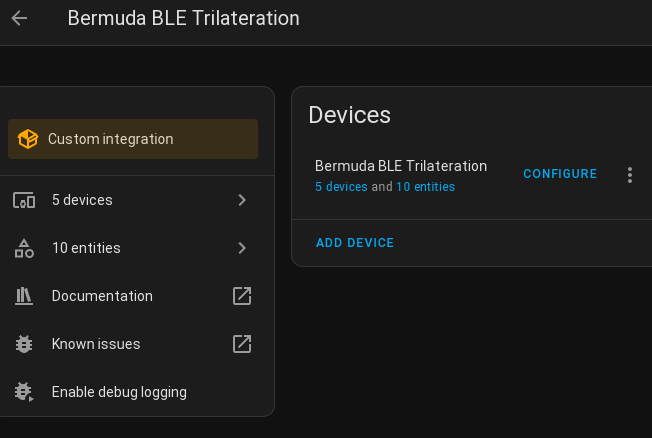
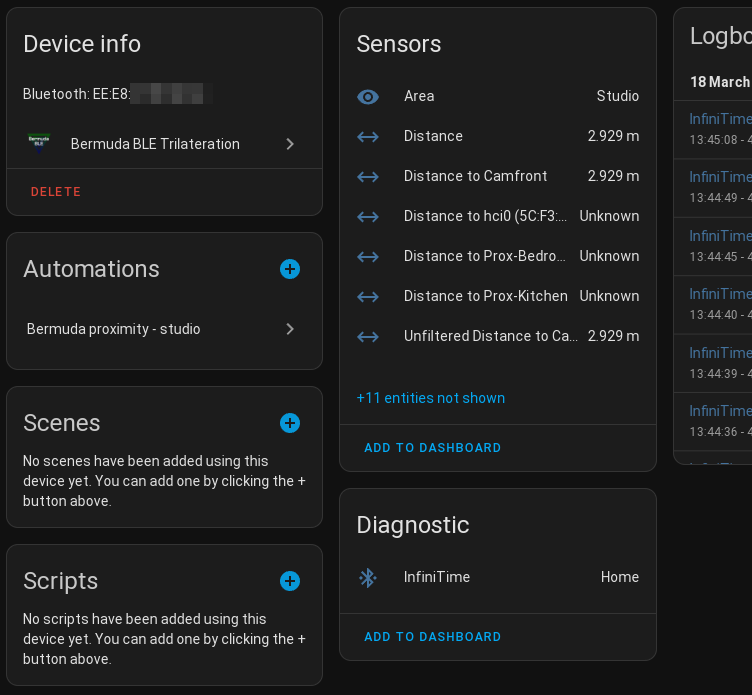
Bermuda BLE Trilateration tracks Bluetooth devices by room in Home Assistant using signal readings from Bluetooth proxies. It works with ESPHome Bluetooth proxies and Shelly Plus or later devices, and a USB Bluetooth adapter on the host can handle basic home or not home tracking. For each chosen device it creates distance and area sensors, plus device tracker entities that can be linked to people for home and away status. It supports iBeacon devices, including those with randomised MAC addresses, and devices set up through the Private BLE Device component. Settings cover reference power, attenuation, maximum tracking radius, smoothing, maximum velocity and per-scanner signal offsets, with calibration steps in the options. A dump devices action returns the internal data with readings from each scanner, and the integration runs locally and is set up in the UI.
Automatic summary of the README and code of agittins/bermuda. Something wrong, or are you the maintainer and want your own text here? Get in touch
Supports
Works locally Talks to your devices on your own network. No vendor cloud in between.
Found by itself Home Assistant spots it on the network and offers to add it.
From the Marketplace Installed through the Marketplace, formerly HACS.
Actively maintained Its author released or pushed a change in the last six months.
Provides
- Switches
- Sensors
- Presence
Setting it up
Install it from the Marketplace and restart Home Assistant, then add it under Settings, Devices and services.
Bermuda BLE Trilateration
- Username
- Password
After setup
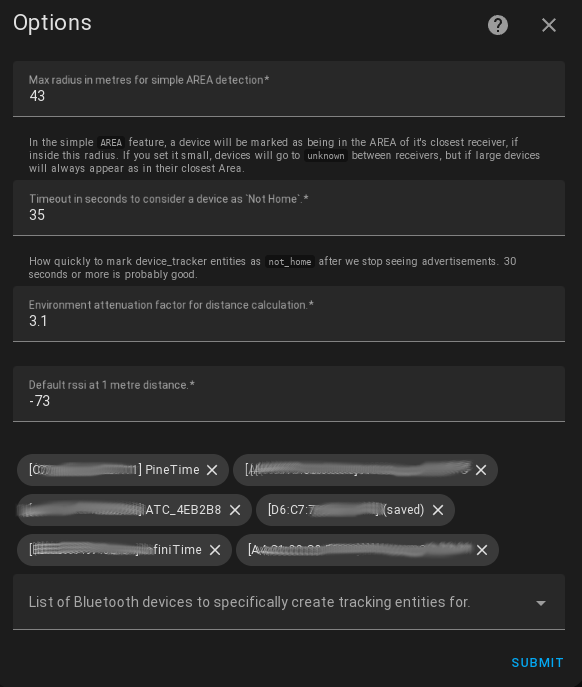
- Max radius in metres for simple AREA detectionIn the simple AREA feature, a device will be marked as being in the AREA of it's closest receiver, if inside this radius. If you set it small, devices will go to unknown between receivers, but if large devices will always appear as in their closest Area.
- Max Velocity in metres per second - ignore readings that imply movement away faster than this limit. 3m/s (10km/h) is good.If a reading implies a device is moving away faster than this, we ignore that reading. Humans normally walk at 1.4m/s, if they're holding scissors they move at 3m/s.
- Devtracker Timeout in seconds to consider a device as Not Home.How quickly to mark device_tracker entities as not_home after we stop seeing advertisements. 30 to 300 seconds is probably good.
- Update Interval - How often (in seconds) to update sensor readings.Shortening distances will still trigger immediately, but increasing distances will be rate limited by this to reduce how much your database grows.
- Smoothing Samples - how many samples to use for smoothing distance readings.How many samples to average distance smoothing. Bigger numbers make for slower distance increases. Shortening distances are not affected. 10 or 20 seems good.
- Attenuation - Environment attenuation factor for distance calculation/calibration.After setting ref_power at 1 metre, adjust attenuation so that other distances read correctly - more or less.
- Reference Power - Default rssi at 1 metre distance, for distance calibration.Put your most-common beacon 1 metre (3.28') away from your most-common proxy / scanner. Adjust ref_power until the distance sensor shows a lowest (not average) distance of 1 metre.
- Configured Devices - Select which Bluetooth devices or Beacons to track with Sensors.
- Device
- Scanner
- Save and CloseAfter you are happy with the calibration, check this box and click Submit. Your changes will be saved, and you can proceed to the next calibration step. Leave this box un-checked while you adjust and test the settings.
- AttenuationAfter adjusting the above settings for 1m distance readings, move the device further away (for example 5 metres) and adust the attenuation until the calculated distances match the physical distance between the scanner and device. Click submit to see the new distance estimations.
- Reference PowerTo calibrate this setting, place the device 1 metre from the scanner, and adjust the value until the figures above reflect that 1m distance. Note that values will only recompute after clicking submit, and a more-negative number will result in a lower distance
- Device
- Save and Close
- Per-Scanner RSSI OffsetsLeave at zero to accept the global default, or enter a non-zero number to offset the rssi reported by that scanner. Adjust until the estimated distance above matches the actual distance between that scanner and the selected transmitting device. Negative values will increase the distance, positive values will decrease it.
Texts from the code of agittins/bermuda.
Entities
- SensorsDistance, Area
Actions
- Dump DevicesReturns the internal data structure, optionally limited to the given address(es). Includes the rssi and other info from each scannerFields: Addresses, Configured Devices, Redact
Troubleshooting
- DiagnosticsDownloads a diagnostics file to attach to a bug report.
- Repair noticesNotices it can show in Settings, Repairs:Some Bluetooth Proxies don't have an AREA
From the README
- Area-based device location (ie, device-level room prescence) is working reasonably well.
- Creates sensors for Area and Distance for devices you choose
- Supports iBeacon devices, including those with randomised MAC addresses (like Android phones running HA Companion App)
- Supports IRK (resolvable keys) via the Private BLE Device core component. Once your iOS device (or Android!) is set up in Private BLE Device, it will automatically receive Bermuda sensors as well!
- Creates device_tracker entities for chosen devices, which can be linked to "Person"s for Home/Not Home tracking
- Configurable settings for rssi reference level, environmental attenuation, max tracking radius
- Provides a comprehensive json/yaml dump of devices and their distances from each bluetooth receiver, via the bermuda.dump_devices service.

Shows in Vulpo
Quick Toggle card, Chart card, Apple Watch, Control Center.Information
- Installs
- 10.4k sharing analytics
- GitHub stars
- 2.1k
- Connection
- Works locally
- Upkeep
- Updated in the last 6 months
- Version
- v0.8.7,
- Category
- Presence and location
- Kind
- Marketplace integration
- Needs
- Needs the Marketplace (HACS on 2026.10 and older)
- Domain
bermuda- Issues
- Report an issue