About
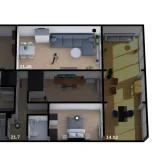
Easy Floorplan is a dashboard card that builds an interactive floorplan with a drag-and-drop editor. The editor is used to draw walls, snap doors and windows into place, and arrange furniture, text and devices, with undo and redo, copy and paste, and position locking. Devices linked to Home Assistant entities can be controlled from the plan, with lights and switches, sensor readings, and doors, windows and shutters shown as they open and close. Rooms can be linked to Home Assistant areas, and presence can be shown, including positions tracked from distance sensors. A plan can span several floors with a switcher that shows summary badges, and it can be shown flat in 2D or with raised walls and furniture in 3D. Lighting effects include colored lamp light, day and night dimming, and sunlight and moonlight, and it is installed through HACS or manually as a dashboard resource.
Automatic summary of the README of nicosandller/easy-floorplan. Something wrong, or are you the maintainer and want your own text here? Get in touch
Supports
From the Marketplace Installed through the Marketplace, formerly HACS.
Actively maintained Its author released or pushed a change in the last six months.
Setting it up
Install it from the Marketplace, then add a card of this type to a dashboard.
From the README
A Home Assistant Lovelace card for building an interactive floorplan with a visual drag-and-drop editor. Draw walls, place furniture and connect your devices to see and control your home in 2D or 3D.
20-second overview: draw walls and doors, connect a Home Assistant entity, control lights, and view the plan in 3D.
- Visual editing — draw walls, snap doors and windows into place, and arrange furniture, text and devices with undo/redo, copy/paste and position locking.
- Live devices — control lights and switches, show sensor readings, and follow doors, windows, shutters, awnings and curtains as they open and close. Device labels can sit on any side, or pick the…
- Lighting — colored light from your lamps and spots, day/night dimming, sunlight, moonlight and ambient daylight.
- Rooms and presence — zoom into rooms, link Home Assistant areas, show presence ripples and track positions from distance sensors.
- Multiple floors — switch between floors or navigate with a staircase.
- Floor summaries — aggregated floor badges (temp, humidity, presence, lights, windows) directly in the switcher.
- Furniture actions — give a piece a tap, hold or double-tap action. A round action icon marks it, or set showIcon: false to make the drawing itself the button. See actions on furniture.
- 2D and 3D views — display the same plan flat or with raised walls and furniture.
- Window sill height — draw floor-to-ceiling or high windows in 3D with sill. See Configuration.
Information
- GitHub stars
- 637
- Upkeep
- Updated in the last 6 months
- Version
- v3.1.0,
- Kind
- Dashboard card
- Needs
- Needs the Marketplace (HACS on 2026.10 and older)
- Issues
- Report an issue