Screenshots From the README of zubir2k/homeassistant-platerecognizer.
About
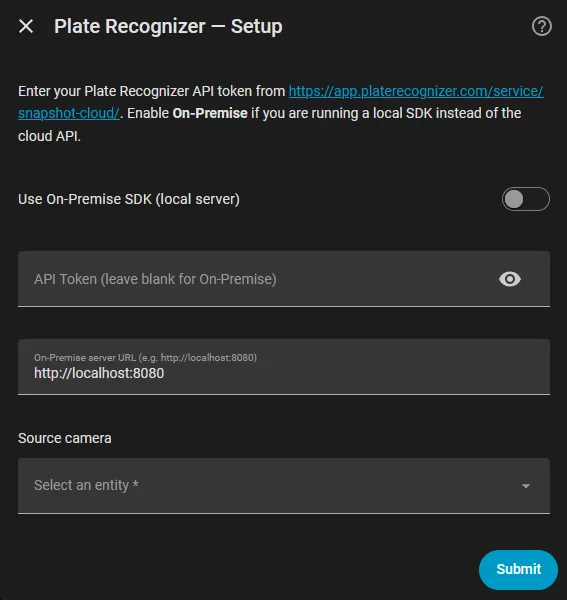
Plate Recognizer reads vehicle number plates from a Home Assistant camera using the Plate Recognizer service. It can use the vendor's cloud API or a self-hosted local SDK, and setup is done in the UI. Each camera becomes a device with a Scan button, a Last plate sensor, a Remaining calls sensor and an image of the last scanned frame. Scans run only when the button is pressed, for example from an automation. Options cover country hints, a watchlist of plates with near-match checking, and optional make, model and colour on paid plans. An event fires for every plate read, and saved frames can be written to a chosen folder.
Automatic summary of the README and code of zubir2k/homeassistant-platerecognizer. Something wrong, or are you the maintainer and want your own text here? Get in touch
Supports
Uses the vendor's cloud Needs an internet connection and an account with the vendor.
From the Marketplace Installed through the Marketplace, formerly HACS.
Actively maintained Its author released or pushed a change in the last six months.
Provides
- Sensors
Setting it up
Install it from the Marketplace and restart Home Assistant, then add it under Settings, Devices and services.
Add a camera
- Camera
- API token
- Use a local Plate Recognizer SDK
- Local SDK address
After setup
- Country hints (comma separated codes, e.g. my, sg)
- Watchlist plates (comma separated)
- Ignore plates that are not on a vehicle
- Only accept plates in the hinted country formats
- Include make, model and colour (paid plans)
- Folder for saved frames, e.g. /media/platerecognizer (blank to turn off)
- Keep a timestamped copy of every frame with a plate
- Save the last frame even when no plate is found
Texts from the code of zubir2k/homeassistant-platerecognizer.
Entities
- ButtonsScan
- ImagesLast frame
- SensorsLast plate, Remaining calls
From the README
A modern Home Assistant integration for Plate Recognizer — detect and read vehicle license plates from any HA camera using the Snapshot Cloud API or a self-hosted On-Premise SDK. No Docker required.
Talks directly to the Plate Recognizer API. The idea of a Plate Recognizer integration for Home Assistant was pioneered by @robmarkcole; this integration is a separate implementation built on config entries.
- ✅ UI setup — config flow and options flow, no YAML, no restart
- ✅ Scan button — button.press from any automation (e.g. on a Frigate car event)
- ✅ Last plate sensor — best plate as state, every read (score, country, vehicle, box) in attributes
- ✅ Last frame image — the scanned frame with plates outlined
- ✅ Remaining calls sensor — cloud API allowance left this month
- ✅ Watchlist — near-match (up to 2 characters off), plus on_watchlist in the event
- ✅ platerecognizer_plate_read event fired for every plate
- ✅ Cloud API or local SDK, make/model/colour for eligible plans
- ✅ Multi-camera — one device per camera

Shows in Vulpo
Button card, Chart card, Apple Watch.Information
- Installs
- 322 sharing analytics
- GitHub stars
- 3
- Connection
- Uses the vendor's cloud
- Upkeep
- Updated in the last 6 months
- Version
- v3.0.3,
- Category
- AI and voice, Image recognition
- Kind
- Marketplace integration
- Needs
- Needs the Marketplace (HACS on 2026.10 and older)
- Domain
platerecognizer- Issues
- Report an issue