

Siemens S7
On Home Assistant 2026.11 or newer? Open it in the Marketplace
- Installs
- 241 sharing analytics
- GitHub stars
- 44
- Connection
- Works locally
- Upkeep
- Updated in the last 6 months
- Version
- 8.0.0,
- Category
- Hubs and protocols, Building automation
- Kind
- Marketplace integration
- Brand
- Siemens
- Needs
- Needs the Marketplace (HACS on 2026.10 and older)
- Domain
s7plc- Issues
- Report an issue
Independent directory, made by the developer of Vulpo. Not affiliated with Home Assistant or the Open Home Foundation.
Screenshots From the README of xtimmy86x/ha-s7plc.
About
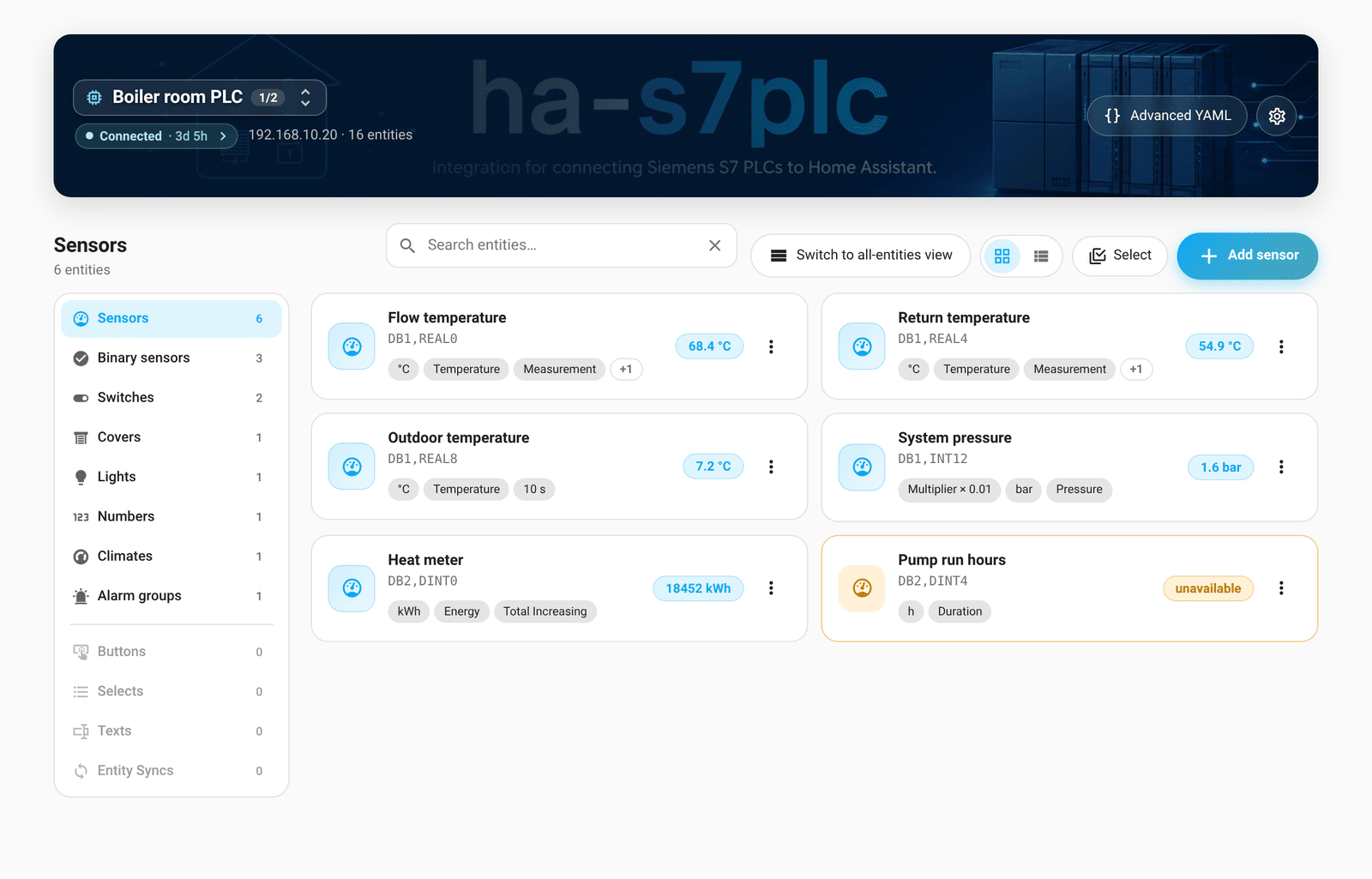
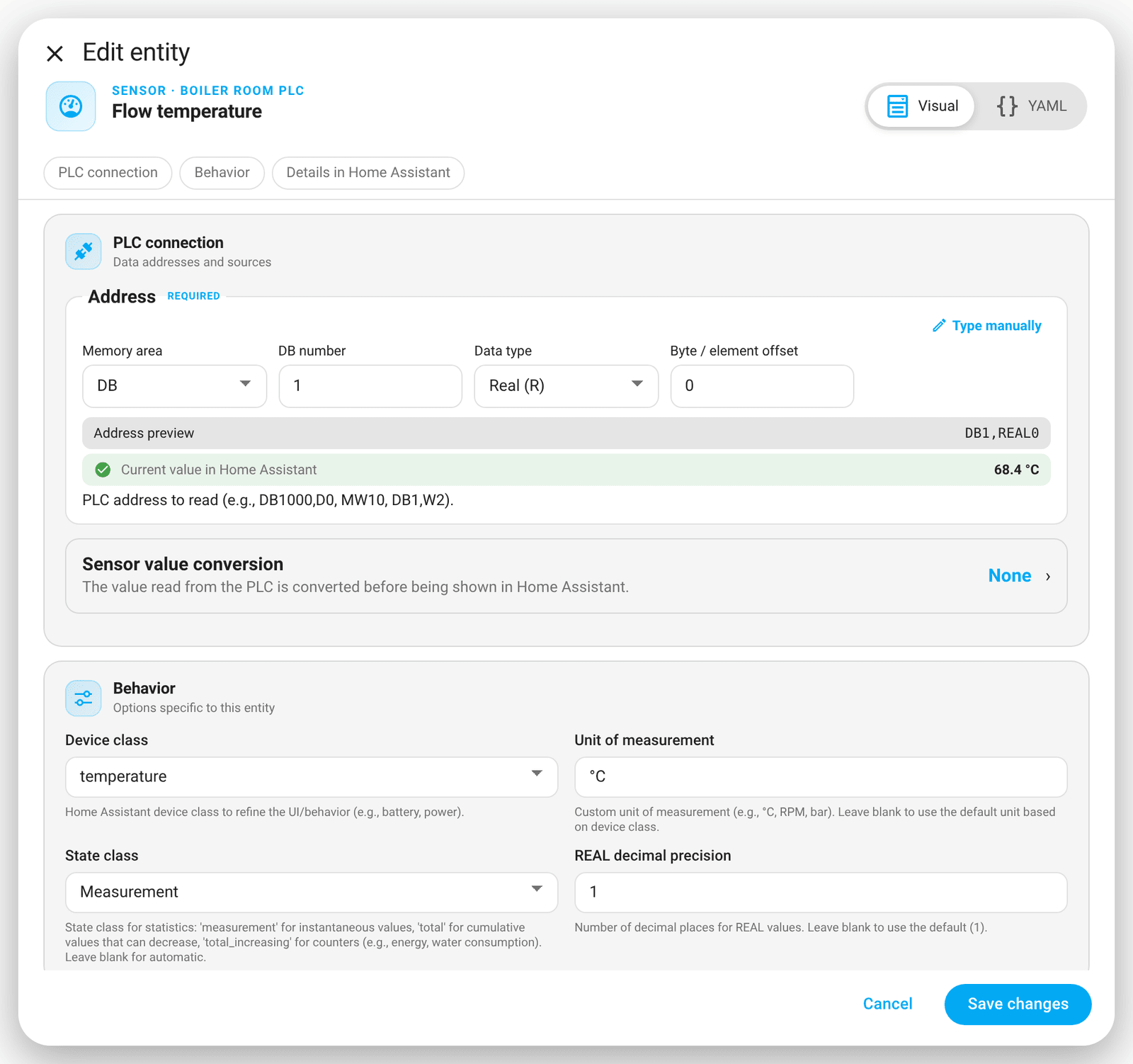
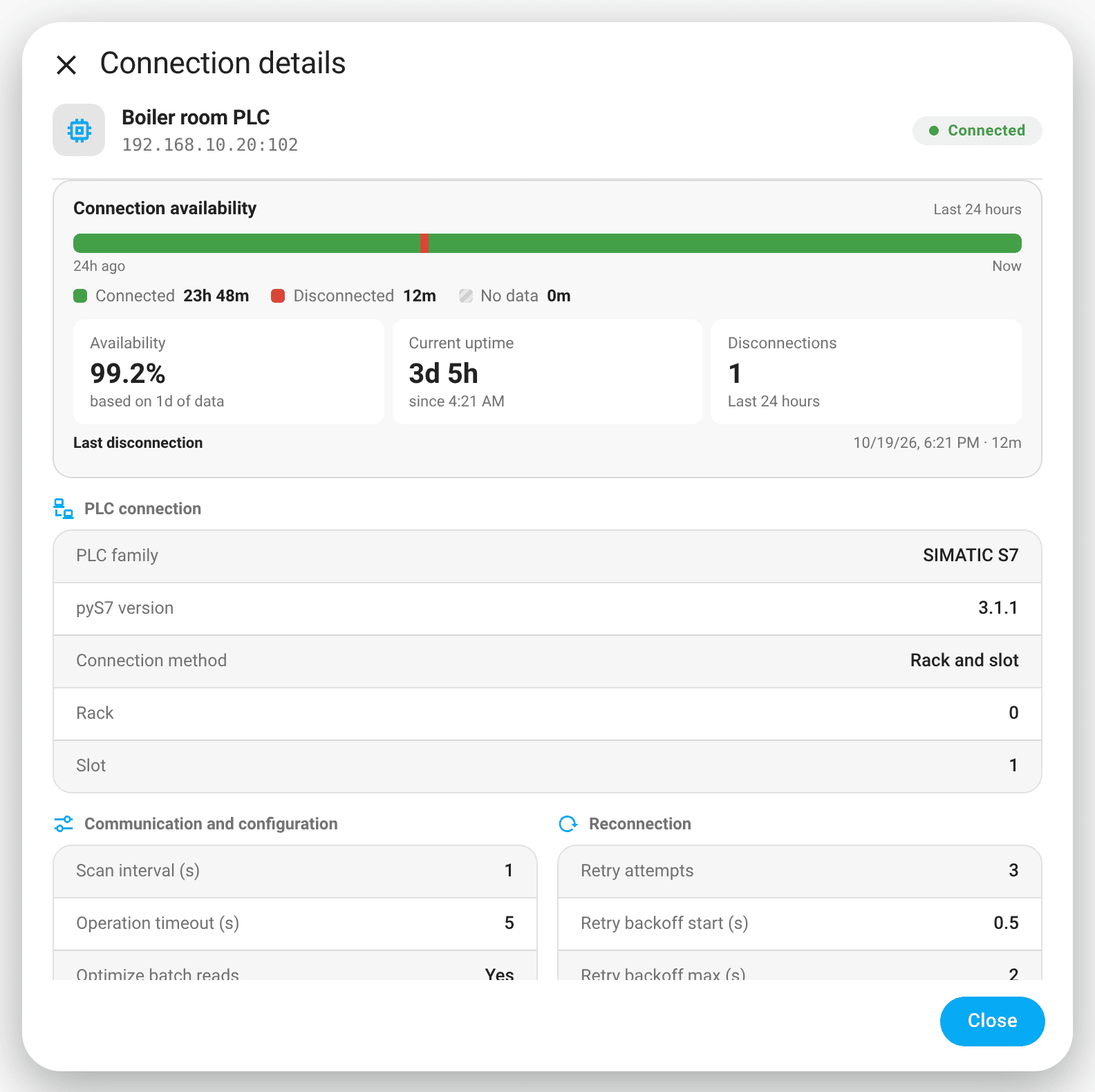
Siemens S7 is an integration that connects Home Assistant directly to Siemens S7 PLCs and Logo! controllers over the local network. It talks to the controller through the S7 protocol using the pys7 library, with no MQTT, REST or middleware in between. PLC addresses can be mapped to lights, switches, covers, buttons, climate, numbers, selects, texts, sensors and binary sensors, and any Home Assistant entity state can be pushed to PLC addresses. A connection uses either rack and slot or TSAP addressing, with adjustable scan interval, timeouts and retry settings. A side panel lists every PLC entity with visual and YAML editors, and a schedule card edits on and off times. Optional diagnostic sensors report connection health and communication statistics, and setup is done in the UI.
Automatic summary of the README and code of xtimmy86x/ha-s7plc. Something wrong, or are you the maintainer and want your own text here? Get in touch
Supports
Works locally Talks to your devices on your own network. No vendor cloud in between.
From the Marketplace Installed through the Marketplace, formerly HACS.
Actively maintained Its author released or pushed a change in the last six months.
Provides
- Lights
- Climate
- Covers
- Switches
- Sensors
Setting it up
Install it from the Marketplace and restart Home Assistant, then add it under Settings, Devices and services.
Choose Connection Type
- Connection Type
- PLC family
Connect to S7 PLC (Rack/Slot)
- NameA friendly name for the PLC (used in entity names).
- HostIP or hostname of the PLC.
- PortISO-on-TCP port, typically 102.
- RackCPU rack number (usually 0).
- SlotCPU slot number (e.g., 1 for S7-1200/1500).
- Connection typeS7 connection type (PG – programming, OP – operator panel, S7 Basic – basic connection).
- Scan interval (s)How often to poll the PLC, in seconds. Use decimal values for millisecond precision.
- Operation timeout (s)Maximum duration for a single read/write cycle before retrying.
- Retry attemptsHow many times to retry a failed PLC operation before giving up.
- Retry backoff start (s)Delay before the first retry attempt.
- Retry backoff max (s)Maximum delay between retry attempts.
- Optimize batch readsEnable optimized batch reads to improve performance. If you experience read errors, disable this option.
- Enable write batchingAutomatically group writes together. When multiple entities update simultaneously, writes are combined into a single PLC request (50ms window). Improves performance for scenes and bulk operations.
- Enable performance metricsEnable performance metrics. Collects and reports performance data for monitoring and optimization.
- Manual connection controlCreates a switch that can suspend the PLC connection and reconnection attempts.
Connect to S7 PLC (TSAP)
- NameA friendly name for the PLC (used in entity names).
- HostIP or hostname of the PLC.
- PortISO-on-TCP port, typically 102.
- Local TSAPLocal TSAP address (e.g., 01.00 or 03.00).
- Remote TSAPRemote TSAP address (e.g., 01.01 or 03.01).
- Connection typeS7 connection type (PG – programming, OP – operator panel, S7 Basic – basic connection).
- Scan interval (s)How often to poll the PLC, in seconds. Use decimal values for millisecond precision.
- Operation timeout (s)Maximum duration for a single read/write cycle before retrying.
- Retry attemptsHow many times to retry a failed PLC operation before giving up.
- Retry backoff start (s)Delay before the first retry attempt.
- Retry backoff max (s)Maximum delay between retry attempts.
- Optimize batch readsEnable optimized batch reads to improve performance. If you experience read errors, disable this option.
- Enable write batchingAutomatically group writes together. When multiple entities update simultaneously, writes are combined into a single PLC request (50ms window). Improves performance for scenes and bulk operations.
- Enable performance metricsEnable performance metrics. Collects and reports performance data for monitoring and optimization.
- Manual connection controlCreates a switch that can suspend the PLC connection and reconnection attempts.
After setup
- NameA friendly name for the PLC (used in entity names).
- HostIP or hostname of the PLC.
- PortISO-on-TCP port, typically 102.
- RackCPU rack number (usually 0).
- SlotCPU slot number (e.g., 1 for S7-1200/1500).
- Connection TypeType of S7 connection (PG for programming, OP for operator panel, S7 Basic for basic connection).
- Scan interval (s)How often to poll the PLC, in seconds. Use decimal values for millisecond precision.
- Operation timeout (s)Maximum duration for a single read/write cycle before retrying.
- Retry attemptsHow many times to retry a failed PLC operation before giving up.
- Retry backoff start (s)Delay before the first retry attempt.
- Retry backoff max (s)Maximum delay between retry attempts.
- Optimize batch readsEnable optimized batch reads to improve performance. If you experience read errors, disable this option.
- Enable write batchingEnable automatic batching of writes. When multiple entities update simultaneously, writes are grouped into a single PLC request (50ms window). Improves performance for scenes and bulk operations.
- Enable performance metricsEnable performance metrics. Collects and reports performance data for monitoring and optimization.
- PLC family
Texts from the code of xtimmy86x/ha-s7plc.
Entities
- Binary sensorsConnection
- SensorsConnection uptime, Connection count, Disconnection count, Total operations, Read count, Write count, Total errors, Success rate, Error rate, Avg read duration, Avg write duration, Operations per minute, and 2 more
- SwitchesEnable connection
Troubleshooting
- DiagnosticsDownloads a diagnostics file to attach to a bug report.
From the README
Home Assistant integration for Siemens S7 PLCs and Logo! controllers Direct + lightweight custom component using pys7. No MQTT • No REST • No middleware
- ⚡ Direct PLC communication over S7 protocol via pys7
- 🧩 Multiple entity types: light, dimmer light, switch, cover, button, binary_sensor, sensor, number, select, text, climate, and Entity Sync
- 🔌 Dual connection modes: Rack/Slot or TSAP addressing
- 🧮 Value multipliers: Scale raw PLC values before Home Assistant sees them
- 🪶 Lightweight: Minimal overhead, no broker/services required
- 🛠️ Full UI configuration: Set up and manage entirely from Home Assistant's UI
- 🖥️ Native side panel: Manage every PLC entity from the Home Assistant sidebar with visual and YAML editors, live states, and validation
- 🕒 Schedule dashboard card: Edit BCD WORD or HHMM on/off times with a visual card editor, automatically loaded with the integration (guide)
- 🔍 Optional auto-discovery: Pre-populates PLCs found on your local network
- 📄 S7 STRING support for text sensors
- 🔄 State synchronization: Bidirectional sync for switches and lights with physical controls
- 📤 Entity Sync: Push any Home Assistant entity state to PLC addresses in real-time

Shows in Vulpo
Light card, Quick Toggle card, Cover card, Climate card, Apple Watch, Control Center, Climate Live Activity.Information
- Installs
- 241 sharing analytics
- GitHub stars
- 44
- Connection
- Works locally
- Upkeep
- Updated in the last 6 months
- Version
- 8.0.0,
- Category
- Hubs and protocols, Building automation
- Kind
- Marketplace integration
- Brand
- Siemens
- Needs
- Needs the Marketplace (HACS on 2026.10 and older)
- Domain
s7plc- Issues
- Report an issue










