On Home Assistant 2026.11 or newer? Open it in the Marketplace
- Installs
- 81 sharing analytics
- GitHub stars
- 17
- Connection
- Works locally
- Upkeep
- Updated in the last 6 months
- Version
- 0.27.17,
- Category
- Productivity and information, Calendars and to-dos
- Kind
- Marketplace integration
- Needs
- Needs the Marketplace (HACS on 2026.10 and older)
- Domain
device_sentinel- Issues
- Report an issue
Independent directory, made by the developer of Vulpo. Not affiliated with Home Assistant or the Open Home Foundation.
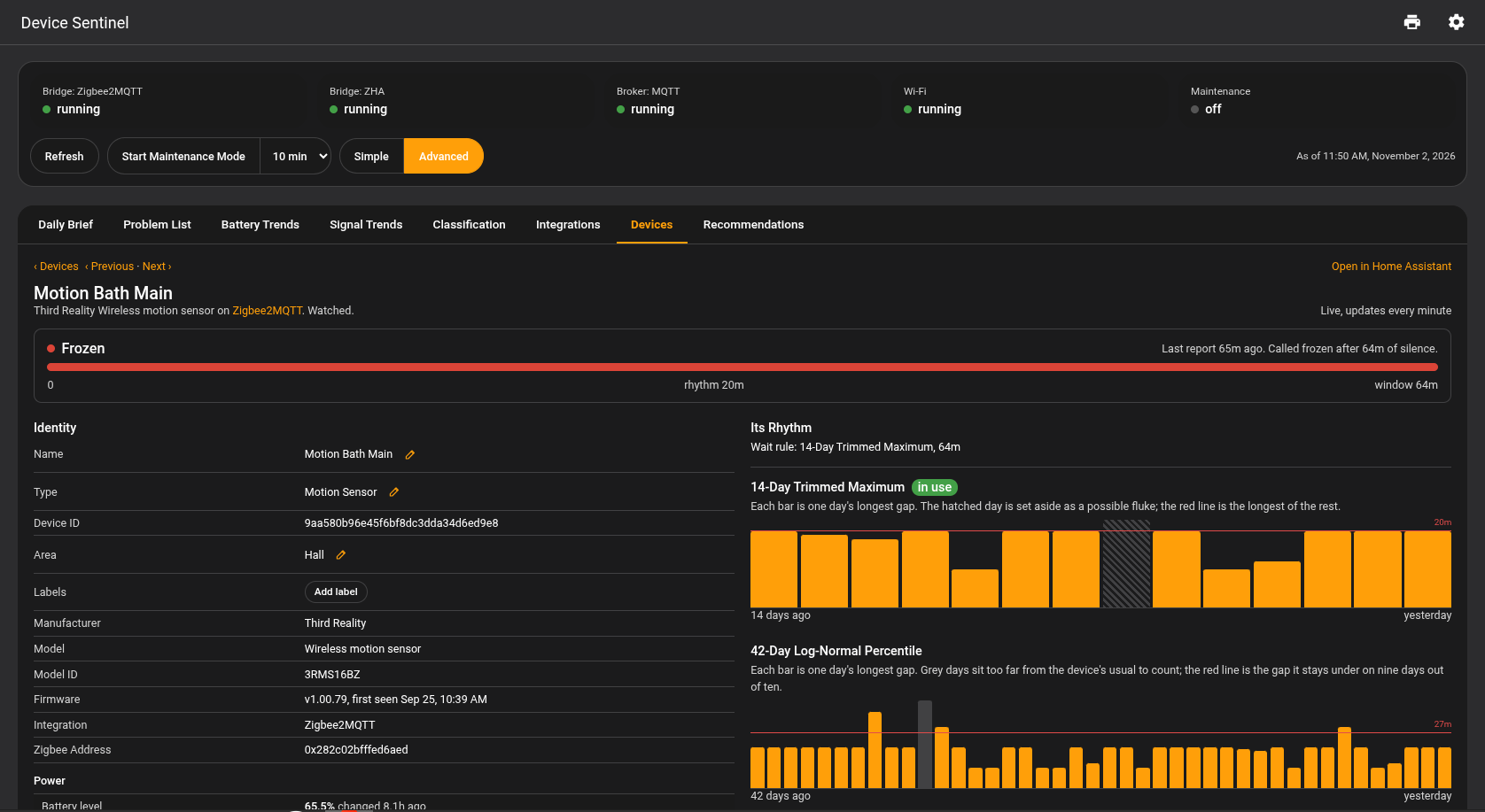
Screenshots From the README of TheThinkingHome/device_sentinel.
About
Device Sentinel detects frozen sensors, failing batteries and weakening radio links in Home Assistant. It learns how often each device normally reports, so a chatty motion sensor is flagged within minutes while a twice-a-day rain gauge gets a longer window. Batteries are judged against a chosen level and against how fast they drain, and radio links against that device's own baseline. All faults collect in one to-do list, and an outage of a coordinator, broker or Wi-Fi network is reported as a single failure instead of one alert per silent device. It also adds a sidebar dashboard, a daily brief by email or push, quiet hours, muting by integration, label or device, and buttons for maintenance mode and regenerating reports. It works locally, is set up in the UI, and is marked as pre-release.
Automatic summary of the README and code of TheThinkingHome/device_sentinel. Something wrong, or are you the maintainer and want your own text here? Get in touch

Shows in Vulpo
Button card, Chart card, Apple Watch.Supports
- Works locallyTalks to your devices on your own network. No vendor cloud in between.
- From the MarketplaceInstalled through the Marketplace, formerly HACS.
- Actively maintainedIts author released or pushed a change in the last six months.
Provides
- Sensors
Setting it up
Install it from the Marketplace and restart Home Assistant, then add it under Settings, Devices and services.
After setup
- High-Priority TargetsSent all alerts, at any hour, Quiet Hours included. The Daily Brief is not sent here; it goes only to Send the Full Brief To.
- Normal-Priority TargetsSent all alerts, except during Quiet Hours. The Daily Brief is not sent here; it goes only to Send the Full Brief To.
- Create a Persistent NotificationShows a single card on the dashboard with the current state of the home, grouped by kind.
- Enable Quiet HoursDuring these hours, Normal-Priority Targets are sent nothing and High-Priority Targets are still sent all alerts. The Daily Brief reports what happened.
- Start
- End
- When to Send It
- How OftenThe brief file is written either way; this decides whether it is sent.
- Send the Full Brief ToEmail or other services that can carry the whole document.
- Links in ReportsDevice names in the daily brief can become links to that device's page on the Device Sentinel dashboard. The brief is emailed and can be forwarded, so a link carries your house's address with it. Choose the address the links use, or None for no links. If the internal or external URLs are not set, they can be configured in Home Assistant's Network Settings.
- Integrations to ExcludeEvery device from a ticked integration is set aside.
- Devices to ExcludeEach device picked here is set aside on its own, by the same rules.
- Globally Muted IntegrationsMutes every device the integration owns. Its devices will be learned and recorded, but will not appear on the Problem List or in any reports or notifications.
- Globally Muted LabelsThe system mutes any device carrying these labels. A label on one entity mutes nothing. You can manage this mute without ever opening this dialog. Simply apply the label on the hardware's own device page, and Device Sentinel stops reporting on it.
- Globally Muted DevicesThis applies the exact same muting rules as the lists above, but targets individual pieces of hardware. Add a specific device here to take it off the Problem List and mute its reports and notifications.
- Low Battery ThresholdA battery at or below this level is flagged low.
- Days Till Low WarningA falling battery is warned about this many days before it reaches your low threshold. Only a battery at or under three times the threshold is judged, and its date comes from its own history as a range: a battery falling faster each week is warned about when the near end of the range is inside these days, and one falling at a steady pace is listed under Batteries to Watch in the Daily Brief and on Battery Trends. A battery holding its charge is never warned about, and a cell already below your threshold is not flagged twice.
- Integrations Muted for Battery ReportingOne tick covers every battery that integration owns (phones under mobile_app, for example).
- Labels Muted for Battery ReportingAny device carrying one of these labels stops being reported for a low battery. Set the label on the device's own page and it applies here without opening this dialog.
- Devices Muted for Battery ReportingEvery listed device has a tracked battery. Checked devices are muted for battery reporting.
- Bad Day Drop, LQISets the fall in LQI points required to flag a bad signal day. A day counts as bad only when it breaches both this threshold and the sensitivity setting below. Raise it to flag fewer days.
- Bad Day Drop, RSSISets the same fall in decibels for devices that report in dBm. It works exactly like the LQI slider above.
- Bad Day SensitivityScales the required drop against the device's own historical jitter, which keeps erratic sensors from being flagged daily. A steady sensor is governed by the drop sliders above. At a setting of 4, a jittery sensor that routinely swings 10 points needs a 40-point plunge to trigger. Lower it to flag more days.
- Days of Signal HistoryThis setting defines how many past days are used to calculate what is typical for a device. Today's signal is compared against that typical level, and a fall below it, as set above, is flagged.
- Integrations Muted for Signal ReportingEvery device from a ticked integration stops being reported for signal.
- Labels Muted for Signal ReportingDevices carrying a ticked label stop being reported for signal.
- Devices Muted for Signal ReportingA ticked device stops being reported for signal. It keeps recording, so re-including it brings its history back instantly.
- Delta Low (Fast-Device Grace, Minutes)The grace a fast device gets, in minutes: how long past its normal it may go quiet before it counts as frozen.
- Delta High (Slow-Device Grace, Hours)The grace a slow device gets, in hours. The two deltas shape the whole curve between them, so a mid-fleet device sits between these.
- Integrations Muted for Freeze ReportingEvery device from a ticked integration stops being called frozen or not reported.
- Labels Muted for Freeze ReportingDevices carrying a ticked label stop being called frozen or not reported. Set the label on the device's own page and it applies here.
- Devices Muted for Freeze ReportingA ticked device is never called frozen or not reported. It keeps its clock and rhythm, so re-including it is instant.
- Labels Muted for Unavailable ReportingDevices carrying a ticked label stop being called unavailable or dropping out. Set the label on the device's own page and it applies here.
- Devices Muted for Unavailable ReportingA ticked device is never called unavailable or dropping out. It keeps its clock and rhythm, so re-including it is instant.
- Dashboard: Simple or AdvancedThe dashboard each window opens in. Simple shows what is broken and what to do about it; Advanced adds the trends, charts and setup. The switch on the dashboard changes it until you leave the dashboard.
- Repeat Offender ThresholdHow many unexplained interruptions in a week put a device in the daily brief's Repeat Offenders section. An interruption is unexplained when no restart, outage, reload, or pairing window accounts for it. Lower names devices sooner; higher waits for a stronger pattern.
- Storage Write IntervalThe amount of time routine activity is held in memory before it is written to disk. Set longer for slower hardware and hubs writing data to an SD card. Longer risks losing timer data should your system suffer a power loss. Events are written when they happen, so risk is minimal.
- How Much History to KeepHow many days of daily battery, signal, and unavailable and freeze gap records are kept for studying long trends. 30 days is necessary, but some trends can only be seen with longer time periods.
- Maintenance Window in MinutesHow long the Maintenance Mode button declares you at work on the hardware. A device that recovers inside the window is treated as your fix, and its silence is not learned as normal.
- Trim Integration HistoryErases the learned history of every device from the selected integrations.
- Trim Device HistoryErases the learned history of any devices selected here.
- Your IoT WiFi NetworksThe networks your devices and sensors use to communicate with Home Assistant. Device Sentinel cannot tell which network any of your devices use. If you pick more than one, when any one of them goes down, the integration will report that WiFi is unavailable. Using a single network for every one of your devices is recommended for optimum performance.
- Confirmation DelayThe number of seconds a network becomes unavailable before an outage is reported. A router rebooting overnight goes missing for about thirty seconds.
- Hardware to StudyOnly hardware found on your system appears here, and only where support is still being built. Choosing something changes nothing about how Device Sentinel behaves.
Texts from the code of TheThinkingHome/device_sentinel.
Entities
- ButtonsRegenerate Reports, Maintenance Mode
- SensorsStatus, Devices: Watched, Devices: Learned, Devices: Set Aside, Signal: Rails, Signal: Weak, Battery: Low, Device: Frozen, Maintenance: Ends, Broker: MQTT, Bridge: WiFi, Bridge: Zigbee2MQTT, and 2 more
- To-do listsProblem List
Troubleshooting
- DiagnosticsDownloads a diagnostics file to attach to a bug report.
- Repair noticesNotices it can show in Settings, Repairs:A Device Sentinel Notification Target No Longer Exists, Device Sentinel Restored Its Storage, Device Sentinel Repaired Its Storage, Device Sentinel Repaired Its Storage Structure, Two Devices Share One Network Address
From the README
Device Sentinel tells you when a device in your house has stops reporting, has a falling battery, or a low signal, even while Home Assistant still shows its last value.
Information
- Installs
- 81 sharing analytics
- GitHub stars
- 17
- Connection
- Works locally
- Upkeep
- Updated in the last 6 months
- Version
- 0.27.17,
- Category
- Productivity and information, Calendars and to-dos
- Kind
- Marketplace integration
- Needs
- Needs the Marketplace (HACS on 2026.10 and older)
- Domain
device_sentinel- Issues
- Report an issue