

ThermIQ MQTT Integration
ThermIQ
On Home Assistant 2026.11 or newer? Open it in the Marketplace
- Installs
- 58 sharing analytics
- GitHub stars
- 29
- Connection
- Works locally
- Upkeep
- Updated in the last 6 months
- Version
- v3.1.3,
- Category
- Hubs and protocols
- Kind
- Marketplace integration
- Needs
- Needs the Marketplace (HACS on 2026.10 and older)
- Domain
thermiq_mqtt- Issues
- Report an issue
Independent directory, made by the developer of Vulpo. Not affiliated with Home Assistant or the Open Home Foundation.
Screenshots From the README of ThermIQ/thermiq_mqtt-ha.
About
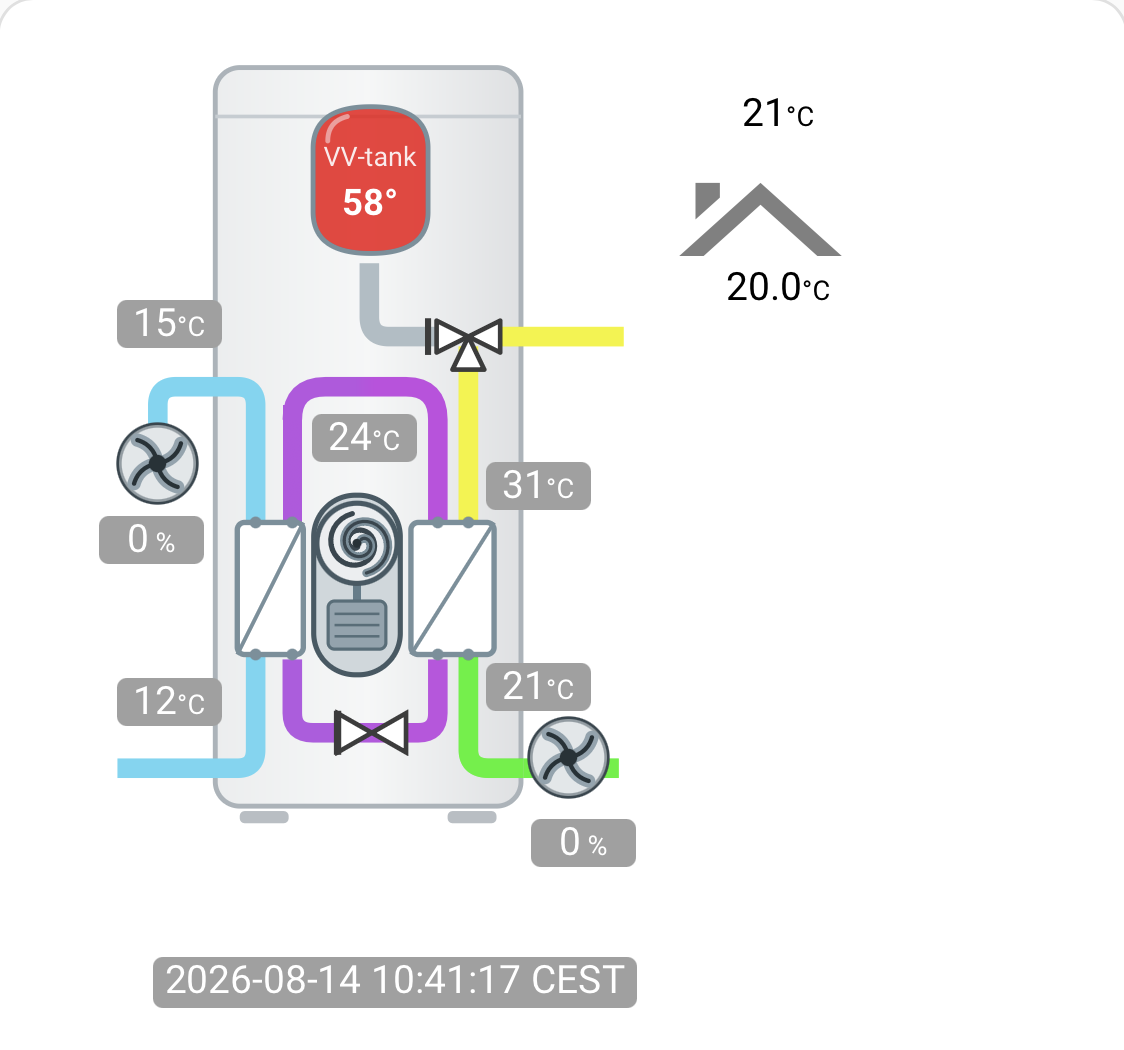
ThermIQ MQTT Integration controls and logs Thermia heat pumps through the ThermIQ-MQTT interface. It connects locally over MQTT and uses the ThermIQ-MQTT and ThermIQ-Room2 hardware interface to monitor and control a Thermia or Danfoss heat pump. It adds binary sensors, numbers, selects, sensors and switches to Home Assistant. Settings cover the MQTT node name, the language, hexadecimal register format in MQTT, an MQTT debug mode, and a request to migrate old data in the recorder database. The repository also ships a dashboard card with an animated widget, where pipe colour follows temperature. It is set up in the UI and needs the Marketplace, which is HACS on 2026.10 and older.
Automatic summary of the README and code of ThermIQ/thermiq_mqtt-ha. Something wrong, or are you the maintainer and want your own text here? Get in touch
Supports
Works locally Talks to your devices on your own network. No vendor cloud in between.
From the Marketplace Installed through the Marketplace, formerly HACS.
Actively maintained Its author released or pushed a change in the last six months.
Provides
- Switches
- Sensors
Setting it up
Install it from the Marketplace and restart Home Assistant, then add it under Settings, Devices and services.
Heatpump config
- Unique ID
- MQTT Nodename
- Language
- Use hexformat for registers in MQTT
- Enable MQTT debug by adding '_dbg' to Nodename
- Request migration of old data in recorder database (may take time)
After setup
- MQTT Nodename
- Language
- Use hexformat for registers in MQTT
- Enable MQTT debug by adding '_dbg' to Nodename
- Request migration of old data in recorder database (may take time)
Texts from the code of ThermIQ/thermiq_mqtt-ha.
From the README
The animated widget: pipe colour tracks temperature all the way round the machine. A screenshot from a live installation, with the pump idle — when it runs, the flows animate and the compressor turns. This integration allows you to use the ThermIQ-MQTT and ThermIQ-Room2 hardware interface to control and monitor your Thermia or Danfoss heatpump from Home Assistant. It is actively supported both here and at Thermiq.net
Please support the continous development by buying a ThermiQ-room2 from ThermIQ, we are a small company and Your support makes a difference! Get the neccessary hardware from Thermiq.net, where you also can read more about our products and background.

Shows in Vulpo
Quick Toggle card, Select card, Chart card, Apple Watch, Control Center.Information
- Installs
- 58 sharing analytics
- GitHub stars
- 29
- Connection
- Works locally
- Upkeep
- Updated in the last 6 months
- Version
- v3.1.3,
- Category
- Hubs and protocols
- Kind
- Marketplace integration
- Needs
- Needs the Marketplace (HACS on 2026.10 and older)
- Domain
thermiq_mqtt- Issues
- Report an issue










