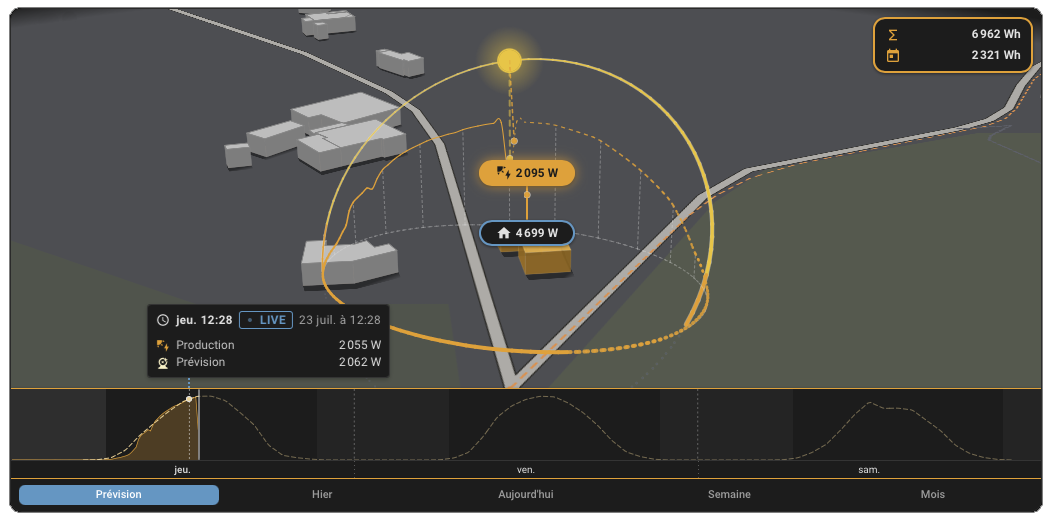
Screenshots From the README of ReikanYsora/Helios-Forecast.
About
Helios Forecast is an integration that predicts solar production and corrects itself against what the installation actually produces. Each panel line is described by tilt, azimuth and peak power, with optional inverter limits and a sun tracker setting, and it is configured in the UI. It adds sensors for current power, next hour, daily energy and peaks, energy left today, and a forecast reliability score, and it feeds a forecast into the Energy dashboard. Learning needs a cumulative energy sensor in kWh for production, and a curtailment signal can keep held-back hours from being learned as low output. Optional battery settings turn on a projected battery state of charge. Two actions return the forecast in 15-minute steps with a P10/P90 band, and the battery projection for 48 hours, for use in automations. It relies on the vendor's cloud and offers an optional public accuracy benchmark.
Automatic summary of the README and code of ReikanYsora/Helios-Forecast. Something wrong, or are you the maintainer and want your own text here? Get in touch
Supports
Uses the vendor's cloud Needs an internet connection and an account with the vendor.
From the Marketplace Installed through the Marketplace, formerly HACS.
Actively maintained Its author released or pushed a change in the last six months.
Provides
- Sensors
Setting it up
Install it from the Marketplace and restart Home Assistant, then add it under Settings, Devices and services.
Helios Forecast: panel line
- Name (e.g. South roof)
- Tilt (degrees, 0 = flat, 90 = vertical)
- Azimuth (degrees from north, 90 = east, 180 = south, 270 = west)
- Peak power (kWp)
- Inverter max output for this line (kW, optional)
- Sun tracker
- Latitude (optional)
- Longitude (optional)
- Inverter max output (kW, optional)
- PV production energy sensor (kWh, for the learned correction)A cumulative energy sensor (kWh), e.g. your inverter's or energy meter's total production. A power sensor (W) will not work: it has no long-term sum statistics, so the learning and the reliability index would stay off.
- Today-trend reference hour (0-23, default 6)
- Add another panel line
- Battery usable capacity (kWh)
- Battery state of charge sensor (%)Fill in the capacity and this sensor to turn on the battery state-of-charge projection. Home consumption is taken from your Energy dashboard, so it needs no sensor here.
- Battery max charge power (kW, optional)
Helios Forecast: additional panel line
- Tilt (degrees, 0 = flat, 90 = vertical)
- Azimuth (degrees from north, 90 = east, 180 = south, 270 = west)
- Peak power (kWp)
- Inverter max output for this line (kW, optional)
- Sun tracker
- Latitude override (optional)
- Longitude override (optional)
- Add another panel line
After setup
- Latitude (optional)
- Longitude (optional)
- Inverter max output (kW, optional)
- PV production energy sensor (kWh, for the learned correction)A cumulative energy sensor (kWh), e.g. your inverter's or energy meter's total production. A power sensor (W) will not work: it has no long-term sum statistics, so the learning and the reliability index would stay off.
- Today-trend reference hour (0-23, default 6)
- Battery usable capacity (kWh)
- Battery state of charge sensor (%)Fill in the capacity and this sensor to turn on the battery state-of-charge projection. Home consumption is taken from your Energy dashboard, so it needs no sensor here.
- Battery max charge power (kW, optional)
- Battery max discharge power (kW, optional)
- Battery reserve, minimum state of charge (%, default 10)
- Battery round-trip efficiency (%, default 90)
- Curtailment signal (binary sensor, input boolean or switch, optional)On while your inverter is being held back for a reason the sky cannot explain: a full battery, a zero-export rule, a grid limit. The hours it marks are not learned as low production. Without it, a full battery is still detected from the state of charge sensor and the inverter cap.
- Tilt (degrees, 0 = flat, 90 = vertical)
- Azimuth (degrees from north, 90 = east, 180 = south, 270 = west)
- Peak power (kWp)
- Inverter max output for this line (kW, optional)
- Sun tracker
- Latitude override (optional)
- Longitude override (optional)
- Remove this panel line
- Add another panel line
- Contribute to the public accuracy benchmark (optional)
Texts from the code of ReikanYsora/Helios-Forecast.
Actions
- Get forecastReturns the full production forecast (today onward, one point per 15 minutes, each with the predicted watts and the P10/P90 confidence band) as response data, for use in automations.Fields: Installation
- Get battery SoC forecastReturns the projected battery state of charge for the next 48 hours (one point per 15 minutes) as response data, for use in automations.Fields: Installation
Troubleshooting
- DiagnosticsDownloads a diagnostics file to attach to a bug report.
- Repair noticesNotices it can show in Settings, Repairs:Location out of range, Location far from your Home Assistant home, No panel line, Inverter limit looks like watts, Inverter limit well below the panels, No production sensor: the forecast cannot learn, Trend reference hour out of range, Battery: capacity set but no state of charge sensor, Battery: state of charge sensor set but no capacity, Battery capacity out of range, Battery charge or discharge power implausible, Battery reserve out of range, Battery efficiency out of range, Production sensor not found, Production sensor is not a cumulative energy sensor
From the README
A solar forecast that learns from your panels.
A Home Assistant integration that predicts your PV production, corrects itself against what your installation really produces, and publishes the result where Home Assistant already knows how to show it.

Shows in Vulpo
Chart card, Apple Watch.Information
- Installs
- 2.1k sharing analytics
- GitHub stars
- 276
- Connection
- Uses the vendor's cloud
- Upkeep
- Updated in the last 6 months
- Version
- 2026.9.6,
- Category
- Weather and alerts, Forecasts
- Kind
- Marketplace integration
- Needs
- Needs the Marketplace (HACS on 2026.10 and older)
- Domain
helios_forecast- Issues
- Report an issue