
ZHA 🧰 Toolkit
mdeweerd
On Home Assistant 2026.11 or newer? Open it in the Marketplace
- Installs
- 3.4k sharing analytics
- GitHub stars
- 310
- Connection
- Works locally
- Upkeep
- Updated in the last 6 months
- Version
- v1.2.5,
- Category
- Hubs and protocols, Wireless protocols
- Kind
- Marketplace integration
- Needs
- Needs the Marketplace (HACS on 2026.10 and older)
- Domain
zha_toolkit- Issues
- Report an issue
Independent directory, made by the developer of Vulpo. Not affiliated with Home Assistant or the Open Home Foundation.
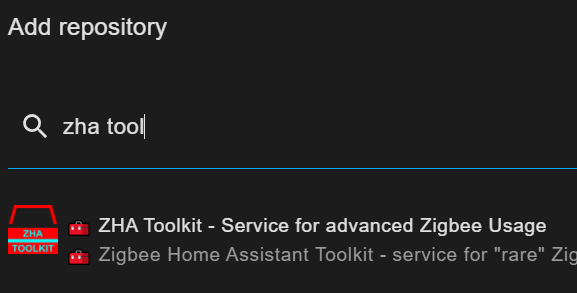
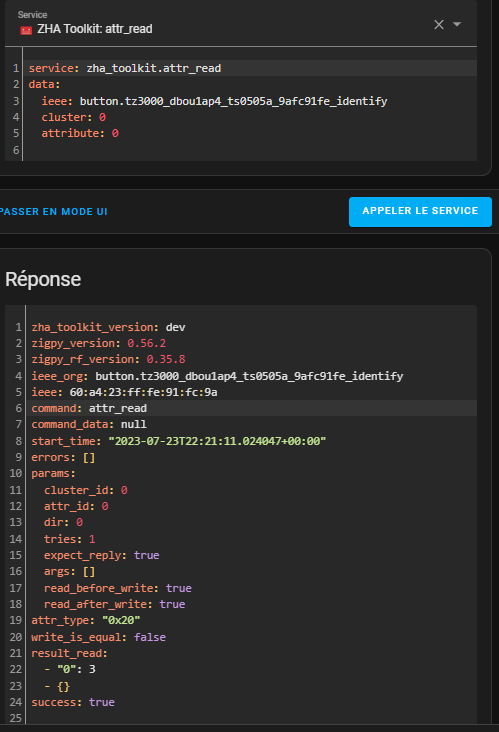
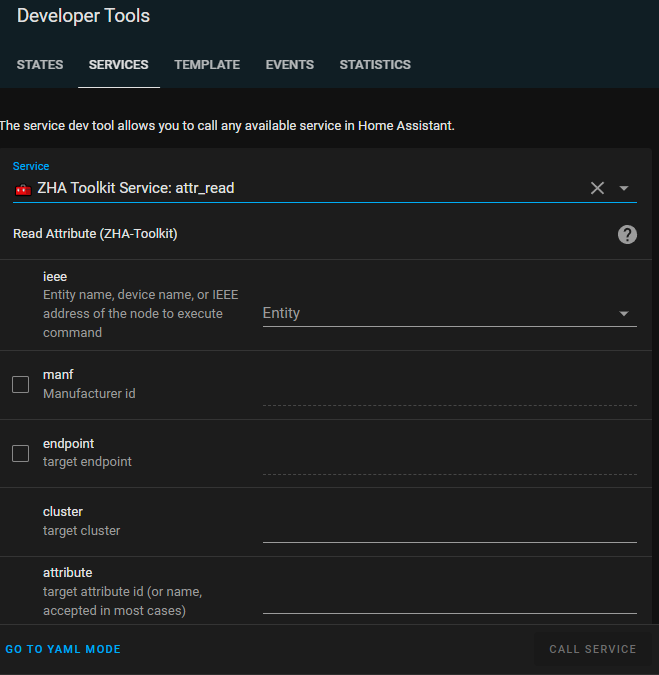
Screenshots From the README of mdeweerd/zha-toolkit.
About
ZHA 🧰 Toolkit is an integration that runs rare low-level Zigbee operations through ZHA. It adds actions to Home Assistant for reading and writing Zigbee attributes, binding and unbinding clusters, managing device groups, and configuring attribute reporting. Other actions scan routes and neighbours, get a device's binding table, ping a device, and make ZHA re-interrogate a device as on a new join. Coordinator data can be backed up for ZNP and EZSP adapters, and a blueprint covers a daily ZNP backup. Its single service runs different commands, so each can be used once from developer tools or scheduled in an automation. It works locally and is added through the Marketplace, then enabled in the configuration file.
Automatic summary of the README and code of mdeweerd/zha-toolkit. Something wrong, or are you the maintainer and want your own text here? Get in touch
Supports
Works locally Talks to your devices on your own network. No vendor cloud in between.
From the Marketplace Installed through the Marketplace, formerly HACS.
Actively maintained Its author released or pushed a change in the last six months.
Setting it up
Install it from the Marketplace and restart Home Assistant. It is then set up in configuration.yaml.
Actions
- Execute any zha toolkit serviceExecute ZHA Toolkit service (Examine the documentation or code to know which parameters are needed)Fields: Command name, Device Reference, Command data, Manufacturer Id, Command Id, Target Endpoint, Destination Endpoint, Target Cluster, Attribute Id or Name, Attribute Type
- Add GroupAdd group to endpoint groups list of device. May be equivalent to add_to_groupFields: Device Reference, Target Endpoint, Group Id, Tries, Success Event Name, Fail Event Name, Done Event Name, Exception When Failure
- Add Device to GroupAdd device to groupFields: Device Reference, Target Endpoint, Removed Group Id, Tries, Success Event Name, Fail Event Name, Done Event Name, Exception When Failure
- Scan all Routes and NeighboursScan for all routes and neighbours, results saved to /homeassistant/scans/...Fields: Success Event Name, Fail Event Name, Done Event Name, Exception When Failure, Expect Reply
- Read AttributeRead AttributeFields: Device Reference, Manufacturer Id, Target Endpoint, Target Cluster, Attribute Id or Name, Tries, State Id, State Attribute, State Value Template, Force Update
- Write AttributeWrite AttributeFields: Device Reference, Manufacturer Id, Target Endpoint, Target Cluster, Attribute Id or Name, Attribute Type, Attribute Value, Use Cache, Tries, State Id
- Backup Coordinator DataBackup coordinator data (znp, bellows/ezsp)Fields: Backup File Suffix, Success Event Name, Fail Event Name, Done Event Name, Exception When Failure, Expect Reply
- Bind ClusterBind clusters from ieee device to command_data deviceFields: Device Reference, Bind To Device Reference, Target Endpoint, Destination Endpoint, Target Cluster, Tries, Success Event Name, Fail Event Name, Done Event Name, Exception When Failure
- Bind Clusters From Device to DeviceBind clusters from ieee device to command_data deviceFields: Device Reference, Target Binding Group, Target Endpoint, Target Cluster, Tries, Success Event Name, Fail Event Name, Done Event Name, Exception When Failure, Expect Reply
- Get Binding TableGet binding table from device.Fields: Device Reference, Tries, Success Event Name, Fail Event Name, Done Event Name, Exception When Failure, Expect Reply
- Remove All Bindings from DeviceRemove (Unbind) all bindings from deviceFields: Device Reference, Remove Bindings with This Device, Target Endpoint, Target Cluster, Tries, Success Event Name, Fail Event Name, Done Event Name, Exception When Failure, Expect Reply
- Configure Attribute ReportingConfigure attribute reporting. You can set a high value for tries (100 or more) for sleepy devices."Fields: Device Reference, Target Endpoint, Target Cluster, Attribute Id or Name, Minimum Report Interval, Maximum Report Interval, Minimum Reportable Change, Manufacturer Id, Tries, Success Event Name
- Read Report ConfigurationRead attribute report configuration You can set a high value for tries (100 or more) for sleepy devices."Fields: Device Reference, Target Endpoint, Target Cluster, Attribute Id or Name, Manufacturer Id, Tries, Success Event Name, Fail Event Name, Done Event Name, Exception When Failure
- Backup Ezsp CoordinatorBackup coordinator data (bellows/ezsp)Fields: Backup File Suffix, Success Event Name, Fail Event Name, Done Event Name, Exception When Failure, Expect Reply
- Get Groups Set On EndpointGet groups set on the endpoints of the deviceFields: Device Reference, Target Endpoint, Tries, Success Event Name, Fail Event Name, Done Event Name, Exception When Failure
- Scan Device's Routes and NeighboursScan for all routes and neighbours, results saved to /homeassistant/scans/...Fields: Device Reference, Success Event Name, Fail Event Name, Done Event Name, Exception When Failure, Expect Reply
- Get Groups for ZLL ClusterGet groups for zll_cluster (if present)Fields: Device Reference, Tries, Success Event Name, Fail Event Name, Done Event Name, Exception When Failure
- Set/Update Home Assistant StateSet/update a Home Assistant stateFields: Attribute Value, Tries, state_id, State Attribute, State Value Template, Allow Create, Success Event Name, Fail Event Name, Done Event Name, Exception When Failure
- Handle JoinHandle join (ZHA should re-interrogate the device as on new join)Fields: Device Reference, Short Network Address
- Ping DevicePing deviceFields: Device Reference, Success Event Name, Fail Event Name, Done Event Name, Exception When Failure, Expect Reply
From the README
ZHA Toolkit (Zigbee Home Assistant Toolkit) helps go beyond some limitations when using the
in Home Assistant (an open source home automation software). It does so by providing extra methods to execute Zigbee requests and helps bridge between ZHA functionality and Home Assistant.
- Reads Zigbee attributes into Home Assistant states/attributes
- Daily ZNP Coordinator backup (See blueprint)
- Provides "Low level" access to most Zigbee commands (read/write/(un)bind/report/cmd/discover)
Information
- Installs
- 3.4k sharing analytics
- GitHub stars
- 310
- Connection
- Works locally
- Upkeep
- Updated in the last 6 months
- Version
- v1.2.5,
- Category
- Hubs and protocols, Wireless protocols
- Kind
- Marketplace integration
- Needs
- Needs the Marketplace (HACS on 2026.10 and older)
- Domain
zha_toolkit- Issues
- Report an issue










