Screenshots From the README of AboveColin/HA-Jev.
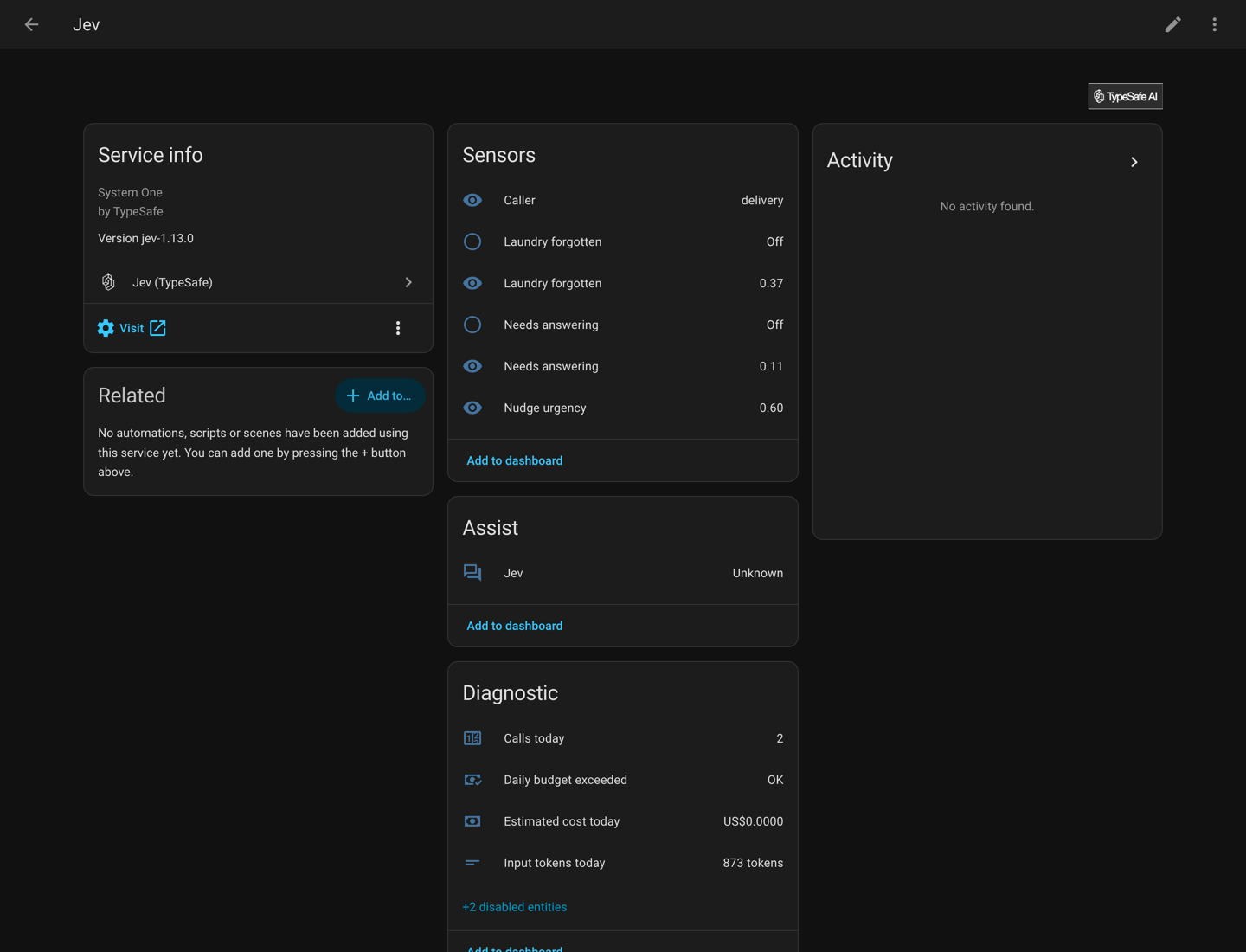
About
Jev (TypeSafe) is an integration that turns questions about the house into typed answers from a decision model. Each answer comes back as a probability, a chosen option or a score, and appears as a sensor or as the response of an action in an automation. Further actions ask several questions at once, locate something in a camera picture, and find the best threshold from recorded history. It also adds a conversation agent for Assist and a weekly house check that opens Repairs cards for entities unavailable for a week, low batteries and states that look like mistakes. Sensors track daily calls, input tokens and estimated cost against a configurable daily token budget. It needs the vendor's cloud or another provider, and is set up in the UI with a provider choice and an API key.
Automatic summary of the README and code of AboveColin/HA-Jev. Something wrong, or are you the maintainer and want your own text here? Get in touch
Supports
Uses the vendor's cloud Needs an internet connection and an account with the vendor.
From the Marketplace Installed through the Marketplace, formerly HACS.
Actively maintained Its author released or pushed a change in the last six months.
Provides
- Sensors
Setting it up
Install it from the Marketplace and restart Home Assistant, then add it under Settings, Devices and services.
Connect a decision model
- ProviderJev (TypeSafe), SubQ Snap and OpenRouter are hosted. A local server is one you run yourself and name in Advanced.
- API keyThe key the requests are sent with. Leave it empty only for a local server that needs no key.
- API addressLeave it empty to use the provider's own address. A local server needs one here. The key is sent as a bearer header, so an http address puts it on the wire in clear.
- ModelThe model id sent with every request. Leave it empty to use the provider's default.
Re-enter your API key
- API keyRequests go to the API address already stored.
Change the provider, key or address
- ProviderJev (TypeSafe), SubQ Snap and OpenRouter are hosted. A local server is one you run yourself and name in Advanced.
- API keyLeave it empty to keep the current key while the address stays the same. A new address gets no key unless you type one.
- API addressLeave it empty to use the provider's own address. A local server needs one here. The key is sent as a bearer header, so an http address puts it on the wire in clear.
- ModelThe model id sent with every request. Leave it empty to use the provider's default.
After setup
- Daily input token budget (0 = no limit)Counted from midnight in the Home Assistant time zone. 0 means no limit.
- Price per million input tokens, in USDSets the estimated cost sensor and the cost in the question preview. Nothing that is sent depends on it.
- Fall back to this agentReceives the whole sentence when Jev is not sure what to do.
- Act only above this confidence (0 to 1)Below this, Jev does nothing and passes the command to the fallback agent.
- Allow commands that name no room or deviceTurning everything off is always allowed, with or without this.
- Offer Jev as a tool to other LLM agentsAdds two tools to the Assist API, one for yes/no questions and one for picking an option. Each LLM agent that uses Assist gets their descriptions in every prompt, which costs tokens at that agent's provider. Each call also counts against the budget above.
- Check the house once a weekAt 10:00, once 7 days have passed since the last check, Jev looks at every entity the Jev conversation agent can control in one request and opens a Repairs card for each state that looks like a mistake. The checks for unavailable entities and low batteries cost nothing and run with it.
Texts from the code of AboveColin/HA-Jev.
Entities
- Binary sensorsDaily budget exceeded
- SensorsCalls today, Input tokens today, Estimated cost today, Latency, Payload
Actions
- Ask a yes/no questionAsk whether something is true and get the probability of yes, from 0 to 1. Use one of these per label when several labels can be true at once.Fields: State, Images, Question, Yes means, No means, Threshold, API key, Model, Include all attributes, Background
- Pick one optionPick one option from your list, and get the probability of every option plus a confidence value.Fields: State, Images, Question, Options, Option descriptions, API key, Model, Include all attributes, Background
- Rate on a scaleRate the text against levels you describe, and get a number that can land between two levels.Fields: State, Images, Question, Levels, API key, Model, Include all attributes, Background
- Ask several questions at onceAsk any mix of question types about one piece of text, in a single request. Every question is judged independently against the same text and they run in parallel, so twenty questions take about as long as one.Fields: State, Images, Questions, API key, Model, Include all attributes
- Find where something isAsk where something is in the current picture of a camera or an image entity. The answer is a box: its left, top, right and bottom edges as fractions of the picture's width and height, from the top left corner, with a confidence. Needs Jev 1.14.Fields: Image, What to find, Background, API key, Model
- Find the best thresholdCompare the recorded history of a yes/no probability with an entity that shows what was really true, and get the threshold that would have been right most often. Reads only the recorder, so it costs no tokens.Fields: Probability, What was really true, State that means yes, Days of history
- Check the houseLook for entities that have been unavailable for a week, batteries below 10 % and, if Ask Jev is on, states that look like a mistake. Opens a Repairs card for each one and returns the list.Fields: Ask Jev, API key
- Undo the house checkPut back what the house check turned off, with the state it had before.Fields: Entities, API key
Troubleshooting
- DiagnosticsDownloads a diagnostics file to attach to a bug report.
- System healthAdds its status to Home Assistant's system information.
- Repair noticesNotices it can show in Settings, Repairs:Jev stopped evaluating: daily budget reached, Has been unavailable for a week, The weekly house check did not reach Jev
From the README
Ask TypeSafe Jev questions about your house and get numbers back. Jev is a decision model, not a chat model. It answers a typed question with a probability, a choice or a score, and this integration turns each answer into an entity you can automate on.
Not affiliated with TypeSafe. The API client is
- Questions become sensors: a probability, one of your options with its distribution, or a number on a scale. Add them in the UI, in YAML, or both.
- Five actions, jev.noul, jev.choice, jev.score, jev.ask and jev.box, answer inside an automation and return a response variable.
- An AI Task entity answers ai_task.generate_data when it is called. A boolean, select or number field becomes the matching question.
- Actions and the AI Task can look at cameras: list camera or image entities, or attach a snapshot, and the picture goes in beside the state, scaled to what the API takes. jev.box finds where…
- A conversation agent for Assist routes spoken commands through the same model.
- A house check opens a Repairs card for entities unavailable for a week, low batteries and, in one request, states that look like a mistake. A light left on can be turned off from its card and put…
- It reports what it spends: calls, input tokens and estimated cost per day, against a daily token budget.
- 25 blueprints to import with one click. Seven start from your own question, and 18 handle one situation each, such as a forgotten washing machine or a window open while the heating runs.

Shows in Vulpo
Chart card, Apple Watch.Information
- Installs
- 65 sharing analytics
- GitHub stars
- 79
- Connection
- Uses the vendor's cloud
- Upkeep
- Updated in the last 6 months
- Version
- 1.22.3,
- Category
- Sensors
- Kind
- Marketplace integration
- Needs
- Needs the Marketplace (HACS on 2026.10 and older)
- Domain
jev- Issues
- Report an issue