
Supernotify
rhizomatics
On Home Assistant 2026.11 or newer? Open it in the Marketplace
- Installs
- 61 sharing analytics
- GitHub stars
- 23
- Connection
- Works locally
- Upkeep
- Updated in the last 6 months
- Version
- v2.16.0,
- Category
- Messaging and notifications
- Kind
- Marketplace integration
- Needs
- Needs the Marketplace (HACS on 2026.10 and older)
- Domain
supernotify- Issues
- Report an issue
Independent directory, made by the developer of Vulpo. Not affiliated with Home Assistant or the Open Home Foundation.
Screenshots From the README of rhizomatics/supernotify.
About
Supernotify is an integration that routes and groups notifications across multiple channels from a single notify action. One call can reach mobile apps, e-mail, voice announcements, chimes and other notify platforms, with adaptors adjusting the data for each one. It discovers mobile app devices and recipients from Home Assistant person entities, and it can attach camera snapshots to messages. Notifications can be snoozed or silenced for everyone or one person, limited by delivery, transport, priority, camera or tag. Duplicate detection, an optional archive with MQTT publishing, and debugging actions that show the last notification and the active scenarios are included. It adds buttons, switches, sensors for notifications sent and failures, and tools for Assist, and it is set up in the UI.
Automatic summary of the README and code of rhizomatics/supernotify. Something wrong, or are you the maintainer and want your own text here? Get in touch
Supports
Works locally Talks to your devices on your own network. No vendor cloud in between.
From the Marketplace Installed through the Marketplace, formerly HACS.
Actively maintained Its author released or pushed a change in the last six months.
Provides
- Switches
- Sensors
Setting it up
Install it from the Marketplace and restart Home Assistant, then add it under Settings, Devices and services.
Environment
- NameDetermines the registered notify action name (notify.NAME) - change only if you need something other than notify.supernotify, e.g. to match an existing automation
- Template PathOptional location where Jinja2 templates for HTML email are to be found. Relative paths are resolved within the Home Assistant config directory
- Media PathStorage path for media created during notifications, for example camera snapshots created for attachments. Relative paths are resolved within the Home Assistant config directory
- Media URL PrefixURL path prefix under which stored media, such as camera snapshots, is served
- Mobile Device DiscoveryAutomatically discover mobile app devices registered in Home Assistant for push notifications
- Recipient DiscoveryAutomatically discover recipients from Home Assistant person entities
Also asked when changing the connection.
After setup
- EnabledTurn on the notification archive
- Archive PathStorage path for archived notifications, useful for debugging configuration, scenarios etc. Relative paths are resolved within the Home Assistant config directory
- Retention DaysHow many days of archived notifications to keep
- Purge Interval (minutes)Minimum interval in minutes between automatic archive purges
- MQTT TopicOptional MQTT topic to publish archived notifications to
- MQTT QoSMQTT quality of service level used when publishing archived notifications
- MQTT RetainWhether archived notifications published to MQTT are retained
- Event NameHome Assistant event name fired for archived notifications
- Event SelectionWhich notification outcomes fire an event
- Diagnostics SelectionWhich notification outcomes are recorded with full diagnostic detail
- Time To Live (seconds)How long a notification is remembered for duplicate detection
- Cache SizeMaximum number of recent notifications remembered for duplicate detection
- Duplicate PolicyHow strictly notifications are compared to detect duplicates
- Housekeeping TimeTime of day (HH:MM:SS) that scheduled housekeeping, such as media purge, runs
- Media Storage DaysHow many days of stored media, such as snapshots and attachments, to keep
- Action toolsSend notifications, and snooze or silence them
- Diagnostic toolsExplain recent notifications, dry-run who a notification would reach, list snoozes, and look up the Supernotify documentation online
- Built-in agent sentencesEnglish and Italian sentences for the built-in agent, such as 'tell Alice that dinner is ready' or 'snooze my notifications for 30 minutes'
- Delivery InclusionControl how Deliveries are considered for inclusion in notifications
- Spoken delivery occupancyLimit when spoken deliveries, such as TTS or Alexa Devices, are considered for notifications, based on home occupancy
Texts from the code of rhizomatics/supernotify.
Entities
- ButtonsReset overrides
- SensorsNotifications sent, Notification failures
Actions
- ReloadReloads supernotify services.
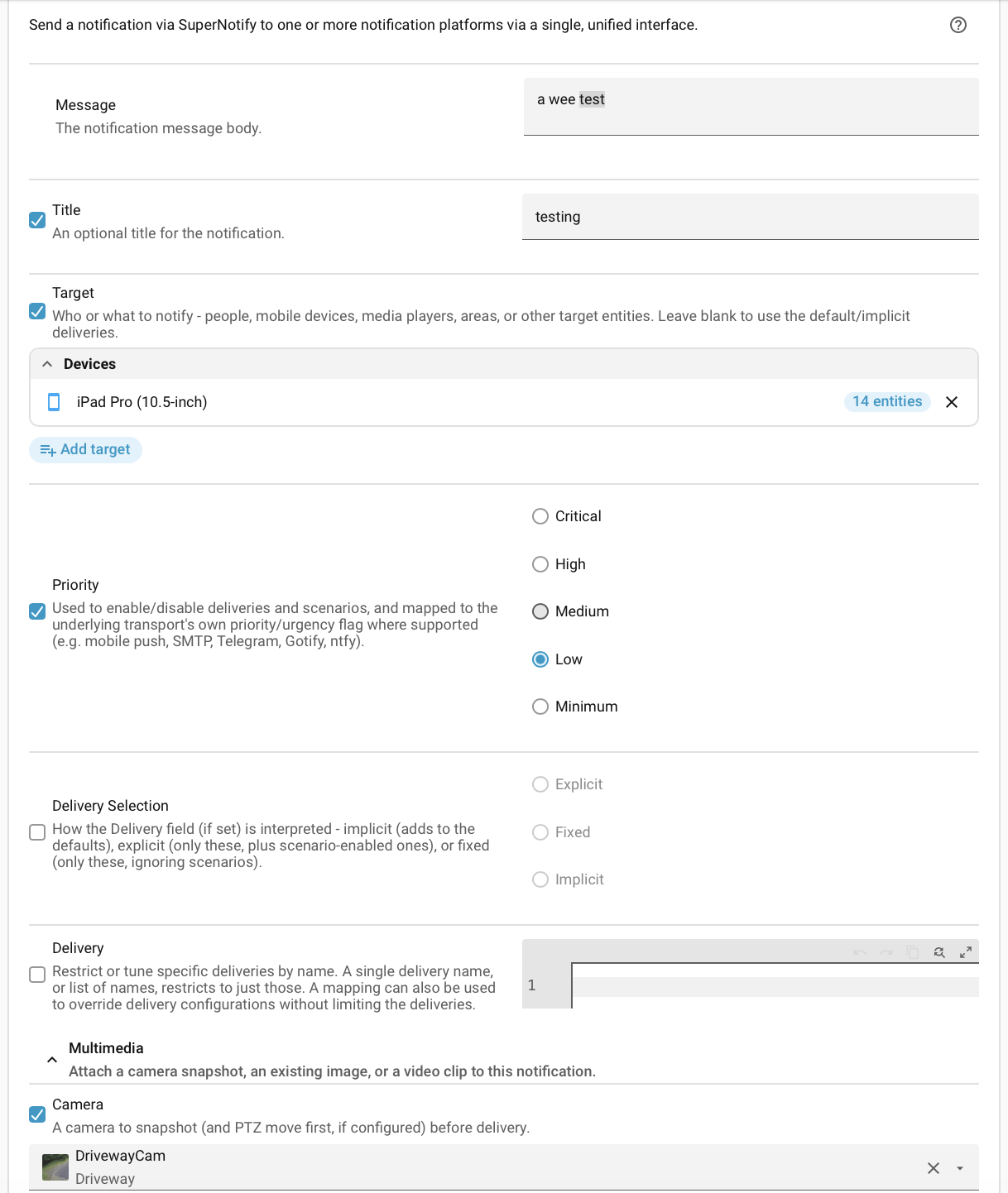
- NotifySend a notification via Supernotify to one or more notification platforms via a single, unified interface.Fields: Message, Title, Target, Custom Targets, Priority, Delivery Selection, Delivery, Required Scenarios, Apply Scenarios, Constrained Scenarios
- Enquire ConfigurationDebugging assistant to show the currently loaded Supernotify configuration
- Enquire Deliveries By ScenarioDebugging assistant to show list of deliveries for each scenario, including default usage
- Enquire Implicit DeliveriesDebugging assistant to show the deliveries used automatically by default for each transport
- Enquire Last NotificationDebugging assistant to show the contents of the last notification sentFields: Diagnostics
- Enquire RecipientsDebugging assistant to show the currently configured recipients
- Enquire ScenariosDebugging assistant to show the currently configured scenarios and their attributes
- Enquire Active ScenariosDebugging assistant to show which scenarios are currently activeFields: Trace
- Enquire OccupancyDebugging assistant to show the current occupancy status used for delivery targeting
- Enquire SnoozesDebugging assistant to show the currently active snoozes
- Refresh EntitiesRefresh every entity Supernotify exposes for introspection and control
- Reset OverridesPut every scenario, recipient, delivery and transport switched on or off at runtime back to its configured stateFields: Kind
- Clear SnoozesClear all currently active snoozes
- SnoozeSnooze notifications for some minutes - for everyone or one person, everything or only some deliveries, transports, priorities, cameras or tagsFields: Scope, Name, Person, Minutes, Reason
- SilenceSilence notifications until they are unsnoozed - for everyone or one person, everything or only some deliveries, transports, priorities, cameras or tagsFields: Scope, Name, Person, Reason
- UnsnoozeRemove the snooze or silence with this scope, name and personFields: Scope, Name, Person
- Purge MediaDelete stored media files older than the configured (or given) number of daysFields: Days
- Purge ArchiveDelete archived notification records older than the configured (or given) number of daysFields: Days
- Enquire archiveReturn archived notifications. Without 'id' returns a list (newest first); with 'id' returns one notification's full detail.Fields: Notification id, Limit, After, Before, Outcome, Period, Verbosity, Priority
Troubleshooting
- DiagnosticsDownloads a diagnostics file to attach to a bug report.
- Repair noticesNotices it can show in Settings, Repairs:Supernotify YAML configuration needs to move, Supernotify YAML configuration must be migrated manually, Python 3.13 no longer supported, Invalid Delivery for Scenario, Invalid Mobile Action Group for Scenario, Invalid Condition for Scenario, Unknown Transport for Delivery, Media Path Cannot be Used, Delivery Has Reserved Delivery Name, Delivery Has Invalid Action, Deprecated Generic Transport Action, Mobile App Not Found for Recipient, Notify Entity Already Exists, Delivery Has Invalid Condition, Delivery No Longer Included By Default
From the README
Unified Notifications for Home Assistant
!!! tip inline end "Recipes" Get started quickly, or get inspired, with one of the notification recipes, try making Alexa whisper low priority notifications, set off sirens for critical alerts, make the Frigate blueprint send e-mail with attached images, move and zoom a camera to take a snapshot or even have spooky notifications on Halloween.
- One Action -> Multiple Notifications
- Remove repetitive config and code from automations
- Adaptors automatically tune notification data for each integration
- For example, use with a Frigate Blueprint to get camera snapshots by e-mail instead of, or as well as, mobile notifications. See the Frigate Recipe for more info.
- Automated set-up
- Delivery configuration auto-discovered, including for Alexa Devices, Mobile Push, Email (SMTP).
- Mobile Apps automatically discovered, including Manufacturer and Model of the phone, which can be used to customize delivery
- Alexa Devices for sending chime noises automatically discovered from Home Assistant
- Go beyond notify integrations
- Chimes, sirens, SMS, TTS, Alexa Announcements and Sounds, API calls, MQTT devices, Gotify, ntfy, LaMetric, Pushover, Telegram
- All the standard notify and notify.group implementations available, including the modern NotifyEntity based ones
- Greatly simplified use of Mobile Push notifications, e.g. for iPhone

Shows in Vulpo
Quick Toggle card, Button card, Chart card, Apple Watch, Control Center.Information
- Installs
- 61 sharing analytics
- GitHub stars
- 23
- Connection
- Works locally
- Upkeep
- Updated in the last 6 months
- Version
- v2.16.0,
- Category
- Messaging and notifications
- Kind
- Marketplace integration
- Needs
- Needs the Marketplace (HACS on 2026.10 and older)
- Domain
supernotify- Issues
- Report an issue