
Screenshots From the README of prestomation/ha-home-keeper.
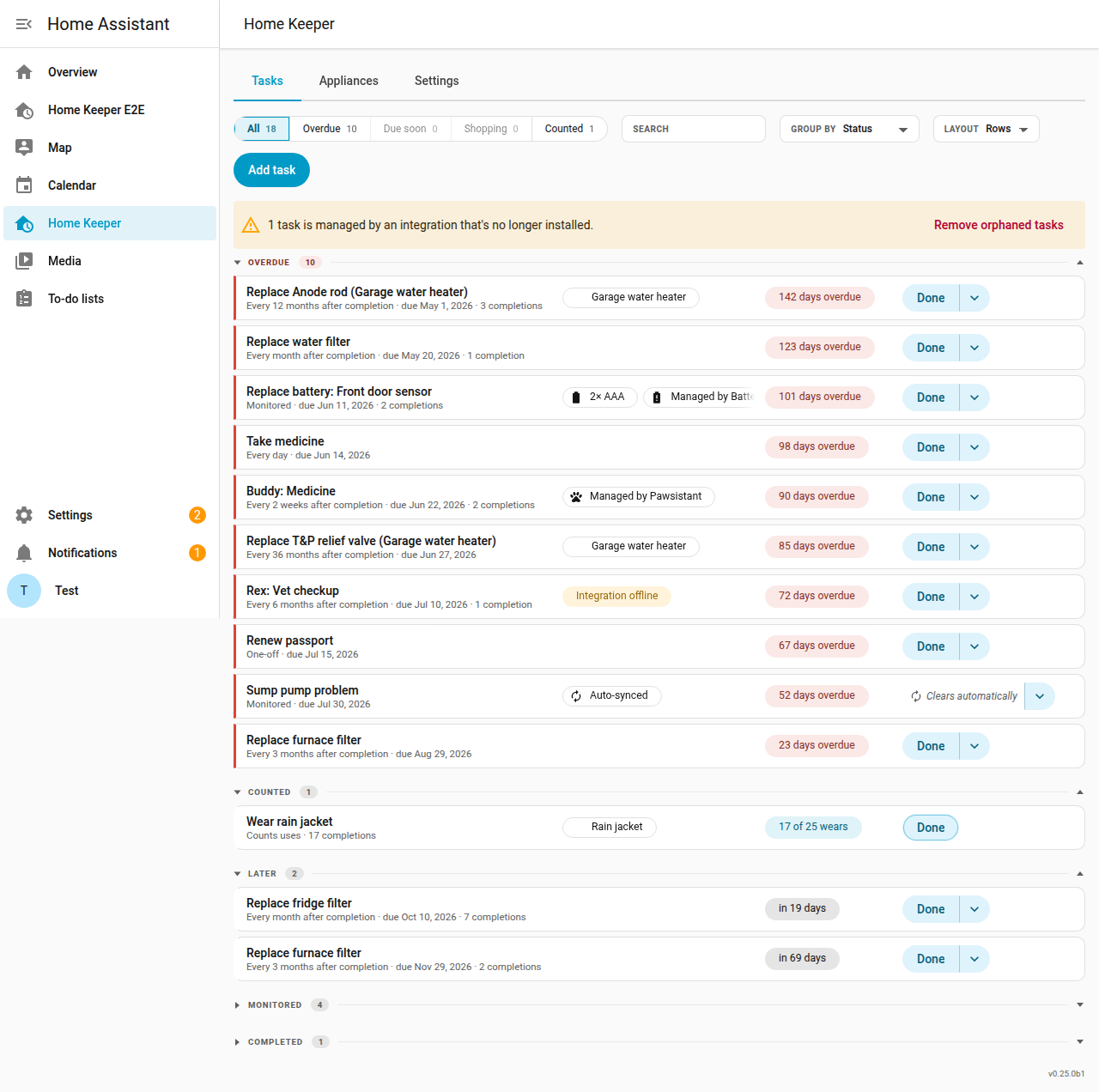
About
Home Keeper tracks home maintenance and chores, such as filter changes or medicine, inside Home Assistant. Tasks can repeat after each completion, follow fixed dates, happen once, fire from a condition, or depend on a usage sensor. It adds a to-do list, an upcoming-tasks calendar, overdue and low-stock binary sensors, a mark-done button, and sensors for next due task and maintenance spend. Appliances can be registered with parts, and completing a linked task uses one spare from stock and raises a low-stock event. Actions cover adding, completing, snoozing, skipping and moving tasks, and device triggers such as task became overdue can start automations. Data is stored locally and the integration is added through the UI.
Automatic summary of the README and code of prestomation/ha-home-keeper. Something wrong, or are you the maintainer and want your own text here? Get in touch
Supports
Works locally Talks to your devices on your own network. No vendor cloud in between.
Device triggers Its devices can start automations directly.
From the Marketplace Installed through the Marketplace, formerly HACS.
Actively maintained Its author released or pushed a change in the last six months.
Provides
- Sensors
- Calendars
Setting it up
Install it from the Marketplace and restart Home Assistant, then add it under Settings, Devices and services.
After setup
- Sync problem sensors as tasksA synced task clears only when the source integration resolves the problem, not when you tap Done. Reminders for one offer Snooze in place of Mark done.
- Excluded sensors
- Excluded devices
- Excluded areas
- Excluded labels
- One-off retention (days)Auto-delete a completed one-off task this many days after it is completed. 0 keeps completed one-offs forever.
- Shopping listSync auto-buy reminders onto this to-do list. Ticking an item off there completes the Home Keeper reminder and restocks the part. Leave empty to turn the sync off.
- Shopping list line textHow a buy reminder reads on the shopping list. Product only shows the part name without the verb, such as "Fabric softener" in place of "Buy fabric softener".
- Due timeWhen a task that repeats after each completion is due. With a set time, the task is due at that time on its due date. A snooze also ends at that time.
- Set due timeThe local time of day that these tasks are due. Used only when the due time is a set time.
Texts from the code of prestomation/ha-home-keeper.
Entities
- Binary sensorsOverdue, Low stock
- ButtonsMark done
- CalendarsUpcoming tasks
- EventsEvents
- NumbersSpares
- SensorsNext due, Tasks, Maintenance spend all time, Appliance purchases total
- To-do listsTasks
Actions
- Add taskCreate a new maintenance task or chore.Fields: Name, Notes, Recurrence type, Interval, Unit, Frequency, Rule, Anchor, Due date, Sensor trigger
- Update taskUpdate fields of an existing task.Fields: Task name or ID, Name, Notes, Recurrence type, Interval, Unit, Frequency, Rule, Anchor, Due date
- Delete taskDelete a task.Fields: Task name or ID, Force
- Delete orphaned tasksDelete every task that an integration manages when that integration is not loaded (removed, disabled or not set up). Admin-only. Returns the IDs of the deleted tasks under "deleted".
- Complete taskMark a task complete and advance its recurrence.Fields: Task name or ID, Completed at, Origin, Note, Cost, Photo, Who, Meter reading
- Update completionAmend the metadata (note, cost, photo, who) of an already-recorded completion, identified by its timestamp. Does not change the schedule or due date.Fields: Task name or ID, Completion timestamp, Note, Cost, Photo, Who, Meter reading
- Trigger taskArm a condition-driven (triggered) task so it reads as due now. This is the owner-facing counterpart to Complete task (which clears it back to dormant). Idempotent. Only valid for triggered tasks.Fields: Task name or ID
- Set task meterRe-anchor a usage (meter) sensor task's baseline without recording a completion. Use it when the work was done before Home Keeper was watching, or when the bound meter itself was replaced or zeroed. Omit baseline to anchor to the sensor's current reading. Only valid for a sensor task in usage mode.Fields: Task name or ID, Baseline
- Snooze taskDefer a task's due date without recording a completion or advancing its recurrence.Fields: Task name or ID, Hours, Until, Origin
- Skip taskAdvance a task to its next occurrence without recording a completion. Home Keeper logs the skip separately from the completions, so it is never counted as a completion.Fields: Task name or ID, Note, Who, Meter reading, Origin
- Set task due todayMove a task's due date to now, whatever its periodic schedule says, without recording a completion or changing its recurrence.Fields: Task name or ID, Origin
- Move one dateMove one date of a fixed task's schedule to a new date and time, and keep the other dates as they are. To undo a move, move the date back to its original time.Fields: Task name or ID, Date, New date, Origin
- Link task to a consumableLink a task to an appliance consumable/part so completing it consumes one spare from the part's stock and fires a low-stock event at the reorder threshold. Omit asset_id and part_id to clear the link.Fields: Task name or ID, Appliance name or ID, Part name or ID, Quantity
- Notify what's dueSend an actionable push notification for what's currently due: name a saved notification or profile, optionally overriding the notify target.Fields: Notification, Profile, Target, Status, When nothing matches
- List tasksReturn all tasks as a response.
- List profilesReturn the saved profiles (named task filters) as a response.
- Add applianceRegister an appliance/asset. By default Home Keeper creates a virtual device for it. Set kind to existing to attach metadata to a device from another integration.Fields: Name, Kind, Device, Area, Manufacturer, Model, Serial number, Notes, Cost, Documents
- Update applianceUpdate fields of an existing appliance/asset.Fields: Appliance name or ID, Name, Device, Area, Manufacturer, Model, Serial number, Notes, Cost, Documents
- Update managed applianceUpdate the name and the part list of an appliance that another integration manages. The stock fields on each part do not change.Fields: Appliance name or ID, Name, Parts
- Delete applianceDelete an appliance/asset. Its virtual device (if any) is removed and tasks attached to it become standalone.Fields: Appliance name or ID, Force
Troubleshooting
- DiagnosticsDownloads a diagnostics file to attach to a bug report.
From the README
Home Keeper tracks home maintenance and chores in Home Assistant. This includes fridge and furnace filter changes, water filters, taking medicine, and anything else that recurs.
📖 Full documentation (a browsable User Guide and Developer Guide) lives at. The site is generated from docs/, so the two never drift.

Shows in Vulpo
Button card, Calendar card, Chart card, Apple Watch.Information
- Installs
- 298 sharing analytics
- GitHub stars
- 122
- Connection
- Works locally
- Upkeep
- Updated in the last 6 months
- Version
- v0.33.0,
- Category
- Productivity and information, Calendars and to-dos
- Kind
- Marketplace integration
- Needs
- Needs the Marketplace (HACS on 2026.10 and older)
- Domain
home_keeper- Issues
- Report an issue










