

MAWAQIT
mawaqit
On Home Assistant 2026.11 or newer? Open it in the Marketplace
- Installs
- 126 sharing analytics
- GitHub stars
- 108
- Connection
- Uses the vendor's cloud
- Upkeep
- Updated in the last 6 months
- Version
- v4.0.3,
- Category
- Productivity and information, Calendars and to-dos
- Kind
- Marketplace integration
- Needs
- Needs the Marketplace (HACS on 2026.10 and older)
- Domain
mawaqit- Issues
- Report an issue
Independent directory, made by the developer of Vulpo. Not affiliated with Home Assistant or the Open Home Foundation.
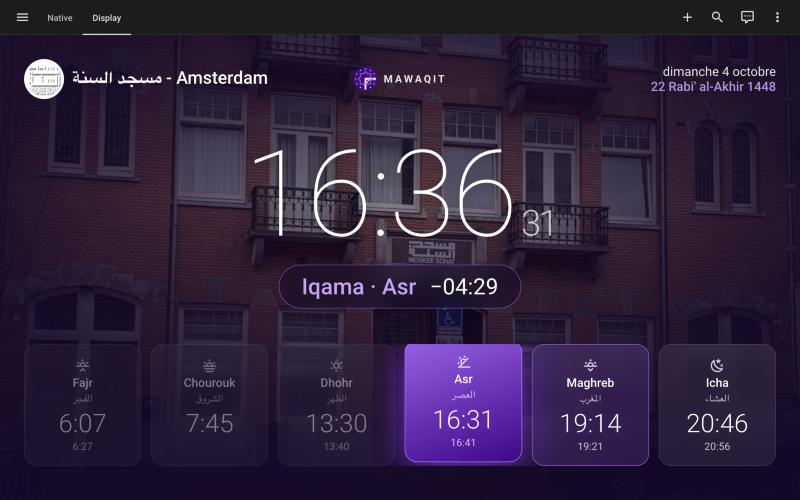
Screenshots From the README of mawaqit/home-assistant.
About
MAWAQIT is a Marketplace integration that brings the prayer times of a MAWAQIT mosque into Home Assistant. It provides sensors and a calendar covering the five prayers, Imsak, Shuruq, the iqamas, Jumu'a, the Eid prayers, the times of the night and the Hijri date. It also adds a flash message sensor and two image entities, a logo and a picture. Several mosques can be followed at once, each as its own device, and the mosque can be changed later without losing entity IDs. A mosque can be found near the home location, by keyword, or by its MAWAQIT ID. It needs a free MAWAQIT account and the vendor's cloud, and it is set up in the UI.
Automatic summary of the README and code of mawaqit/home-assistant. Something wrong, or are you the maintainer and want your own text here? Get in touch
Supports
Uses the vendor's cloud Needs an internet connection and an account with the vendor.
From the Marketplace Installed through the Marketplace, formerly HACS.
Actively maintained Its author released or pushed a change in the last six months.
Provides
- Sensors
- Calendars
Setting it up
Install it from the Marketplace and restart Home Assistant, then add it under Settings, Devices and services.
Log in to MAWAQIT
- PasswordYour MAWAQIT account password.
- EmailYour MAWAQIT account email address.
Also asked when signing in again.
Your favourite mosque
- MosqueSelect your mosque, another page of results or a new search.
Search for your mosque
- KeywordName of the mosque or of its city. Leave empty to go back to the search methods.
Enter the MAWAQIT ID
- MAWAQIT IDA number, such as 12345. Leave empty to go back to the search methods.
Your favourite mosque
- Multiple mosques are available around you, select one:Mosques near your Home Assistant location.
- MosqueSelect the mosque closest to your location.
Texts from the code of mawaqit/home-assistant.
Entities
- CalendarsPrayer Times
- ImagesLogo, Picture
- SensorsEnd of the First Third, Flash Message, Hijri Day, Hijri Month, Hijri Year, Imsak, Asr Iqama, Dhuhr Iqama, Fajr Iqama, Isha Iqama, Maghrib Iqama, Start of the Last Third, and 12 more
Troubleshooting
- DiagnosticsDownloads a diagnostics file to attach to a bug report.
From the README
ٱلسَّلَامُ عَلَيْكُمْ وَرَحْمَةُ ٱللَّٰهِ وَبَرَكَاتُهُ
This integration brings the prayer times of your MAWAQIT mosque into Home Assistant: the five prayers, Imsak, Shuruq, the iqamas, Jumu'a, the Eid prayers, the times of the night and the Hijri date, as sensors and as a calendar. Use them to play the adhan, send a reminder before the iqama, warm up the house before Fajr, open the shutters at Shuruq or wake up for suhoor during Ramadan.

Shows in Vulpo
Calendar card, Chart card, Apple Watch.Information
- Installs
- 126 sharing analytics
- GitHub stars
- 108
- Connection
- Uses the vendor's cloud
- Upkeep
- Updated in the last 6 months
- Version
- v4.0.3,
- Category
- Productivity and information, Calendars and to-dos
- Kind
- Marketplace integration
- Needs
- Needs the Marketplace (HACS on 2026.10 and older)
- Domain
mawaqit- Issues
- Report an issue










