

Skolmat
Kaptensanders
On Home Assistant 2026.11 or newer? Open it in the Marketplace
- Installs
- 298 sharing analytics
- GitHub stars
- 33
- Connection
- Uses the vendor's cloud
- Upkeep
- Updated in the last 6 months
- Version
- v3.2.0,
- Category
- Productivity and information, Calendars and to-dos
- Kind
- Marketplace integration
- Needs
- Needs the Marketplace (HACS on 2026.10 and older)
- Domain
skolmat- Issues
- Report an issue
Independent directory, made by the developer of Vulpo. Not affiliated with Home Assistant or the Open Home Foundation.
Screenshots From the README of Kaptensanders/skolmat.

About
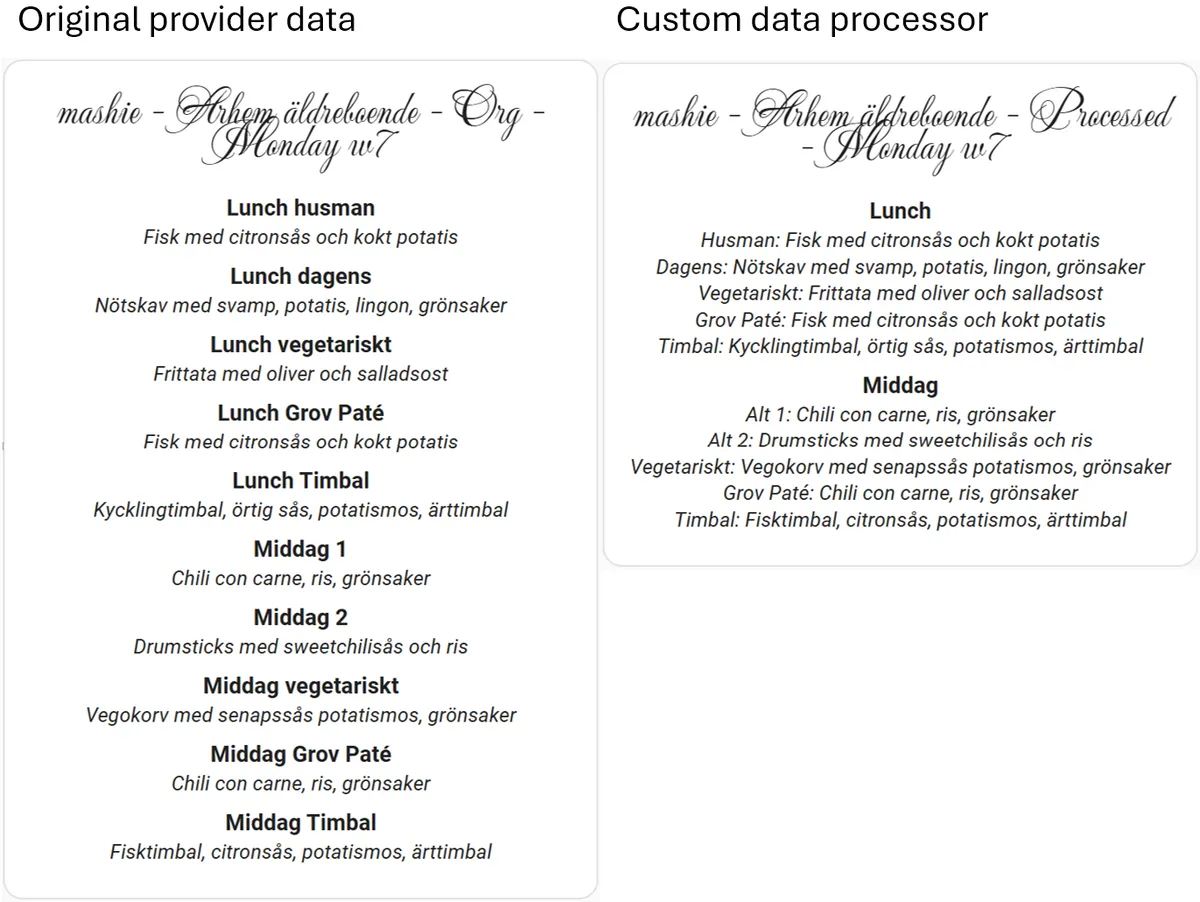
Skolmat is a Home Assistant integration that shows the food menu for Swedish schools and some other institutions. For each configured school it adds a sensor with today's lunch, with the full menu data as attributes, and a calendar with lunch events for past and upcoming days. It reads menu data from providers such as skolmaten.se, Matilda, Mashie, Mateo, skolmat.info and menugo.se, using a menu URL, and it depends on the vendor's cloud. Setup runs in the UI, asking for the school name, menu URL and optional lunch start and end times for calendar events. A second step lets the daily summary be filtered by meal, by excluded or preferred dish keywords, and by a maximum number of dishes to merge. An advanced option runs a custom data processor for menus that the filters cannot handle.
Automatic summary of the README and code of Kaptensanders/skolmat. Something wrong, or are you the maintainer and want your own text here? Get in touch
Supports
Uses the vendor's cloud Needs an internet connection and an account with the vendor.
From the Marketplace Installed through the Marketplace, formerly HACS.
Actively maintained Its author released or pushed a change in the last six months.
Provides
- Sensors
- Calendars
Setting it up
Install it from the Marketplace and restart Home Assistant, then add it under Settings, Devices and services.
Add Skolmat
- School name
- Menu URL
- Lunch start time (HH:MM)
- Lunch end time (HH:MM)
Configure daily summary
- Date
- Input data (read-only)
- State and Calendar summary (read-only)
- Meals found, select to filter (none = all, always)
- Exclude dishes containing:
- Exclude keywords (press Enter, /regex/ optional)
- Prefer dishes containing (only have effect if Max dishes is set)
- Prefer keywords (press Enter, /regex/ optional)
- Max dishes to merge (0 or blank = unlimited)
- Custom data processor (advanced)
- Processor file (under processors/)
- Processor function name
- Reload menu + processor
- I'm done configuring
After setup
- Date
- Input data (read-only)
- State and Calendar summary (read-only)
- Meals found, select to filter (none = all, always)
- Exclude dishes containing:
- Exclude keywords (press Enter, /regex/ optional)
- Prefer dishes containing (only have effect if Max dishes is set)
- Prefer keywords (press Enter, /regex/ optional)
- Max dishes to merge (0 or blank = unlimited)
- Custom data processor (advanced)
- Processor file
- Processor function name
- Reload menu + processor on submit
- I'm done configuring
Texts from the code of Kaptensanders/skolmat.
From the README
- Config flow has multiple filtering options to support better daily summaries for calendar events.
- skolmaten.se back to using the api instead of rss
- mateo.se switched to new api
- added provider skolmat.info
- Card updated with some config options
- Added visual UI editor support to card
- Added custom data preprocessor option for those multi-meal, multi course, custom key menues filtering cannot handle
- Added proper translations (sv/en) to both integration and card
- Issue and compability fixes

Shows in Vulpo
Calendar card, Chart card, Apple Watch.Information
- Installs
- 298 sharing analytics
- GitHub stars
- 33
- Connection
- Uses the vendor's cloud
- Upkeep
- Updated in the last 6 months
- Version
- v3.2.0,
- Category
- Productivity and information, Calendars and to-dos
- Kind
- Marketplace integration
- Needs
- Needs the Marketplace (HACS on 2026.10 and older)
- Domain
skolmat- Issues
- Report an issue










