
Thames Water
jelmer
On Home Assistant 2026.11 or newer? Open it in the Marketplace
- Installs
- 136 sharing analytics
- GitHub stars
- 6
- Connection
- Uses the vendor's cloud
- Upkeep
- Updated in the last 6 months
- Version
- v1.4.0,
- Category
- Water
- Kind
- Marketplace integration
- Needs
- Needs the Marketplace (HACS on 2026.10 and older)
- Domain
thames_water- Issues
- Report an issue
Independent directory, made by the developer of Vulpo. Not affiliated with Home Assistant or the Open Home Foundation.
Screenshots From the README of jelmer/homeassistant-thameswater.
About
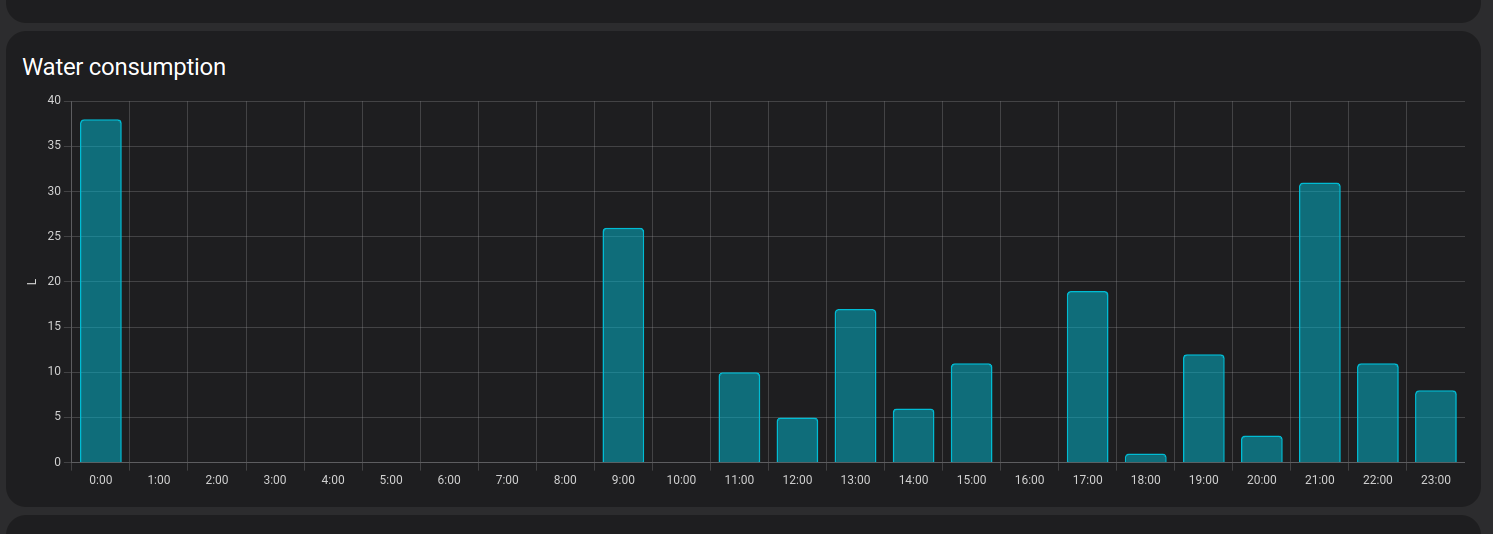
Thames Water is an integration that retrieves water consumption data from the Thames Water cloud API into Home Assistant. It adds sensors for the latest hourly meter read in litres, with hourly and daily statistics that can be used in the Energy dashboard. It also reports the outstanding account balance in GBP and the current metered tariff, including a unit rate per litre that can serve as the price entity for the water source. Tariff figures are read from a public help page and refreshed daily, while consumption data is fetched twice a day. A Thames Water smart meter is required, and the consumption data arrives about three days late or more because of the provider's data system. Setup happens in the UI and asks for a contract account.
Automatic summary of the README and code of jelmer/homeassistant-thameswater. Something wrong, or are you the maintainer and want your own text here? Get in touch
Supports
Uses the vendor's cloud Needs an internet connection and an account with the vendor.
From the Marketplace Installed through the Marketplace, formerly HACS.
Actively maintained Its author released or pushed a change in the last six months.
Provides
- Sensors
Setting it up
Install it from the Marketplace and restart Home Assistant, then add it under Settings, Devices and services.
Sign in
- Contract account
Texts from the code of jelmer/homeassistant-thameswater.

Shows in Vulpo
Chart card, Apple Watch.Information
- Installs
- 136 sharing analytics
- GitHub stars
- 6
- Connection
- Uses the vendor's cloud
- Upkeep
- Updated in the last 6 months
- Version
- v1.4.0,
- Category
- Water
- Kind
- Marketplace integration
- Needs
- Needs the Marketplace (HACS on 2026.10 and older)
- Domain
thames_water- Issues
- Report an issue