
Screenshots From the README of FaserF/ha-db_infoscreen.
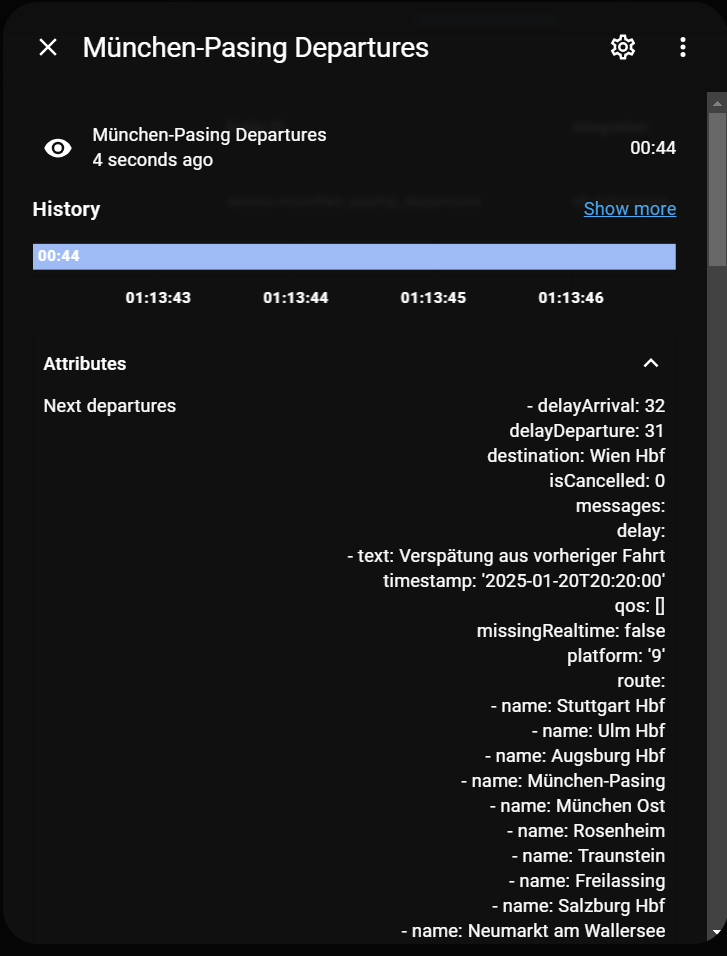
About
db-infoscreen is a departure board integration that shows train departures for a chosen station in Home Assistant. It gathers data from several sources, mainly Deutsche Bahn IRIS-TTS, through a backend that can be the public service or a self-hosted one, and it covers stations in Germany and Europe. It adds sensors, binary sensors and a departures calendar, covering delay, cancellation, connection status, a leave-now alarm, station punctuality and a trip watchdog. Actions can watch a specific train, track a connecting train at a transfer station, refresh departures, set a temporary time offset and pause updates. Filters cover platforms, via stations, directions, train types and cancelled trains, and display options include a simplified text view and arrival or departure mode. Setup runs in the UI, and a backend add-on can be found automatically on the network.
Automatic summary of the README and code of FaserF/ha-db_infoscreen. Something wrong, or are you the maintainer and want your own text here? Get in touch
Supports
Uses the vendor's cloud Needs an internet connection and an account with the vendor.
Found by itself Home Assistant spots it on the network and offers to add it.
From the Marketplace Installed through the Marketplace, formerly HACS.
Actively maintained Its author released or pushed a change in the last six months.
Provides
- Sensors
- Calendars
Setting it up
Install it from the Marketplace and restart Home Assistant, then add it under Settings, Devices and services.
Select Server
- Server Type
- Server URL/IP (e.g. http://192.168.1.50:8092 or Home Assistant Add-on URL http://127.0.0.1:8092)
Find your Station
- Station Name
- Data Source (Standard used for trains)
Select Station
- Station
- ← Back (Change Search / Data Source)
Configure Departure Board
- Number of Upcoming Departures to show
- Update Interval (minutes)
- Walk Time to Station (minutes)
- Show Advanced Options (Filter Settings / Special Handling)
- Pause periodic updates (Stop data fetching)
Advanced Configuration
- Hide Low Delays (under 5 mins)
- Remove trains that are already gone
- Filter out duplicate entries
- Show Detailed Information
- Include departures from the last 60 minutes
- Keep full route details (intermediate stops)
- Keep departure even if this is the end station
- Data Source (Backend)
- Time Offset (HH:MM)
- Display Mode (Arrival vs Departure)
- Filter by Platforms (comma separated, e.g. 1, 2, 5-7)
- Filter by Via Stations (comma separated)
- Via Station Search Logic (AND = all must match, OR = at least one)
- Filter by Final Destination
- Exclude Final Destinations
Configure Custom Station
- Data Source (Required)
- Number of Upcoming Departures
- Update Interval (minutes)
- Filter by Platforms
- Filter by Via Stations
- Via Station Search Logic
Reconfigure Departure Board
- Station Name / ID
- Server Type
- Server URL/IP
- Data Source
After setup
- Station Name / ID
- Data Source
- Number of Upcoming Departures
- Via Stations (comma separated)
- Direction
- Platforms (comma separated)
- Number of Upcoming Departures
- Update Interval (minutes)
- Cache TTL (seconds)
- Offset (HH:MM)
- Walk Time to Station (minutes)
- Pause periodic updates (Stop data fetching)
- Calendar Event Duration (minutes)
- Calendar: Only include favorite trains
- Calendar: Only include delayed trains
- Server Type
- Server URL
- Platforms
- Via Stations
- Via Station Search Logic
- Direction
- Excluded Directions
- Ignored Train Types
- Exclude Cancelled Trains
- Multiple Favorite Trains (comma separated e.g. 'ICE 1, RE 2')
- Detailed Information
- Enable Simplified Text View
- Template for Simplified Text View
- Display Mode
- Hide Low Delay
- Show Occupancy Information
- Deduplicate Departures
- Keep Route Details
- Keep Endstation
- Drop Late Trains
- Include Past 60 Minutes
- Data Source
- Custom Deduplication Key (e.g. {line} - Leave empty for default: {journeyID}{journeyId}{id}{key}{trainNumber})
- Maximum JSON Size (Bytes)
Texts from the code of FaserF/ha-db_infoscreen.
Entities
- Binary sensorsDelay, Cancellation, API Connection, Update Status, Station Accessibility, Connection Status
- CalendarsDepartures
- SensorsDepartures, Leave Now Alarm, Station Punctuality, Trip Watchdog
Actions
- Watch TrainRegisters a background task to monitor a specific train departure from a station.Fields: Train ID, Notify Service, Delay Threshold, Notify on Platform Change, Notify on Cancellation
- Track ConnectionMonitors a connecting train at a transfer station.Fields: Current Train ID, Change Station, Next Train ID
- Refresh DeparturesTriggers a manual refresh of train departures for all configured stations.
- Set OffsetDynamically overrides the default time offset for departures temporarily.Fields: Offset, Station
- Set Paused StateEnables or disables periodic data fetching for a specific station or all stations.Fields: Paused, Station
Troubleshooting
- Repair noticesNotices it can show in Settings, Repairs:Station data is stale, API error for station, API error for station (Via route configured), Station may no longer be supported, Connection error
From the README
A comprehensive departure board integration for Home Assistant.

Shows in Vulpo
Calendar card, Chart card, Apple Watch.Information
- Installs
- 491 sharing analytics
- GitHub stars
- 96
- Connection
- Uses the vendor's cloud
- Upkeep
- Updated in the last 6 months
- Version
- v2026.10.0,
- Category
- Productivity and information, Calendars and to-dos
- Kind
- Marketplace integration
- Needs
- Needs the Marketplace (HACS on 2026.10 and older)
- Domain
db_infoscreen- Issues
- Report an issue










