Screenshots From the README of eigger/hass-sip.
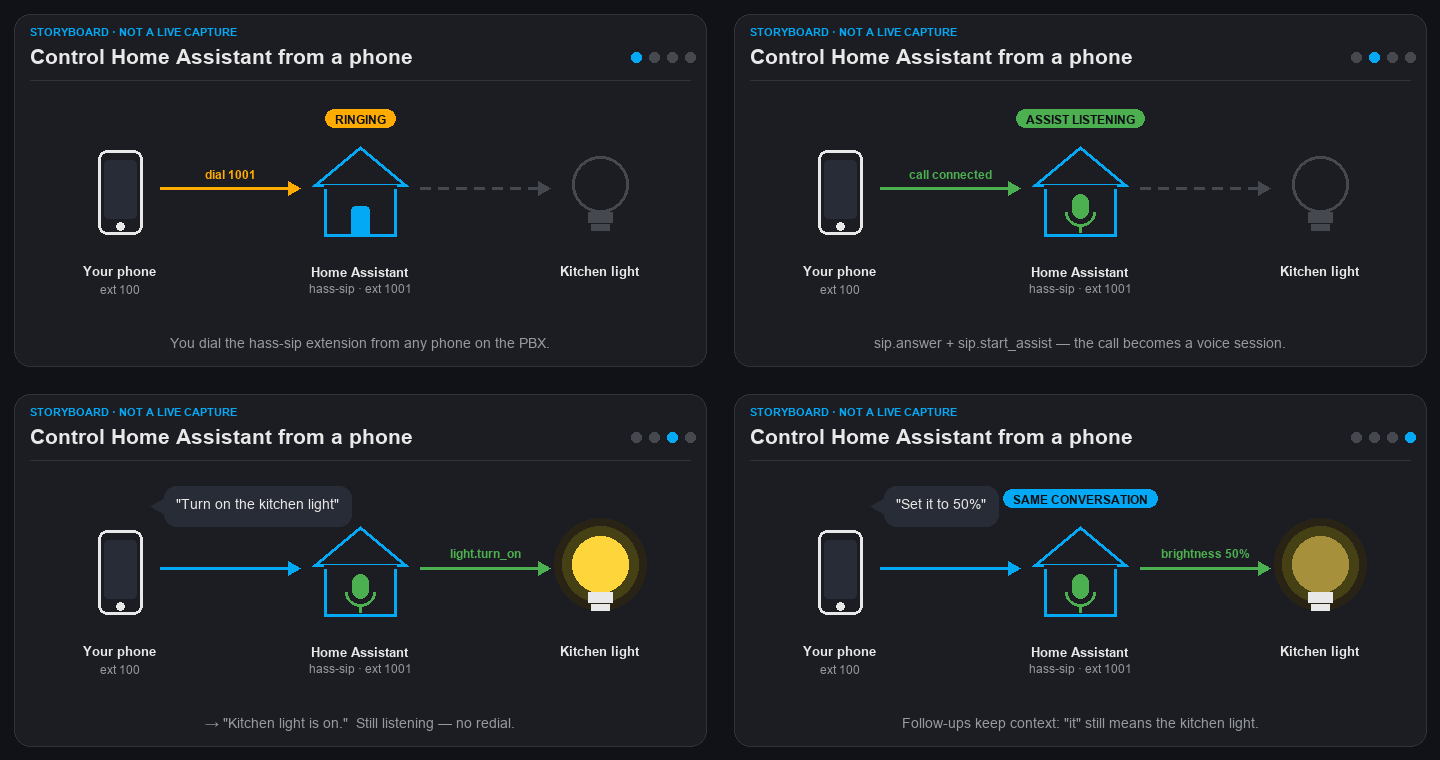
About
SIP Client is a Home Assistant integration that registers as a SIP extension on a PBX for calls, intercoms and Voice Assist. It exposes the phone line as a media player, so text-to-speech or audio URLs can be played into the active call. Actions cover dialing, answering, hanging up, sending DTMF digits, recording call audio to a local WAV file, and bridging a call to the Voice Assist pipeline for multi-turn conversation. It also provides sensors for registration status, last call, negotiated codec and call audio path, plus a Do Not Disturb switch and answer and hang up buttons. Audio uses G.722 when the far end offers it, otherwise G.711, and the codec order can be changed in the options. It works locally over SIP on UDP and is added through the UI with the server address, port and account credentials.
Automatic summary of the README and code of eigger/hass-sip. Something wrong, or are you the maintainer and want your own text here? Get in touch
Supports
Works locally Talks to your devices on your own network. No vendor cloud in between.
From the Marketplace Installed through the Marketplace, formerly HACS.
Actively maintained Its author released or pushed a change in the last six months.
Provides
- Media
- Switches
- Sensors
Setting it up
Install it from the Marketplace and restart Home Assistant, then add it under Settings, Devices and services.
Configure SIP Client
- SIP Server / Host
- Port
- Username / Extension
- Password
- Authentication Username (Optional)
- Domain (Optional)
- Caller ID (Optional)
- Outbound Proxy (Optional)
- Register Expiration (seconds)
- Local RTP Port (Optional)
- Media timeout (seconds, 0=disabled)
- Max call duration (seconds, 0=unlimited)
- Use server-observed address (NAT)Enable when Home Assistant is behind NAT/SNAT toward the SIP server (for example a firewall that rewrites the source address) and calls have no audio. The address the server sees (Via received/rport) is advertised in Contact and SDP instead of the local interface address.
Also asked when changing the connection.
After setup
- Codec preferenceChoose which audio codecs are offered and in what order. If calls have one-way audio (for example on a FRITZ!Box negotiating G.722), pick a G.711-only preset. Saving reloads the account.
Texts from the code of eigger/hass-sip.
Entities
- Binary sensorsCall Active, Bidirectional Audio
- ButtonsAnswer, Hang Up
- EventsCall Events
- MediaPhone Line
- SensorsRegistration Status, Last Call, Negotiated Codec, Call Audio, Last Call Reason
- SwitchesDo Not Disturb
Actions
- DialInitiates an outbound SIP call.Fields: Number, IVR menu, Ring timeout, Message, TTS engine, Language, TTS options
- Hang upEnds the active SIP call or declines an incoming call.Fields: SIP status code
- AnswerAnswers an incoming SIP call.Fields: IVR menu, Message, TTS engine, Language, TTS options
- Send DTMFSends DTMF digits to the active SIP call.Fields: Digits
- Start recordingStarts recording call audio to a local WAV file.Fields: Recording file path
- Stop recordingStops the active call recording.
- Start AssistBridges the active call to Home Assistant's Voice Assist pipeline for multi-turn conversation.Fields: Assist pipeline, Conversation ID, Initial prompt, System prompt, Max turns, Max silent turns, Barge-in, Silence timeout, Noise suppression, Turn start tone
Troubleshooting
- DiagnosticsDownloads a diagnostics file to attach to a bug report.
- Repair noticesNotices it can show in Settings, Repairs:SIP registration was rejected
From the README
A Home Assistant custom integration for SIP calls, IVR, intercoms, and Voice Assist.
The Downloads badge counts GitHub release asset downloads across all releases, not active installations.
- media_player line: TTS or audio URLs into the active call
- Services: sip.dial, sip.hangup, sip.answer, sip.send_dtmf, sip.start_recording, sip.stop_recording, sip.start_assist (multi-turn)
- IVR trees with DTMF, PIN, and Home Assistant service actions
- G.722 (16 kHz) when the far end offers it, otherwise G.711; the codec order (or G.711-only) is selectable under Configure on the integration
- Sensors: registration, last caller, codec, audio path (none / no_rx / no_tx / bidirectional)

Shows in Vulpo
Quick Toggle card, Media Player card, Button card, Chart card, Apple Watch, Control Center.Information
- Installs
- 55 sharing analytics
- GitHub stars
- 16
- Connection
- Works locally
- Upkeep
- Updated in the last 6 months
- Version
- 3.7.0,
- Category
- Messaging and notifications, Email, SMS and calls
- Kind
- Marketplace integration
- Needs
- Needs the Marketplace (HACS on 2026.10 and older)
- Domain
sip- Issues
- Report an issue