
Pool Lab
dala318
On Home Assistant 2026.11 or newer? Open it in the Marketplace
- Installs
- 332 sharing analytics
- GitHub stars
- 24
- Connection
- Uses the vendor's cloud
- Upkeep
- No update in 6 to 18 months
- Version
- v1.3.1,
- Category
- Water, Pools and spas
- Kind
- Marketplace integration
- Needs
- Needs the Marketplace (HACS on 2026.10 and older)
- Domain
poollab- Issues
- Report an issue
Independent directory, made by the developer of Vulpo. Not affiliated with Home Assistant or the Open Home Foundation.
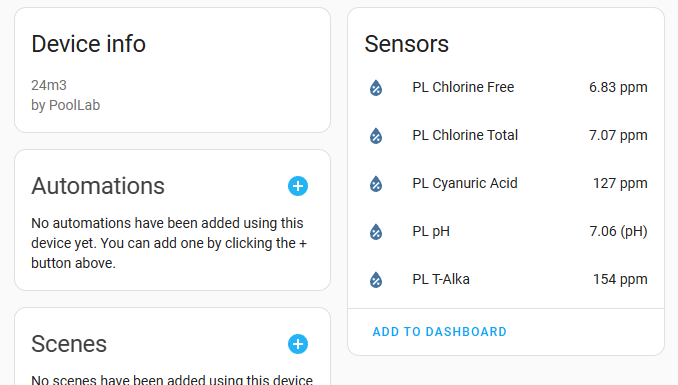
Screenshots From the README of dala318/python_poollab.
About
Pool Lab is an integration that brings data from Pool Lab photometers into Home Assistant. It reads measurements from the vendor's cloud, so an API key for the account is required. Each pool in the account appears as its own device, which can be assigned to a room. The integration provides sensors, and each one holds the latest measurement of a parameter, based on the timestamp from the device. Sensors also carry attributes such as the measurement time, the ideal low and high limits, the device serial, the operator name and a comment. Setup is done in the UI, where the API key, the endpoint URL and an SSL option are entered.
Automatic summary of the README and code of dala318/python_poollab. Something wrong, or are you the maintainer and want your own text here? Get in touch
Supports
Uses the vendor's cloud Needs an internet connection and an account with the vendor.
From the Marketplace Installed through the Marketplace, formerly HACS.
Provides
- Sensors
Setting it up
Install it from the Marketplace and restart Home Assistant, then add it under Settings, Devices and services.
PoolLab
- API key
- API endpoint URL
- Use SSL
Also asked when changing the connection.
Texts from the code of dala318/python_poollab.
Troubleshooting
- DiagnosticsDownloads a diagnostics file to attach to a bug report.
From the README
Python API for Pool Lab Photometers. For now only fetching all data and parsing to classes.

Shows in Vulpo
Chart card, Apple Watch.Information
- Installs
- 332 sharing analytics
- GitHub stars
- 24
- Connection
- Uses the vendor's cloud
- Upkeep
- No update in 6 to 18 months
- Version
- v1.3.1,
- Category
- Water, Pools and spas
- Kind
- Marketplace integration
- Needs
- Needs the Marketplace (HACS on 2026.10 and older)
- Domain
poollab- Issues
- Report an issue